OK, YouTube downloads not working at all...

ERNESTOV

Bit poster
Hello. I am a new Parallels user, and so far loving the app.
HOWEVER....
I am trying to download a YouTube video (see link below)
Nothing seems to be working! different videos also not working
Very frustrating, considering this was the main reason for my purchase.
I have created the following report ID:
357194221
https://www.youtube.com/watch?v=8nOaC0PraP4
 
Hello,
I checked your link, it should work fine. Also I don't see any information about downloading failure in your report.

Let's do the next:
- Make sure that 'Use detailed log messages' option is enabled in Parallels Toolbox preferences;
- Try to download same video again;
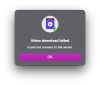
- If error occurred then a) generate and send Technical Report again b) Make screenshot of error appeared and post it here;
 
Hello,

I have the same issue here. btw I'm also a new user
- Make sure that 'Use detailed log messages' option is enabled in Parallels Toolbox preferences;
- Try to download same video again;
- If error occurred then a) generate and send Technical Report again b) Make screenshot of error appeared and post it here;
- share problem link with us;
 
Thank you for your response, I did exactly the steps above but I still have the same problem.
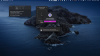
- 'Use detailed log messages' option is enabled as you can see in the screenshot
- Here is an example video I want to download (
)
- I tried also with the Safari extension, but also it didn't work
 

Attachments

  • Download probelm.png
    Download probelm.png
    926.3 KB · Views: 2
Any update??
Have you tried it with the latest Toolbox update? we have released version 4.1.1 on December 29th last year, and it should fix most of the issues with downloads from YT and other sites. I tried the "I hate coding" video and it downloaded fine for me.
 
Unfortunately it didn't work at all.
I tried to reinstall the app and Parallels Toolbox several times, but I don't know why it doesn't work
Btw "Use detailed log messages" is enabled
 

Attachments

  • Screenshot 2021-01-05 at 2.40.54 PM.png
    Screenshot 2021-01-05 at 2.40.54 PM.png
    48.1 KB · Views: 1
Oh sorry, I found the problem.
I'm using Pi-Hole in my network, and it seems like when I connect my Mac to the internet with Pi-hole, it doesn't download the videos anymore
 
Oh sorry, I found the problem.
I'm using Pi-Hole in my network, and it seems like when I connect my Mac to the internet with Pi-hole, it doesn't download the videos anymore
I tried to reinstall the app and Parallels Toolbox several times, but it didn't work as expected, but I think this could be the reason.

Thanks for sharing.
 
I tried to reinstall the app and Parallels Toolbox several times, but it didn't work as expected, but I think this could be the reason.

Thanks for sharing.
I actually installed pi-hole on my network a couple of days ago, and Download Video works fine for me. So a couple of things to consider:
- try disabling some of the black lists and see if this solves the problem
- consider adding some of the youtube URLs to the whitelist (s.youtube.com, s2.youtube.com, www.youtube-nocookie.com, youtube-nocookie.com, youtu.be).
 
Back
Top