Install the app
How to install the app on iOS
Follow along with the video below to see how to install our site as a web app on your home screen.
Note: This feature may not be available in some browsers.
You are using an out of date browser. It may not display this or other websites correctly.
You should upgrade or use an alternative browser.
You should upgrade or use an alternative browser.
DirectX 12 Support (add app titles in comments)
JonathanA9
Junior Member
There is no excuse for not adding this now that Metal 3 is released.
InVietDung
Bit poster
Kindly add direct x 12 support for playing high end gaming virtually
There are other topics about how certain games won't work, because they require DX12, and DX12 is not possible because Metal does not do some of the functions that are possible with DX12.
There is an app I use that only needs DX11 feature levels, but that uses a DX12 syntax. I gather that DX12 syntax is easier than DX11 syntax.
Would it be possible for Parallels to support DX12 syntax, even if only DX11 feature levels are supported?
There is an app I use that only needs DX11 feature levels, but that uses a DX12 syntax. I gather that DX12 syntax is easier than DX11 syntax.
Would it be possible for Parallels to support DX12 syntax, even if only DX11 feature levels are supported?
WilliamT14
Member
Here's hoping that the beta Metal 3 API (included in macOS 13 beta) helps to provide for DirectX12. The prior two Metal API's missed to many features to be able to support DirectX12.
Metal 3 includes key API features that are compatible with DirectX 12. One is mesh/object shaders. The other is the (very, very recently) removed restriction on argument buffer bind counts (https://developer.apple.com/metal/Metal-Feature-Set-Tables.pdf). Previously, it was at 500k which is shy of 1M that DirectX needs. There was a Reddit thread (https://www.reddit.com/r/macgaming/comments/sjcthy/directx_12_support_on_parallels_desktop) that said this was a blocking issue, but I (1) don't think it would have been blocking in the first place and (2) it has already been fixed. If there's enough user demand, which Parallels maintainers can definitely see there is, they could add some kind of "unsafe" mode that assumes the game dev keeps within 500k. Why would anyone use all 1M slots in the argument buffer anyway? If it crashes at runtime, there are already things that can crash at runtime, especially in a VM.
Besides that, the biggest block may have been things like "geometry shaders" and "domain shaders". That terminology is foreign to me, an experienced Metal developer. The addition of mesh/object shaders as described in the MSL specification may or may not fill that gap in functionality. Another blocker might be BC compression which is unsupported by Apple silicon, but that's part of DX11 (https://docs.microsoft.com/en-us/windows/win32/direct3d11/texture-block-compression-in-direct3d-11) which Parallels already supports. If someone on the staff reads this, I'm curious how you pulled that off. Parallels is closed-source, but perhaps you could explain with a source code sample or a pointer to Metal features used.
I would be most interested if Parallels tackled DX12, Vulkan, and OpenCL at once. See (https://www.codeweavers.com/blog/cj...etting-there-crossover-support-for-directx-12) for some technical limitations of DX12 and Vulkan. OpenCL has been ported on top of DX12, which should make adding OpenCL to Parallels easier. I would like to see that because I'm doing a project with OpenCL and would like to compile it in Windows. Another cool thing would be testing out Microsoft's DirectML backend for TensorFlow, which uses DX12 for compute shaders instead of OpenCL.
Besides that, the biggest block may have been things like "geometry shaders" and "domain shaders". That terminology is foreign to me, an experienced Metal developer. The addition of mesh/object shaders as described in the MSL specification may or may not fill that gap in functionality. Another blocker might be BC compression which is unsupported by Apple silicon, but that's part of DX11 (https://docs.microsoft.com/en-us/windows/win32/direct3d11/texture-block-compression-in-direct3d-11) which Parallels already supports. If someone on the staff reads this, I'm curious how you pulled that off. Parallels is closed-source, but perhaps you could explain with a source code sample or a pointer to Metal features used.
I would be most interested if Parallels tackled DX12, Vulkan, and OpenCL at once. See (https://www.codeweavers.com/blog/cj...etting-there-crossover-support-for-directx-12) for some technical limitations of DX12 and Vulkan. OpenCL has been ported on top of DX12, which should make adding OpenCL to Parallels easier. I would like to see that because I'm doing a project with OpenCL and would like to compile it in Windows. Another cool thing would be testing out Microsoft's DirectML backend for TensorFlow, which uses DX12 for compute shaders instead of OpenCL.
Same. I would pay a small extra fee as well.Please support DX12_2, OpenGL 4.6 and Vulkan. I would be willing to pay a small extra fee for this support.
FriedrichW
Junior Member
I would like to see DirectX 12 and I would also pay a extra for this
I'm a Developer in the 3d CAM Market and now there is a request to support
Open 3D Engine
here: https://www.o3de.org
I'm a Developer in the 3d CAM Market and now there is a request to support
Open 3D Engine
here: https://www.o3de.org
Because Parallels Desktop 15 for Mac supports DirectX 11, this list now focuses on performance issues that can be addressed.
It should be noted that some applications only work on macOS Catalina, where Apple added more functionality with Metal.
Performance is also best on macOS Catalina and ATI Radeon graphics cards.
Apps that have been requested:
Revit 2020 by Autodesk (works in Parallels Desktop 15)
3Ds Max 2020 by Autodesk (works in Parallels Desktop 15)
Hardware acceleration by Autodesk (works in Parallels Desktop 15)
Lumion (works in Parallels Desktop 15)
ArcGIS Pro version 2.3 (works in Parallels Desktop 15)
The Master Series (works in Parallels Desktop 15)
Prepar3D by Lockheed Martin
FIFA 19 (works in Parallels Desktop 15, macOS Catalina is required)
Turing's Test (works in Parallels Desktop 15)
NFL Madden 19 (works in Parallels Desktop 15)
1st Battlefield (works in Parallels Desktop 15, but there are lags)
Call of Duty: Black Ops III, 4, and 5 (not tested yet)
Unknown Battleground of the Player (works in Parallels Desktop 15, but there are lags)
Original Sin 2: Divinity (works in Parallels Desktop 15)
The Last Hope - Star Ocean (not tested yet)
Dark Souls III (not tested yet)
Champions of Quake (not tested yet)
Rainbow Six Siege by Tom Clancy (requires fixes)
Halo Wars: The Master Chief Collection (works in Parallels Desktop 15, but there are lags)
2019 Golf Club (not tested yet)
Dangerous Elite (works in Parallels Desktop 15, but there are lags)
Kurtpel (not tested yet)
Online Black Desert (not tested yet)
The Witcher 3: Wild Hunt (works in Parallels Desktop 15, but there are lags)
Rise of Nations: Deluxe Edition (not tested yet)
Far Cry 5: Blood Dragon (works in Parallels Desktop 15, but there are lags and some texture issues)
Definitive Edition of Age of Empires (works in Parallels Desktop 15)
The game Crysis 3 (works in Parallels Desktop 14)
The Apex Legends (works in Parallels Desktop 15, but there are lags)
Fallout 4: New Vegas (works in Parallels Desktop 15, but there are lags)
Dangerous Elite (works in Parallels Desktop 15, but there are lags)
The Railway Empire (works in Parallels Desktop 15)
Anno 2205 (works in Parallels Desktop 15)
2nd Chance of Rain (works in Parallels Desktop 15)
Engineers in Space (works in Parallels Desktop)
Anno 1800 (works in Parallels Desktop 15) Frostpunk (works in Parallels Desktop 15)
It should be noted that some applications only work on macOS Catalina, where Apple added more functionality with Metal.
Performance is also best on macOS Catalina and ATI Radeon graphics cards.
Apps that have been requested:
Revit 2020 by Autodesk (works in Parallels Desktop 15)
3Ds Max 2020 by Autodesk (works in Parallels Desktop 15)
Hardware acceleration by Autodesk (works in Parallels Desktop 15)
Lumion (works in Parallels Desktop 15)
ArcGIS Pro version 2.3 (works in Parallels Desktop 15)
The Master Series (works in Parallels Desktop 15)
Prepar3D by Lockheed Martin
FIFA 19 (works in Parallels Desktop 15, macOS Catalina is required)
Turing's Test (works in Parallels Desktop 15)
NFL Madden 19 (works in Parallels Desktop 15)
1st Battlefield (works in Parallels Desktop 15, but there are lags)
Call of Duty: Black Ops III, 4, and 5 (not tested yet)
Unknown Battleground of the Player (works in Parallels Desktop 15, but there are lags)
Original Sin 2: Divinity (works in Parallels Desktop 15)
The Last Hope - Star Ocean (not tested yet)
Dark Souls III (not tested yet)
Champions of Quake (not tested yet)
Rainbow Six Siege by Tom Clancy (requires fixes)
Halo Wars: The Master Chief Collection (works in Parallels Desktop 15, but there are lags)
2019 Golf Club (not tested yet)
Dangerous Elite (works in Parallels Desktop 15, but there are lags)
Kurtpel (not tested yet)
Online Black Desert (not tested yet)
The Witcher 3: Wild Hunt (works in Parallels Desktop 15, but there are lags)
Rise of Nations: Deluxe Edition (not tested yet)
Far Cry 5: Blood Dragon (works in Parallels Desktop 15, but there are lags and some texture issues)
Definitive Edition of Age of Empires (works in Parallels Desktop 15)
The game Crysis 3 (works in Parallels Desktop 14)
The Apex Legends (works in Parallels Desktop 15, but there are lags)
Fallout 4: New Vegas (works in Parallels Desktop 15, but there are lags)
Dangerous Elite (works in Parallels Desktop 15, but there are lags)
The Railway Empire (works in Parallels Desktop 15)
Anno 2205 (works in Parallels Desktop 15)
2nd Chance of Rain (works in Parallels Desktop 15)
Engineers in Space (works in Parallels Desktop)
Anno 1800 (works in Parallels Desktop 15) Frostpunk (works in Parallels Desktop 15)
WilliamT14
Member
Now that macOS 13.0 Ventura has been released, I'm hoping for quick utilization of the Metal 3 API and potential improvements regarding DirectX.
Soulhunterla
Bit poster
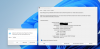
Hello, i am new to parallels and I have a Question to the DirectX 12 support. I have used the trial version of parallels 18 and looked up the DirectX Analyse Programm and the last point is "DirectX-Version: DirectX 12". So my Question is, why is there an entry with "DirectX-Version: DirectX 12" if parallels does not support DirectX 12? It's very confusing for customers which want to buy parallels and expect to run their DirectX 12 Applications on it... I would prefer either to fix this wrong DirectX Version to 11 or really update to DirectX 12.
I would also buy parallels if there would be a real DirectX 12 support for my Applications!
Maybe someone can clear why Win 11 in parallels says it supports DirectX 12, it thats not true?
I hope it doesn't matter if the picture is in German
I would also buy parallels if there would be a real DirectX 12 support for my Applications!
Maybe someone can clear why Win 11 in parallels says it supports DirectX 12, it thats not true?
I hope it doesn't matter if the picture is in German