You don't have to go to Release Preview. Others are correct, the update has not been pushed to the Beta Insiders channel yet. The version that has come out, 22631.3737 cannot be installed over a beta installation, even manually. So: 1) Beta testers have to wait, and update to the beta channel should be out soon I think, as they have demonstrated they have fixed the problem.
(2) To clean up your Windows Update with the old failed install still showing/still trying to install, you can either clear things out per the manual instructions set forth earlier in this thread, or the easiest (and a great tool used by many) is to
download WuMgr from Github. All you have to do is download the zip file, and extract the program and run it - no install, it's free. It is a very simple interface to manage the Windows Download process. It allows you, among other things, to "hide" an update. So bring it up and press the Search button (see arrows on pictures).
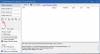
Then go to the Windows update section, you will see a checkbox next to the rogue install that fails.
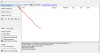
Click it, then click the Hide button (which also functions as an unhide button, depending on context).
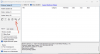
That's it in WuMgr - then bring up Windows Update, Click to Pause updates for a week, then immediately Unpause updates - you will see the Updater checking, and it will say you are clean no updates! Ready for the good download when it comes. Simple.


 . 22631.3737
 .

