"Your Product Activation Key Reached Its Activation Limit..."

Dhruba,

Did the above - still same issue.

I logged into my account and it's showing that I can only install on 1 host, is that the problem? Your compare page says unlimited hosts for the new Pro version.

I am currently using the Trial version to get some work done - but I need this resolved.

I believe this is the issue Lawrence - I see the same problem - 1 Host, and it will not install on the second machine
 
Dhruba,

Did the above - still same issue.

I logged into my account and it's showing that I can only install on 1 host, is that the problem? Your compare page says unlimited hosts for the new Pro version.

I am currently using the Trial version to get some work done - but I need this resolved.

Also, we are supposed to get "Premium 24/7 phone and email support", not just posting here to grovel for help...
 
Lawrence, I just called the help desk - the guy on line told me that its not possible to have this running on more than one machine. So I have my refund coming.

Just call customer support and you'll get the same answer, if you hear something different, please send me a PM
 
Me have a same, I have a Parallels Mac 10, face the same problem, couldn't able to activate it, feeling jumping to VMWARE, I fit and emails from them 2 times in a week but I dismissed there emails, but if this problem will not be solved, I'll buy the VMware better, I have Parallels 9 and 10 also, before I got a best support, but now a days they're blocking a supports regarding activations, and let them buying new one.


Damn
 
Lawrence, I just called the help desk - the guy on line told me that its not possible to have this running on more than one machine. So I have my refund coming.

Just call customer support and you'll get the same answer, if you hear something different, please send me a PM


What's the Customer Service #?
 
Last edited:
Hi, I need to reset my license activation due to a computer upgrade. Who do I contact about this?

Thanks!
-Will
Hi, I've checked your account and all of your keys are OK. If the issue still persists please provide me with the license key in private message.
 
Hello, having the same problem - after hdd crash and restored backup Parallels is not starting due to this error - what to do? Already behind deadline...

J
 
Another user who wants to do a clean install of El Capitan. Any hope of this deactivation/reactivation process being available to the user online or through direct email contact--or are we stuck with having to seek one-on-one interaction every single time.
 
Hi, we've reset your key. Please activate again and also check your inbox for more information.

Hi maria, I have just sold my Mac book and tired to install the Parallel desktop in the new machine, it comes up saying that Number of activation has reached! I tired to log into my account online using my email id. either I see the key associated with my account nor, I can registered the key again. But I did got an email from you guys saying the the following
"

Dear Dr,
You or somebody else had tried to register key for Parallels Desktop 10 for Mac. This key is already registered.
Registration details:

Product: Parallels Desktop 10 for Mac
Key: XXXXXXXXXXXXXXXXXXXXXXX

Sincerely,
The Parallels Team

"

and I am unable to contact to any support people. I have no ways of supporting the team. I just don't see any ways f contacting you. Can you please help?


Thank you
 
Same problem here. Read the product comparison between the home and pro edition, that specifically says that with a pro subscription "maximum licenses allowed: unlimited". Just bought the pro edition. But apparently it means, you're allowed to spend unlimited money while using the pro edition on licenses, but for every single host instance you have to buy a subscription???

With VMware it is possible that you install your product on all machines you own:

Can I use a single license on more than one Mac?
VMware Fusion for personal use:
You may install and use VMware Fusion for personal, non-commercial use on any Apple-branded products running Mac OS X ("Mac Computer") that you own or control.

VMware Fusion for commercial use:
If you are a commercial enterprise or educational institution, you may install and use the Software on a number of Apple-branded products running Mac OS X ("Mac Computer") that you own or control equal to the number of licenses purchased. Installing and using the Software on multiple Mac Computers with a single license is prohibited even if the computers are not running the Software concurrently.

You can review the End User License Agreement(s) from this page: www.vmware.com/download/eula/

- See more at: http://www.vmware.com/nl/support/fusion/faq/licensing#sthash.USGycUQy.dpuf

So, if this is really the case, Parallels for every machine you have to pay, VMware, pay once for all your machines, I'll switch to VMware
 
Last edited:
Same problem here. Read the product comparison between the home and pro edition, that specifically says that with a pro subscription "maximum licenses allowed: unlimited". Just bought the pro edition. But apparently it means, you're allowed to spend unlimited money while using the pro edition on licenses, but for every single host instance you have to buy a subscription???

With VMware it is possible that you install your product on all machines you own

Looks like I was confused by the same marketing trick. What sense does that make???? "With this Pro version, we allow you to give us an unlimited amount of money! Aren't we great?" I feel ripped off. Time to look at Fusion, like you said......
 
I've signed out of my Parallels Desktop 11 application on my old MacBook and am trying to activate the latest version on my new system in accordance with KB116527 (How to move a Parallels Desktop 11 license key to a new Mac?). Parallels reports that I've reached my activation limit, so obviously my transfer wasn't successful.

The Knowledge Base Article is also incorrect. It states that when attempting to activate my Parallels Desktop 11 application on the new machine:

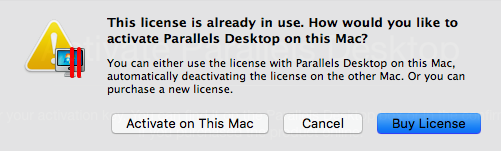
If you try to use the license on a new Mac without signing out on the old one, then upon activation on the new Mac you will see a warning that the license is already in use.


licinuse.png
magnifier_zoom_out.png


If you click on Activate on This Mac, the current copy will be successfully activated, and license will automatically be deactivated on the old Mac.


However, this option isn't displayed on the current version (11.0.2)

Could you please reset my activation count to zero so I can continue the transfer to my new machine? Thank you.
 
Last edited:
I've signed out of my Parallels Desktop 11 application on my old MacBook and am trying to activate the latest version on my new system in accordance with KB116527 (How to move a Parallels Desktop 11 license key to a new Mac?). Parallels reports that I've reached my activation limit, so obviously my transfer wasn't successful.

The Knowledge Base Article is also incorrect. It states that when attempting to activate my Parallels Desktop 11 application on the new machine:

If you try to use the license on a new Mac without signing out on the old one, then upon activation on the new Mac you will see a warning that the license is already in use.


licinuse.png
magnifier_zoom_out.png


If you click on Activate on This Mac, the current copy will be successfully activated, and license will automatically be deactivated on the old Mac.


However, this option isn't displayed on the current version (11.0.2)

Could you please reset my activation count to zero so I can continue the transfer to my new machine? Thank you.

Hi, we can find only the Parallels Desktop 9 and 8 keys in your account. Could you please provide us with your Parallels Desktop 11 key in private message?
 
Hi Maria

Thanks for your response. I just tried to open up a conversation but there was no response. Which email address should I respond to?

My Parallels Desktop 11 license is listed as a Pro subscription valid through 26 May 2016.

Could you please advise as to how I can cancel my recurring Parallels subscription? The information provided by the Parallels Support Team was incorrect, as I wasn't able to cancel this subscription directly via the My Account page as suggested.

I've installed my original Windows 7 x64 ISO in VMware Professional V8.0.1 and will give that a try in the meantime.
 
Last edited:
Guys, we now have the transferring option for Parallels Desktop 11. If you need to transfer your license to another Mac and resolve the "limit activation" issue please use this KB
 
Unfortunately, this information was posted late for me. I did a clean install of El Capitan and need to re-install Parallels. First I cannot locate a download link for my subscription. The link in my invoice email is no longer valid. I view my product list and my subscription is not listed.
1. Where is the download link for subscribers?
2. It appears I will need to have my installation count reset to zero.

HELP PLEASE, QUICK!!
 
Unfortunately, this information was posted late for me. I did a clean install of El Capitan and need to re-install Parallels. First I cannot locate a download link for my subscription. The link in my invoice email is no longer valid. I view my product list and my subscription is not listed.
1. Where is the download link for subscribers?
2. It appears I will need to have my installation count reset to zero.

HELP PLEASE, QUICK!!
Hello DerekB2, you may download the latest build for Parallels Desktop 11 for Mac at http://www.parallels.com/directdownload/pd11 and follow this article to activate Parallels Desktop on your Mac again.
 
Hi, I upgraded to a Pro License for 50 euro's a year, and I can use my license on 1 macpro. I need at least to use my license on 1 macbook pro as well, which wasn't a problem at all earlier. Can you fix it?
 
Back
Top