
Install the app
How to install the app on iOS
Follow along with the video below to see how to install our site as a web app on your home screen.
Note: This feature may not be available in some browsers.
You are using an out of date browser. It may not display this or other websites correctly.
You should upgrade or use an alternative browser.
You should upgrade or use an alternative browser.
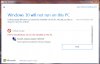
Can't Reserve Win10 - Parallels Display Driver Critical Issue
- Thread starter MichaelS4
- Start date
Best answer

Guys, please check some info about the issue here.
Also I'd like to let you know that we're working on the resolution with our Development.
While we do not have ETA for the fix, it has been prioritized appropriately.
Also I'd like to let you know that we're working on the resolution with our Development.
While we do not have ETA for the fix, it has been prioritized appropriately.
Guys, if you follow this http://kb.parallels.com/123053, you will successfully install windows 10.
You don't have to upgrade from that taskbar icon. Go to https://www.microsoft.com/en-us/software-download/windows10ISO and download media creation tool and choose upgrade this PC. That's all.
I have just done it. And works perfectly. I had Windows 8.1 Pro now Win 10 Pro and works without any problem.
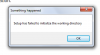
Tried it twice now following these instructions and this is the error message I got each time
I'm using the latest version of Parallels and have more than 2GB RAM allocated to the VM on my MacBook Pro.
Any comments from Parallels is appreciated. None received on same post yesterday.
So I've read through the discussions after seeing the problem that my Parallels display driver is holding things up. Probably a bogus error and probably I can do the ISO route, but my work, for which I rely upon my Windows VM, is fixing software that doesn't install properly. I'm one of a team of 12 that engineers software distribution on over 300,000 workstations, so I get my fill of solving install/upgrade glitches. I'm not willing to be a troubleshooter for the tools I use to do that troubleshooting!!! I'll wait until Parallels and Microsoft have it worked out. I can take a snapshot, futz around and restore everything when that doesn't work or has some drawback, but then I'm doing that instead of my job. I'm confident Parallels will fix this and I don't care about getting a free version of Win10... we have a year and anyway, my company's KMS server will activate any copy I install anyway. So I have a different perspective than most users here. (Reliability and transparency are key.)
I hate to say it but Windows is Windows. So 10 was just released and everyone wants to use it the day it comes out. I get it, but I'm not falling victim to it and screaming at Parallels about it. It's disappointing, to be sure. But at the end of the day, I run Windows on a Mac and it doesn't much matter what version of Windows it is as long as it lets me do the things I need to do every day that can't be done directly on my Mac. That's all it's here for as far as I'm concerned. Windows 8.1 with the free Start8 add on that came with Parallels does what I need it to do, perhaps better than 10 will in some ways. I wonder what Start8 will offer now to 10 users... hopefully something, because they did a great job of turning the pig's ear that was Win8 into a silk purse.
It's too bad we hit this kerfuffle, but the tool is still great and they'll get it sorted out so that everything works as it should in a reasonable period of time.
I hate to say it but Windows is Windows. So 10 was just released and everyone wants to use it the day it comes out. I get it, but I'm not falling victim to it and screaming at Parallels about it. It's disappointing, to be sure. But at the end of the day, I run Windows on a Mac and it doesn't much matter what version of Windows it is as long as it lets me do the things I need to do every day that can't be done directly on my Mac. That's all it's here for as far as I'm concerned. Windows 8.1 with the free Start8 add on that came with Parallels does what I need it to do, perhaps better than 10 will in some ways. I wonder what Start8 will offer now to 10 users... hopefully something, because they did a great job of turning the pig's ear that was Win8 into a silk purse.
It's too bad we hit this kerfuffle, but the tool is still great and they'll get it sorted out so that everything works as it should in a reasonable period of time.
AbdulkadirB
Bit poster
You need to be more specific about that warning. How it pop up? What were you doing? From the image It can't be understand. Can you explain those please?Tried it twice now following these instructions and this is the error message I got each time
I'm using the latest version of Parallels and have more than 2GB RAM allocated to the VM on my MacBook Pro.
Any comments from Parallels is appreciated. None received on same post yesterday.
View attachment 10081
But anyhow I have one tip for you. Make sure you have at least 30GB (might be over, but just to be safe side) space in your Windows in Virtual PC.
Your windows downloading starts but if there no enough space for iso file and installation files, this error might come up. Just guessing.
This reply is for JoeF1 above; he took the time to post a well written post that deserves a
response; I'm well into my third day of using Win 10 in PD 10; I'm running OS X 10.10.5 (second
public beta--up to date); I'm also running on a newish MacBook Air (2014) with 8 GB Ram and an I7
processor); 4GB ram/2 CPUs configured for my Win 10 VM (formerly an 8.1 VM); the update going
the iso approach completed without any hiccups (oh..I have 128 GB disk set aside for the VM BTW)
In a former life (before I retired I had a similar job to Joe's altho I trouble-shot networks, large
servers, and storage systems instead of workstations; unbaked or incompletely baked s/w was
always an issue in my life..I know exactly where Joe is coming from on this..all of this
is somewhat introductory and 3 days is hardly enough time to celebrate but here are my early
findings:
1) Given that Win 10 is a fairly substantial re-release of Win 8.1 PD runs remarkably well on my
somewhat under-powered MacBook; I have had no kernel hiccups,crashes, blue screens or freezes
of any kind running Adobe Premier Pro, Adobe Lightroom, set up email client,edge andinternet explorer,
Quicken 2015, and all kinds of twists & turns with Win 10's new Virtual desktops
2)apps tend to load faster with Win 10 on the same host machine as Win 8.1
3)apps tend to run faster altho this one is subjective; LR 6 imported thousands of raw images as
fast as I've seen it on my native MacBook w/o VM; Adobe PPro is not running well; videos in
projects do not seem to survive a suspend mode; this will get fixed I hope; Quicken response lags
at times but I have a 23 year long database of data that I occasionally mine for data
4)start-up and suspend times are a bit better with Win10; sleeps & pauses are instantaneous
and to date I have not lost any instance of my suspended apps
5)PD is still somewhat of a battery hog; my MBA runs much hotter when I'm doing Windows jobs but
one has to expect a hotter machine when one piece of hardware is running two OS's together and
more memory is locked down
6)All in all..as Joe stated above PD is a great tool and I'm somewhat mystified given all that is changing
that it is running as well as it is with Win 10 as a guest os..my $.02 (YMWV)
response; I'm well into my third day of using Win 10 in PD 10; I'm running OS X 10.10.5 (second
public beta--up to date); I'm also running on a newish MacBook Air (2014) with 8 GB Ram and an I7
processor); 4GB ram/2 CPUs configured for my Win 10 VM (formerly an 8.1 VM); the update going
the iso approach completed without any hiccups (oh..I have 128 GB disk set aside for the VM BTW)
In a former life (before I retired I had a similar job to Joe's altho I trouble-shot networks, large
servers, and storage systems instead of workstations; unbaked or incompletely baked s/w was
always an issue in my life..I know exactly where Joe is coming from on this..all of this
is somewhat introductory and 3 days is hardly enough time to celebrate but here are my early
findings:
1) Given that Win 10 is a fairly substantial re-release of Win 8.1 PD runs remarkably well on my
somewhat under-powered MacBook; I have had no kernel hiccups,crashes, blue screens or freezes
of any kind running Adobe Premier Pro, Adobe Lightroom, set up email client,edge andinternet explorer,
Quicken 2015, and all kinds of twists & turns with Win 10's new Virtual desktops
2)apps tend to load faster with Win 10 on the same host machine as Win 8.1
3)apps tend to run faster altho this one is subjective; LR 6 imported thousands of raw images as
fast as I've seen it on my native MacBook w/o VM; Adobe PPro is not running well; videos in
projects do not seem to survive a suspend mode; this will get fixed I hope; Quicken response lags
at times but I have a 23 year long database of data that I occasionally mine for data
4)start-up and suspend times are a bit better with Win10; sleeps & pauses are instantaneous
and to date I have not lost any instance of my suspended apps
5)PD is still somewhat of a battery hog; my MBA runs much hotter when I'm doing Windows jobs but
one has to expect a hotter machine when one piece of hardware is running two OS's together and
more memory is locked down
6)All in all..as Joe stated above PD is a great tool and I'm somewhat mystified given all that is changing
that it is running as well as it is with Win 10 as a guest os..my $.02 (YMWV)
You need to be more specific about that warning. How it pop up? What were you doing? From the image It can't be understand. Can you explain those please?
But anyhow I have one tip for you. Make sure you have at least 30GB (might be over, but just to be safe side) space in your Windows in Virtual PC.
Your windows downloading starts but if there no enough space for iso file and installation files, this error might come up. Just guessing.
I don't know when exactly in the install process it quits and can't find "a working directory". Also if it is a disk space issue, why can't Windows produce a message that says so! Anyhow, I have 76GB allocated to the VM running Windows 7 and that should be more than enough.
I had the same problem as everybody else. The windows reservation said I could not upgrade because the Parallels display driver was incompatible. Well, I just went to the Windows 10 media creation tool download site and the installation went smoothly. I had Windows 7 SP1 and I am now running the official Windows 10. Took about two hours with multiple reboots of my VM.
Yes, I can well recommend this procedure:I had the same problem as everybody else. The windows reservation said I could not upgrade because the Parallels display driver was incompatible. Well, I just went to the Windows 10 media creation tool download site and the installation went smoothly. I had Windows 7 SP1 and I am now running the official Windows 10. Took about two hours with multiple reboots of my VM.
a) Get on your Mac host to here: Installing Windows 10 using the media creation tool ...
b) select the right windows version (for me "Windows 10" 64 Bit) and download the ISO
c) mount the ISO using the Mac finder tools
d) execute from your Win 8/8.1 explorer the Setup.exe obtained in step c)
e) patiently wait for the progress, without getting lured into any interaction, with one exception: somewhen after a Parallels roboot it tells "Parallels Tools 100% installed", and you can/should safely press "Reboot".
After three quarters of an hour the installation was finished. But my PM was swollen from 14 GB to 21 GB. I used the Windows Utility for "removing unneeded data" (or so, I know it only in German), including the function "remove unnecessary system data" (or so), but this found only 30 MB to set free. But when I scrolled down the items found, I stumbled upon "previous Windows installation" with a whopping 15 GB. After checking this item and executing "Ok", disk space was freed, but going to the Parallels menu Actions/Configuration revealed only 5 GB space possible to free. After I executed that, my PM was back again at 14 GB.
So after about an hour everything was fine again.
You don't need to do all that. From within your Window 7/8/8.1 VM go to http://www.microsoft.com/en-us/software-download/windows10 and click on either the 32 bit or 64 bit version download button. Then just follow instructions - takes up to 3 hours all told depending on the speed of you hardware, the amount of memory allocated to the VM, the amount of disk space you have available, and anything else happening on the rest of your MAC. You need to exit all other Windows programs gracefully and make sure you have the latest version of your current Windows OS. This worked for me and I am a happy camper. As a long time MAC user I am impressed and I think Windows 10 will give Apple a run for its moneyYes, I can well recommend this procedure:
a) Get on your Mac host to here: Installing Windows 10 using the media creation tool ...
b) select the right windows version (for me "Windows 10" 64 Bit) and download the ISO
c) mount the ISO using the Mac finder tools
d) execute from your Win 8/8.1 explorer the Setup.exe obtained in step c)
e) patiently wait for the progress, without getting lured into any interaction, with one exception: somewhen after a Parallels roboot it tells "Parallels Tools 100% installed", and you can/should safely press "Reboot".
After three quarters of an hour the installation was finished. But my PM was swollen from 14 GB to 21 GB. I used the Windows Utility for "removing unneeded data" (or so, I know it only in German), including the function "remove unnecessary system data" (or so), but this found only 30 MB to set free. But when I scrolled down the items found, I stumbled upon "previous Windows installation" with a whopping 15 GB. After checking this item and executing "Ok", disk space was freed, but going to the Parallels menu Actions/Configuration revealed only 5 GB space possible to free. After I executed that, my PM was back again at 14 GB.
So after about an hour everything was fine again.
I'm going to throw a spanner in the works. I have Win 8.1 and Win 7 Pro on the same late 2012 Mac book Pro running parallels VMs on all the latest software. Win 8.1 is already upgraded to Win 10, Win 7 Pro has an incompatible display adapter, no amount of fiddling around or following the instructions on this thread will fix the Win 7 problem. Do I smell a $49.00 upgrade?
Mike Boreham
Pro
I have updated both a Win 8.1 and a Win 7 Pro successfully with the Media Creation Tool method.I'm going to throw a spanner in the works. I have Win 8.1 and Win 7 Pro on the same late 2012 Mac book Pro running parallels VMs on all the latest software. Win 8.1 is already upgraded to Win 10, Win 7 Pro has an incompatible display adapter, no amount of fiddling around or following the instructions on this thread will fix the Win 7 problem. Do I smell a $49.00 upgrade?
Only problem I had was that the Win 7 Pro VM had insufficient hard drive space (even though an expanding disk) and I had to increase the HDD size. The Media Creation Tool method failed until I increased the HDD size but didn't tell me that was the reason.
That solved my problems too. Make sure to have enough HDD space for the VM.I have updated both a Win 8.1 and a Win 7 Pro successfully with the Media Creation Tool method.
Only problem I had was that the Win 7 Pro VM had insufficient hard drive space (even though an expanding disk) and I had to increase the HDD size. The Media Creation Tool method failed until I increased the HDD size but didn't tell me that was the reason.
I have tried to update my windows 7 64bit virtual machine 3 times using the media creation tool and each time i get the same issue. It seems to upgrade fine but then the machine gets stuck on a solid black screen after a restart and just hangs there....for hours with nothing. Help?
Do I need to use the upgrade ISO vs upgrading within the app?
Do I need to use the upgrade ISO vs upgrading within the app?
Thanks for this, not the problem with my machine though. There was no challenge upgrading Won 8.1, but with Win 7 on the same machine I am told there is a Parallels Display adapter problem??? On the same machine as Win 8.1 upgrade works??That solved my problems too. Make sure to have enough HDD space for the VM.
Hi,
I tried the Media Creation Tool migrating from Windows 8.1 and it worked fine. HOWEVER, now I'm trying to activate some additional features that comes with Windows 10 (as any other Windows), like Telnet Client or TFTP... and, unfortunatelly, the ERROR IS STILL THERE. I'm unable to activate any of the additional Windows features.
So, I'm affraid, that the Media Creation Tool is just a workaround but it does not fix the problem actually.
Any ideas?
Thanks!
I tried the Media Creation Tool migrating from Windows 8.1 and it worked fine. HOWEVER, now I'm trying to activate some additional features that comes with Windows 10 (as any other Windows), like Telnet Client or TFTP... and, unfortunatelly, the ERROR IS STILL THERE. I'm unable to activate any of the additional Windows features.
So, I'm affraid, that the Media Creation Tool is just a workaround but it does not fix the problem actually.
Any ideas?
Thanks!
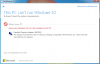
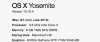
Guys, please check some info about the issue here.
Also I'd like to let you know that we're working on the resolution with our Development.
While we do not have ETA for the fix, it has been prioritized appropriately.
I tried to resolve the issue using the info on that page but was unsuccessful. However, I tried a different approach, listed below, to get my machine upgraded.
NOTE: First, I had to cancel my reservation (doing so pushed my upgrade further out a few days as I had to wait on Microsoft) that I used previously w/ the Parallels Display Adapter (WDDM) and then reserved a new spot after the steps below in order for the upgrade from Windows 8.1 Pro to 10.
- Open Device Manager > Display Adapters > Right click on Parallels Display Adapter (WDDM) > Select Uninstall
- Update the default display adapter, right click and select Update Driver Software ...
- Select -> Browse my computer for driver software
- Select -> Let me pick from a list of devices on my computer
- Select Microsoft Basic Display Adapter from the Show compatible hardware list
- Click Next and follow instructions
- Restart Parallels and Check your PC again
- If there aren't any issues, create new reservation and try the Windows 10 Upgrade process again