
Install the app
How to install the app on iOS
Follow along with the video below to see how to install our site as a web app on your home screen.
Note: This feature may not be available in some browsers.
You are using an out of date browser. It may not display this or other websites correctly.
You should upgrade or use an alternative browser.
You should upgrade or use an alternative browser.
Can't Reserve Win10 - Parallels Display Driver Critical Issue
- Thread starter MichaelS4
- Start date
Hi Michael,
Check the build of Parallels Desktop installed, update it to the latest build, refer http://kb.parallels.com/111603
Install the latest build of Parallels Tools and check how it works.
Check the build of Parallels Desktop installed, update it to the latest build, refer http://kb.parallels.com/111603
Install the latest build of Parallels Tools and check how it works.
Frederic Puhan
Member
I have the same issue. I checked my version of Parallels Desktop 10 for Mac (Version 10.2.1 (29006)) and it's the latest. So, I re-installed Parallels Tools and now the Windows 10 Reservation App has disappeared. This seems to be recursive: Windows Update brings the Reservation App, which states the video driver won't work, and re-installing the Parallels Tools removes the Reservation App.
(Interestingly enough, I have TWO Windows 7 Pro virtual machines configured in Parallels, and one of them does not exhibit this behavior. I've compared the two configurations, and made them identical, but the Reservation App still doesn't work on the second).
(Interestingly enough, I have TWO Windows 7 Pro virtual machines configured in Parallels, and one of them does not exhibit this behavior. I've compared the two configurations, and made them identical, but the Reservation App still doesn't work on the second).
Last edited:
I have the same Windows 10 app critical WDDM issue from Windows 7 Pro 64 bit . I checked my version of Parallels Desktop 10 for Mac 10.2.1 (29006). It is the latest. I re-installed Parallels Tools. Still have the WDDM issue for MacBook Pro 13 Mid 2012 Intel HD Graphics 4000 1024MB, 8GB RAM, Yosemite 10.10.3 with Parallels Display Adapter (WDDM) driver 10.2.29006.0. I do not have the issue for my Mac Mini Server Mid 2010 NVIDIA GeForce 320M 256MB, 8GB RAM, Yosemite 10.10.3 with Parallels Display Adapter (WDDM) driver 10.2.29006.0.
kamahaffey1
Bit poster
I am having the same problem too. Will this be addressed or do we lost the free upgrade to Windows 10. I'm running Windows 7 and it's giving me the same message.
agranovsky
Member
Same issue here. Would love to see a fix.
agranovsky
Member
Have you guys actually tried reserving a Win10 upgrade from Win7 before sending this response?Hi Michael,
Check the build of Parallels Desktop installed, update it to the latest build, refer http://kb.parallels.com/111603
Install the latest build of Parallels Tools and check how it works.
Latest version of Parallels here as well, exact same behavior as described by the OP, with Win7 SP1 guest, 10.10.3 MBP host.
kamahaffey1
Bit poster
An update. I was able to reserve Windows 10 on my Mac mini (Mid 2011) 2.5 GHz Core i5 running OSX Yosemite. However, the iMac continues to get the message stating there's a problem and incompatible with Parallels Display Adapter (WDDM) driver; thus, cannot reserve. Running the same versions of Yosemite and Parallels with over 8 GB on both macs. I'm also running Windows 7 with SP1 on both machines. Parallels, please help.
I'm having the same issue too.
OSX Yosemite 10.10.2
Parallels 10.2.1 (29006)
Windows 8.1 works
Windows 7 with SP1 doesn't work
Update:
Both Systems 64Bit Running on iMac 12GB Ram
Windows 8.1 Pro works
Windows 7 Ultimate with SP1 doesn't work
Frederic Puhan
Member
While Parallels hasn't addressed this yet, I think it's only fair to mention that this is just about "reserving" Windows 10. When July 29 rolls around, the update will be available to all (who qualify, obviously). All the reservation does is pre-load the software on your Windows 7/8/8.1 VM so that you can proceed without having to go online and hitting the expected traffic jam.
What I find odd is that my issue began when I created a SECOND VM of Windows 7 Pro using my licensed disk. I wanted to "preserve" my original VM and try out Windows 10 (I also have the "insider preview") so I created a fresh install and this is when the issue started. To recap: My *original* VM of Windows 7 Pro does not report the WDDM driver issue. Go figure.
What I find odd is that my issue began when I created a SECOND VM of Windows 7 Pro using my licensed disk. I wanted to "preserve" my original VM and try out Windows 10 (I also have the "insider preview") so I created a fresh install and this is when the issue started. To recap: My *original* VM of Windows 7 Pro does not report the WDDM driver issue. Go figure.
While Parallels hasn't addressed this yet, I think it's only fair to mention that this is just about "reserving" Windows 10. When July 29 rolls around, the update will be available to all (who qualify, obviously). All the reservation does is pre-load the software on your Windows 7/8/8.1 VM so that you can proceed without having to go online and hitting the expected traffic jam.
What I find odd is that my issue began when I created a SECOND VM of Windows 7 Pro using my licensed disk. I wanted to "preserve" my original VM and try out Windows 10 (I also have the "insider preview") so I created a fresh install and this is when the issue started. To recap: My *original* VM of Windows 7 Pro does not report the WDDM driver issue. Go figure.
@Dear Frederic,
You're right. I installed Windows 7 Ultimate complete new, now it work's. Win 8.1 was a complete new installation, in this case it's running ok.
Regards

Maria@Parallels
Problem solver
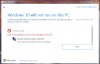
I just attempted to reserve Windows 10 and the app is saying that the Parallels Display Driver (WDDM) is a critically conflicting piece of equipment. Any ideas on how to make this message go away so I can reserve?
Did you try to uninstall and reinstall the Parallels Adpapter driver from "Device manager"?
I'm also having exactly this issue. I have windows 7 with SP1 installed. I've confirmed that I have the latest build of Parallels 10, uninstalled and reinstalled the Parallels adapter driver within "Device Manager", reinstalled Parallels Tools. After all this I still get a message stating that Windows 10 can not be installed on my machine due to the WDDM as there will be display issues.
As others have said it will be annoying if Windows 10 can not be reserved during the period that the upgrade is being offered free due to this issue preventing the reservation process from progressing.
Are we any nearer a solution? Has anyone been able to overcome the problem yet?
Thanks.
As others have said it will be annoying if Windows 10 can not be reserved during the period that the upgrade is being offered free due to this issue preventing the reservation process from progressing.
Are we any nearer a solution? Has anyone been able to overcome the problem yet?
Thanks.
Maria@Parallels
Problem solver
Hey, I would like to let you know that we have already involved our Development in this case and they are currently working on the resolution.
Once we receive any update we will let you know.
Once we receive any update we will let you know.
Maria thank you for the response. I have tried uninstalling and reinstalling the driver, however there does not appear to be a way to force the "get win 10" app to re-check the configuration. Per Microsoft the app only checks configuration once per month. Please have the development team address this potential issue as well when they determine a resolution. I definitely do not want to lose out on the free upgrade opportunity. Thank you again.