
Install the app
How to install the app on iOS
Follow along with the video below to see how to install our site as a web app on your home screen.
Note: This feature may not be available in some browsers.
You are using an out of date browser. It may not display this or other websites correctly.
You should upgrade or use an alternative browser.
You should upgrade or use an alternative browser.
Windows 11 Update 0xc1900101 Error
- Thread starter FabioP4
- Start date
And to make it even more frustrating I tried installing Win 10 ARM64 with an ISO generated by uupDump.net. I tried both the latest Win 10 and a September 2022 version and they both gave me a BSOD. So much for that effort. I'm going to try to setup a VMWare workstation and see if 26020 will install on it.
I went to uupDump.net and created a 26020 ISO. Installed VMWare 13, selected install from image file and dragged the ISO into the program. Waited around while VMware did whatever it is VMWare does to install an operating system, went through the entire Microsoft install for Windows 11, and VOILA! I now have Windows Canary 26020.1000 successfully running on my MacStuio. Parallls has a problem and I'd really like to see it get fixed soon.
AlessandroL7
Bit poster
Sonoma 14.2.1 (23C71).Yep. 26020 fails as well. Has anyone stopped to consider that it may be a MacOS error? What version of MacOS is everyone with the problem running? I'm running Sonoma version 14.3 Beta (23D5043d). Every update since 25995 has not installed and given a 1900101 error but it also happened in Ventura. I tested in both Ventura and Sonoma but nothing prior to that. This may well be a Parallels problem instead but I tested with a prior version of Parallels with the same results. The update does work on Intel machines however with absolutely NO problem. This is really frustrating and not hearing anything from Parallels doesn't make it any better.
That's the latest release version. I just updated to the latest beta last night Same story but the VMWare success makes me thing the problem is NOT MacOS. I think there may be an obsolete (or at least outdated) driver included somewhere that Win11 isn't particularly fond of.Sonoma 14.2.1 (23C71).
As of Canary Insider release 25997, there have been no working Canary builds available to run under Parallels. Read back through this thread and you will see I have tried every conceivable method to get the updates to work with no success. I also test Beta and Developer Insider releases and they work with no problem. The problem needs to be fixed between Parallels and Microsoft. (Incidentally, update 26020.1000 works fine under VMWare so it is fixable)
Hmm, as a follow-up to my response above, if the Beta and Developer version both update and work as expected but the Canary version consistently fails to upgrade with the same Oxc1900101 error, it seems to me the problem would lie with MS, but try telling them that. 
I remembered this issue arising many years ago with Windows 10 and a much earlier version of Parallels. The solution (or workaround) at the time worked this time as well. In advanced CPU settings, switch from Parallels hypervisor to Apple. It worked for me. After I installed the newest version of Win11, I tried to switch back to the parallels hypervisor and I got a green screen upon reboot. It only works with the Apple hypervisor.
AlessandroL7
Bit poster
Where do you find the option you mentioned? In my Control center->Configuration->Hardware->CPU and Memory->Advanced I only have the possibility to uncheck the option "Adaptable hypervisor". Unchecking this item, the updating process still fails with the same error. But, maybe, I didn't operate as you suggested...I remembered this issue arising many years ago with Windows 10 and a much earlier version of Parallels. The solution (or workaround) at the time worked this time as well. In advanced CPU settings, switch from Parallels hypervisor to Apple. It worked for me. After I installed the newest version of Win11, I tried to switch back to the parallels hypervisor and I got a green screen upon reboot. It only works with the Apple hypervisor.
Same for me!Where do you find the option you mentioned? In my Control center->Configuration->Hardware->CPU and Memory->Advanced I only have the possibility to uncheck the option "Adaptable hypervisor". Unchecking this item, the updating process still fails with the same error. But, maybe, I didn't operate as you suggested...
That option was available in previous Parallels version as I remember.Same for me!
In current build this is not available or I missed smth.
That option was available in previous Parallels version as I remember.
In current build this is not available or I missed smth.
I'm running Parallels Intel version 19.0.0 (54570) on a MacBookPro 15" 2019 (MacBookPro15,3). I go to Settings->Hardware->CPU & Memory->Advanced->Hypervisor. There is a drop-down menu that allows me to choose either Parallels or Apple. The default is Parallels and I selected Apple.
Well, there is a Hypervisor question in 19.2.1 and it's where mnfe states. However, there is no Apple or Parallels selection, just the choice of Adaptive Hypervisor or not.well most of us are on 19.2.1 that has removed the hypervisor selection....
I can confirm that:
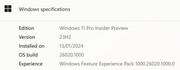
- Parallels Desktop 19 Pro Intel 19.2.1 (54832) does indeed allow selecting the Apple Hypervisor (this option has not been removed):

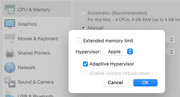
- This configuration will allow fresh installation of, and in-place upgrade to, Windows 11 Pro Insider 26020.1000
Same Issue - The error seems to be associated with a driver problem- but several other updates have been successful except for the last three.Same issue
Windows 11 Insider Preview 26002.1000 (rs_prerelease)
Install error - 0xc1900101
Well this has nothing to do with Parallels version.(19 or 19.2) Parallels or any other virtualization layer is not possible on Apple Silicon therefore only Apple Virtualization available as option. That is why we don't have advanced virtualization options like "nested virtualization" on M series processors. Apple hypervisor layer does not support it.
Looks like @mnfe uses Intel CPU and that why he/she has that options.
Looks like @mnfe uses Intel CPU and that why he/she has that options.
Notice the word INTEL above. He's running an Intel version Macbook. He must have overlooked the ARM or Apple Silicon part of the problem.I can confirm that:
- Parallels Desktop 19 Pro Intel 19.2.1 (54832) does indeed allow selecting the Apple Hypervisor (this option has not been removed):
- This configuration will allow fresh installation of, and in-place upgrade to, Windows 11 Pro Insider 26020.1000
In respect of the OP's question:I am getting this erreor trying to update Windows 11
How can I solve that? Thanks in advance.
Fabio
- If you're running Intel silicon: you're in luck! Switch to the Apple hypervisor and you have a workaround.
- If you're running Apple silicon: you're in not-so-much luck. You'll need to wait for the root issues to be addressed, or switch to VMware, if running Canary builds is that important to you.