VS Code UI broken in Mojave VM

MichaelD32

Junior Member
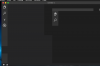
Running the trial Parallels 14 for Mac in an effort to build a dev environment. Stuck at Visual Studio code. Mojave installed fine. VS Code 1.27.2 on it has a broken UI and is not usable.
What can I do to fix this?
 
Do we know if VS Code is broken on Mojave when Parallels isn't involved?
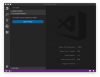
VS Code 1.27.2 runs perfectly on Mojave in the host environment. The intent was to recreate my dev environment in a VM. I could not have predicted I would get stuck at the code editor.
 

Attachments

  • VS Code in Parallels (Broken).png
    VS Code in Parallels (Broken).png
    92.3 KB · Views: 34
  • VS Code on host (good).png
    VS Code on host (good).png
    243 KB · Views: 30
I like the snapshot feature of Parallels but without my editor of choice working it's s no go. I'm very surprised. Checking out Fusion next....snapshots feature there is too costly. But at least I can build a dev VM. :-(
 
It might get fixed in upcoming Parallels patches, but I get you on the editor. Have you reported as a bug to Parallels?
 
Running the trial Parallels 14 for Mac in an effort to build a dev environment. Stuck at Visual Studio code. Mojave installed fine. VS Code 1.27.2 on it has a broken UI and is not usable.
What can I do to fix this?
VS Code 1.27.2 runs perfectly on Mojave in the host environment. The intent was to recreate my dev environment in a VM. I could not have predicted I would get stuck at the code editor.
I like the snapshot feature of Parallels but without my editor of choice working it's s no go. I'm very surprised. Checking out Fusion next....snapshots feature there is too costly. But at least I can build a dev VM. :-(
Hello MichaelD32. I believe you reached out on the social channel with the same query. Just got word that the Report ID you provided earlier was sent across to the engineering team. We will keep you posted. Appreciate your time.
 
Running the trial Parallels 14 for Mac in an effort to build a dev environment. Stuck at Visual Studio code. Mojave installed fine. VS Code 1.27.2 on it has a broken UI and is not usable.
What can I do to fix this?

Any luck getting this to work nicely I am having the same issue?

You can start VS code or any electron app with graphics acceleration disabled from terminal. This makes the app usable as long as you don't need webgl support.

How was your experience with Fusion? I really like Parallels for running windows on mac but I might need to ditch it for running OSX I am having a bunch of other issues running OSX as a guest OS such as tabs in all OSX applications such as finder and safari being messed up and graphically glitchy, blur in terminal not working, preview hanging up and firefox not working at retina resolution.

Makes it really hard to have an OSX dev environment in Parallels when basically every program I need to use is having issues :(
 
Any luck getting this to work nicely I am having the same issue?

You can start VS code or any electron app with graphics acceleration disabled from terminal. This makes the app usable as long as you don't need webgl support.

How was your experience with Fusion? I really like Parallels for running windows on mac but I might need to ditch it for running OSX I am having a bunch of other issues running OSX as a guest OS such as tabs in all OSX applications such as finder and safari being messed up and graphically glitchy, blur in terminal not working, preview hanging up and firefox not working at retina resolution.

Makes it really hard to have an OSX dev environment in Parallels when basically every program I need to use is having issues :(
Hi Paul, nope I'm afraid not. Also the trail period ended so I wasn't even able to proceed. Parallels support did not pick that up. What turned me down actually is that the support team left me waiting for a week on a known issue known for over a year. I can not build a solution that is meant to keep me going at all times without a support team operating at this level.
Anyways, apparently VMWare found away around the issue and I have macOS clients running happily under Fusion now. What bothered me though is the sheer size of the macOS deployments. So where possible I turned to a Linux Desktop distribution which can be as small as a few GBs compared to the 50GB macOS VMs.
Hope this helps. Regards from The Netherlands,
Michael
 
Parallels support did not pick that up. What turned me down actually is that the support team left me waiting for a week on a known issue known for over a year. I can not build a solution that is meant to keep me going at all times without a support team operating at this level.
Sorry for the delay. As per our conversation on the FB channel, we have forwarded your feedback to the management. Should we receive any updates in this regard, we will let you know.
 
Sorry for the delay. As per our conversation on the FB channel, we have forwarded your feedback to the management. Should we receive any updates in this regard, we will let you know.
Parallels support did not pick up that the trial period was over and that they should naturally offer to extend it while I was dedicating time testing the product.
I'm sorry I was unclear.
 
Hi Parallels Support,
Do we have any update on this? I'm facing UI app issues as well.
Regards,
Jairo Santana
 
I've had the exact same problem. I did a little more research and this is what I've found.
  • The problem exists in other versions of macOS as the guest. I am running Mojave as the host, and I've not seen this in any previous versions of the host os.
  • The problem also extends to Chrome. I set up a brand new guest OS (both Mojave and High Sierra) and ran tests. Chrome was also having graphical issues just like VS Code, so the root of the problem isn't just VS Code. It's Chrome since VS Code uses Electron which uses Chromium.
I've got a support incident opened and a remote session scheduled, hopefully something can be gleaned from that.
 
ok, I just read the other posts. @parallels - you have REALLY got to fix this problem. Everyone is using Electron to write apps. If you can't work with Electron, you're going to be obsolete and VMWare will eat your lunch.
 
I concur. This is extremely annoying. I am forced to run MacOS VM and Windows VM in order to solve it or run Electron apps from command line in MacOS.
 
Back
Top