Has anyone been able to get Win 11 24H2 running on ARM? I've been checking the Insider Preview channel for a couple of weeks and it still has not been offered to me. I am not sure if it is because of the rolling deployment or if it the ARM version is only being offered to Copilot+ PCs.

Install the app
How to install the app on iOS
Follow along with the video below to see how to install our site as a web app on your home screen.
Note: This feature may not be available in some browsers.
You are using an out of date browser. It may not display this or other websites correctly.
You should upgrade or use an alternative browser.
You should upgrade or use an alternative browser.
Update Windows to 24H2 on Arm
- Thread starter JulsS
- Start date
Best answer
Creating a new registry key "Windowsupdate" in Computer\HKEY_LOCAL_MACHINE\SOFTWARE\Policies\Microsoft\Windows with the three value as shown here seems to have worked for me...
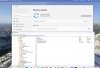
Creating a new registry key "Windowsupdate" in Computer\HKEY_LOCAL_MACHINE\SOFTWARE\Policies\Microsoft\Windows with the three value as shown here seems to have worked for me...
View attachment 22893
Apple M1 Max
macOS 15.0.1
Parallels 20.1.0
I was stuck on Windows 11 Pro 21H2, and this registry hack worked to start downloading 24H2 as soon as I clicked "Check for Updates."
@WarrenH3, you need to right-click > New > Key to add the key "Windowsupdate".
Then, inside that "key," add two new String Value entries and one DWORD value. The DWORD value will be "1".
Tim Lorenzen
Bit poster
Worked here as well with the registry key. Now the question is... why does Microsoft not want us to "officially" get 24H2 yet? My Parallels VM was even stuck on Win11 22H2 before I manually downloaded the KB from the Windows Update catalog that forces the 23H2 update - but there is no such KB for 24H2 anymore.
If you want to avoid typos when trying to do this, here's another method you can use to get this into the registry
- Open Notepad
- Copy and Paste the text below into Notepad
Code:Windows Registry Editor Version 5.00 [HKEY_LOCAL_MACHINE\SOFTWARE\Policies\Microsoft\Windows\Windowsupdate] "TargetReleaseVersion"=dword:00000001 "ProductVersion"="Windows 11" "TargetReleaseVersionInfo"="24H2" - File > Save As
- Save the file on your desktop as Update.reg
- Go to your desktop and double click Update.reg
- You'll be asked if you're sure you want to import - click yes
- Go to Windows update, the update should be available now.
- To remove the registry entires, you can repeat the same procedure using the code below saved as Delete.reg
Code:Windows Registry Editor Version 5.00 [-HKEY_LOCAL_MACHINE\SOFTWARE\Policies\Microsoft\Windows\Windowsupdate]
Hi Everyone. I'm getting an install error when trying to update Win11 ARM in Parallels on my M1 Pro.
"2024-10 Cumulative Update Preview for Windows 11 Version 24H2 for arm64-based Systems (KB5044384)"
"Install error - 0x800f081f"
I tried the above registry edit, which didn't resolve the problem.
Any suggestions would be much appreciated.
"2024-10 Cumulative Update Preview for Windows 11 Version 24H2 for arm64-based Systems (KB5044384)"
"Install error - 0x800f081f"
I tried the above registry edit, which didn't resolve the problem.
Any suggestions would be much appreciated.
Quick update: after applying the registry edit AND restarting the VM, the "2024-10 Cumulative Update Preview for Windows 11 Version 24H2 for arm64-based Systems (KB5044384)" completed successfully. Thanks @AndrewN18 for the text to copy and paste using Notepad.Hi Everyone. I'm getting an install error when trying to update Win11 ARM in Parallels on my M1 Pro.
"2024-10 Cumulative Update Preview for Windows 11 Version 24H2 for arm64-based Systems (KB5044384)"
"Install error - 0x800f081f"
I tried the above registry edit, which didn't resolve the problem.
Any suggestions would be much appreciated.
By any chance, did it hang at the "Install Network Adapter" stage?Microsoft has released Windows 11 24H2 for ARM as an ISO. You can download it from the Microsoft site. Unfortunately, a clean install into a new VM hung for me. I was able to upgrade a VM with 23H2 using the ISO image.
Just want to confirm that I successfully upgraded a VM on 23H2 by launching setup.exe from within the arm64 ISO file.Microsoft has released Windows 11 24H2 for ARM as an ISO. You can download it from the Microsoft site. Unfortunately, a clean install into a new VM hung for me. I was able to upgrade a VM with 23H2 using the ISO image.
I haven't been all the way through this thread but found it when wondering why my VM was still on 21H2. That was a couple months ago but an item saying Microsoft had released an ISO of Windows 11 ARM got me looking again. After trying a few times with various suggestions, the following has worked for me:
1) Download the ISO from Microsoft - pick the US English version (I initially tried the International English version as I'm in the UK, but it would only work if I let it delete everything except my personal data).
2) Fire up the VM and change the language settings to US English.
3) Move the VM into the C:/ drive (I put it in the root). Mount it and click on setup.exe
4) Follow the on screen instructions as it proceeds.
5) When it finishes on its final reboot, change the language settings back.
6) Go to the update section and run any new updates.
That worked for me - a couple hours work. Oh, and step 0) Back up your VM before starting!
I suspect that might all have been covered already, in previous messages, but it's allowed me to note down my procedure before I forget
1) Download the ISO from Microsoft - pick the US English version (I initially tried the International English version as I'm in the UK, but it would only work if I let it delete everything except my personal data).
2) Fire up the VM and change the language settings to US English.
3) Move the VM into the C:/ drive (I put it in the root). Mount it and click on setup.exe
4) Follow the on screen instructions as it proceeds.
5) When it finishes on its final reboot, change the language settings back.
6) Go to the update section and run any new updates.
That worked for me - a couple hours work. Oh, and step 0) Back up your VM before starting!
I suspect that might all have been covered already, in previous messages, but it's allowed me to note down my procedure before I forget
MichaelM25
Bit poster
Thanks to AndrewN18 for his very handy copy and paste technique. I have an M3 iMac, running Parallels 20 Pro that refused to update past 22H2. Once I applied your fix (did a restart after modifying Registry), the 24H2 update immediately showed and then installed flawlessly.
Query: After modifying the Registry, is it necessary to remove the workaround from the Registry as shown in your second Notepad entry?
Query: After modifying the Registry, is it necessary to remove the workaround from the Registry as shown in your second Notepad entry?
Yes, Desktop for Mac Pro v20.1.1, on macOS 15.1.1.for those of you that succeeded upgrading to 24H2, are you running the latest version of parallels?

Download the ARM ISO form Microsoft. It's 24H2. Run Setup from the ISO.Still can't get the update