
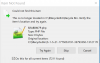
After running Cleanup and cleaning about 0.44GB of data, I'm stuck with Cleanup popping up repeatedly saying it can't find items that were in the Recycle bin (see image below). I can't find anything in Help or the forum to resolve this, or even mention it.
Although I have checked the box "Do this for all current items", it seems to do it for each and every one separately whatever other button I choose afterwards.
And there are over 7000 of them.
How do I get Cleanup to stop prompting?
Cancel doesn't stop it for more than about ten seconds, then it pops up again. The Close button X doesn't stop it either, for more than a very short time. And the "Do this for all current items" seems to be unchecked afresh every time it pops up.
I am using Parallels v17.1.6 (51584) and Toolbox v6.0.1-3534 on an iMac Late 2015 running Monterey v12.6.3.
Bug?
User error? If so, what else can I try?
Although I have checked the box "Do this for all current items", it seems to do it for each and every one separately whatever other button I choose afterwards.
And there are over 7000 of them.
How do I get Cleanup to stop prompting?
Cancel doesn't stop it for more than about ten seconds, then it pops up again. The Close button X doesn't stop it either, for more than a very short time. And the "Do this for all current items" seems to be unchecked afresh every time it pops up.
I am using Parallels v17.1.6 (51584) and Toolbox v6.0.1-3534 on an iMac Late 2015 running Monterey v12.6.3.
Bug?
User error? If so, what else can I try?