I have a french keyboard. I try to use Windows 10 via Parallels Desktop under Mac.
In Mac, in Chrome we use "cmd + =" and "cmd + -" to zoom in and zoom out. It is the same in VS Code.
But in Windows, it does not work well:
1) in Chrome, "control + -" can zoom in, whereas I have not found the shortcut to zoom out.
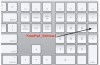
2) in VS Code, "control + -" can zoom in, whereas I have not found the shortcut to zoom out. In the setting it is written that the shortcut for zooming out is "control + NumPad_Subtract", but what is the key?
Could anyone help?
In Mac, in Chrome we use "cmd + =" and "cmd + -" to zoom in and zoom out. It is the same in VS Code.
But in Windows, it does not work well:
1) in Chrome, "control + -" can zoom in, whereas I have not found the shortcut to zoom out.
2) in VS Code, "control + -" can zoom in, whereas I have not found the shortcut to zoom out. In the setting it is written that the shortcut for zooming out is "control + NumPad_Subtract", but what is the key?
Could anyone help?