Shortcut of zooming out in Windows in Parallels Desktop

TieC

Member
I have a french keyboard. I try to use Windows 10 via Parallels Desktop under Mac.

In Mac, in Chrome we use "cmd + =" and "cmd + -" to zoom in and zoom out. It is the same in VS Code.

But in Windows, it does not work well:

1) in Chrome, "control + -" can zoom in, whereas I have not found the shortcut to zoom out.

2) in VS Code, "control + -" can zoom in, whereas I have not found the shortcut to zoom out. In the setting it is written that the shortcut for zooming out is "control + NumPad_Subtract", but what is the key?

Could anyone help?
 
Hi TieC
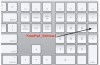
The NumPad is the extra area on a keyboard that looks some what like a calculator
Screen Shot 2017-12-24 at 8.00.35 AM.png
 
because I am not using a laptop without a num-pad but I found an explanation that may provide numpad input by holding a modifier key https://en.wikipedia.org/wiki/Numeric_keypad
if you are able to bring up the num-pad use the key mapping instructions from above to use the keys you have readily available.
 
because I am not using a laptop without a num-pad but I found an explanation that may provide numpad input by holding a modifier key https://en.wikipedia.org/wiki/Numeric_keypad
if you are able to bring up the num-pad use the key mapping instructions from above to use the keys you have readily available.
Thank you for this...
`Fn` (the modifier key) does not seem to work on my French Laptop keyboard under Parallels Desktop. I tried eg, `Ctrl + Fn + -` in VS Code in Windows in Parallels Desktop, it did not zoom out.
 
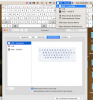
have you tried to use the virtual keyboard preferences>keyboard>check Show keyboard and emoji viewers in menu bar this will cause the keyboard you selected to appear on the screen (the only thing I am not sure of is will it provide the keyboard you are looking for, for me this is my key board, I will look for a hard wired one with out extra num pad to see if that changes my options.)
Screen Shot 2017-12-24 at 12.40.52 PM.png
 
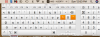
With my keyboard disconnected and the ABC - Azerty keyboard selected I get this on screen keyboard to use with my mouse Screen Shot 2017-12-24 at 12.53.25 PM.png
 
Back
Top