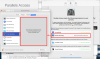
As with the other users above, I also was unable to get the screen recording permissions to activate. I tried removing Parallels Access (using the .sh script provided by Parallels) and reinstalling, but to no avail. [Very latest release of version 5.6 being used.]
I then did a clean install of Catalina (15.3) on a complete blank drive and installed no other 3rd party applications or utilities prior to installing Parallels Access alone. The result was exactly the same: Accessibility and Full Disk Access permissions activated normally and Sound Software permissions were granted, however Screen Recording permission stubbornly refuses to play ball.
I repeated the delete and reinstall action for completeness, but no dice: refer attached screenshot.
View attachment 15875