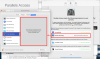
screen recording request does not work

ReinhardK1

Bit poster
Parallels Access does not turn on because under Security the screen recording for Parallels Access is not registered. A complete reinstallation of Parallels Access was not successful.
Does anyone have a suggested solution?
macOS 10.15.1
MacBook Air 11 Zoll
 
  • Like
Reactions: QTC
Parallels Access does not turn on because under Security the screen recording for Parallels Access is not registered. A complete reinstallation of Parallels Access was not successful.
Does anyone have a suggested solution?
macOS 10.15.1
MacBook Air 11 Zoll
Could you please provide us with the screenshot of the error message you get? And which Parallels Access version are you using?
 
When allowing the permissions needed, a Parallels Access icon and name shows up under Accessibility and Full Disk Access. But there is no icon for Parallels Access under Screen Recording. It just explains that apps that requested access would be listed there. But no apps are listed.
 
  • Like
Reactions: QTC
Have tried this - no difference at all!
I assume the 5.6 update is not available yet?
Does this mean nobody running on a Mac can use access?
 
  • Like
Reactions: QTC
Have tried this - no difference at all!
I assume the 5.6 update is not available yet?
Does this mean nobody running on a Mac can use access?
Hi Parallels Access 5.6 was released on February 26, 2020.
Could you please share a bit more detailed issue description with us?
 
As with the other users above, I also was unable to get the screen recording permissions to activate. I tried removing Parallels Access (using the .sh script provided by Parallels) and reinstalling, but to no avail. [Very latest release of version 5.6 being used.]

I then did a clean install of Catalina (15.3) on a complete blank drive and installed no other 3rd party applications or utilities prior to installing Parallels Access alone. The result was exactly the same: Accessibility and Full Disk Access permissions activated normally and Sound Software permissions were granted, however Screen Recording permission stubbornly refuses to play ball.

I repeated the delete and reinstall action for completeness, but no dice: refer attached screenshot.Screen Shot 2020-03-18 at 9.32.19 am.png
 
  • Like
Reactions: QTC
As with the other users above, I also was unable to get the screen recording permissions to activate. I tried removing Parallels Access (using the .sh script provided by Parallels) and reinstalling, but to no avail. [Very latest release of version 5.6 being used.]

I then did a clean install of Catalina (15.3) on a complete blank drive and installed no other 3rd party applications or utilities prior to installing Parallels Access alone. The result was exactly the same: Accessibility and Full Disk Access permissions activated normally and Sound Software permissions were granted, however Screen Recording permission stubbornly refuses to play ball.

I repeated the delete and reinstall action for completeness, but no dice: refer attached screenshot.View attachment 15875
After updating to macOS Catalina I was also not able to do that - But This worked for me.
Thanks & Regards!
 
  • Like
Reactions: QTC
Same problem here, opened a ticket on April 1th, still open and getting the idea my issue is not understood by the agent.
Get to do the same stuff over and over again, or even to try to access my Mac even when the service is not yet running.

It comes down to one (simple?) question...: How do we get the software to ask access to record the contents of the screen.
Provided links to resolve asume we can add the software in the list, but that is the main issue I guess, The software does not get listed, and we are unable to add.....

Running latest versions available of Parallels on macOS 10.15.3.
 
Hello, could you please perform the following steps and share any results with us:
1. Quit Parallels Access (click on the Parallels Access icon in the system menu, select Quit Parallels Access)
2. Open Terminal.app
3. In the terminal run the following commands:
tccutil reset All com.parallels.mobile
tccutil reset All com.parallels.mobile.prl_deskctl_agent
4. Reboot Mac
5. Open Parallels Access again
6. Click "View Permissions..." button
7. Consequently press "Accessibility Preferences...", "Screen Recording Preferences..." and "Full Disk Access Preferences..." buttons and check "Parallels Access.app" and "Parallels Access Agent.app" checkboxes on the corresponding panes in System Preferences dialog.
8. When granting Screen Recording and Full Disk Access permissions, System Preferences will show a message asking to quit Parallels Access. Press "Later" on that dialog.
9. When all three checkboxes are enabled in System Preferences, switch back to Parallels Access window and press "Close" on the "View permissions" dialog
10. Quit Parallels Access (click on the Parallels Access icon in the system menu, select Quit Parallels Access)
11. Reboot Mac
12. Open Parallels Access. Now It should have all the permissions granted.

Looking forward to your reply.
 
Hi Maria,
Got exactly the same text from Parallels Support this morning, and tried it right away.
Sadly it didn't work, while when running the ttcutil reset all commands it returned Successfully reset>>>>
In the end, same result. Somehow the Screen Recording permission ias a hard one..... Parallels Access doen't seem to request the Screen Recording permission somehow
Best regards,
Q
 
Hi Maria,
Got exactly the same text from Parallels Support this morning, and tried it right away.
Sadly it didn't work, while when running the ttcutil reset all commands it returned Successfully reset>>>>
In the end, same result. Somehow the Screen Recording permission ias a hard one..... Parallels Access doen't seem to request the Screen Recording permission somehow
Best regards,
Q
Thank a lot for provided results.
Informed Parallels Engineering Team about that.
Once we get any updates we will let you know.
 
I had this exact problem as well (installed 5.6.0 on a new machine) with Catalina 10.15.4. Here's how I worked around it:
1) from the menu bar, I click the parallels access icon, select "Manage Access"
2) try to turn it on with "Turn On Access", and of course, can't do it because of permissions (screen capture is not listed in the security dialog)
3) from the menu bar, "Quit Parallels Access", and then relaunch "Parallels Access" from my applications
4) the app tries to turn itself on, requests the permission, and I can finally enable it in the security dialog
5) then restart Parallels Access again (as in step 3) - at that point, it finally works :)
 
Any updates on this issue? I'm on Catalina 10.15.4 and I'm having the same issue. Parallels doesn't show up under Screen Recording.

Thanks
 
Back
Top