JonC8

Bit poster
I've been unable to login with an Apple ID in the Big Sur guest that is offered at Parallels install time. The error is the same for my normal Apple ID and one newly created from within the guest OS.

Logging into iCloud from System Preferences generates a 'Verification error'. All generic stuff and seems to happen a lot with Apple devices.

When I log into appleid.apple.com I can see that VirtualMac is a connected device, but I'm not logged into the OS.

It feels like an Appel problem but wondering if the VM is causing something to fail?
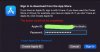


Screenshot 2021-10-10 at 19.45.jpg
 
Wondering whether this is some protection Apple use to identify genuine Macs?

Code:
akd: (AppleIDAuthSupport) [com.apple.AppleIDAuthSupport:general] SendRequestAndCreateResponse: submissing a request to: <private>
akd: (AppleIDAuthSupport) [com.apple.AppleIDAuthSupport:general] -[AIASSession URLSession:task:didReceiveChallenge:completionHandler:]: checking pinning
akd: (AppleIDAuthSupport) [com.apple.AppleIDAuthSupport:general] -[AIASSession URLSession:task:didReceiveChallenge:completionHandler:]: use credentials
akd: (AppleIDAuthSupport) [com.apple.AppleIDAuthSupport:general] -[AIASSession URLSession:dataTask:didReceiveData:]: <private> got more data: 657 bytes
akd: (AppleIDAuthSupport) [com.apple.AppleIDAuthSupport:general] -[AIASSession URLSession:task:didCompleteWithError:]: <private>: <private>: (null)
akd: (AppleIDAuthSupport) [com.apple.AppleIDAuthSupport:general] SendRequestAndCreateResponse: completed request <private>
akd: (AppleIDAuthSupport) [com.apple.AppleIDAuthSupport:general] AppleIDAuthSupport: setError: 2:selected protocol key missing
akd: [com.apple.authkit:core] Authentication with server failed! Error: Error Domain=com.apple.AppleIDAuthSupport Code=2 UserInfo={NSDescription=<private>, Status=<private>}
akd: [com.apple.authkit:core] Attempting to show login error: Error Domain=AKAuthenticationError Code=-7018 UserInfo={NSLocalizedDescription=<private>, NSUnderlyingError=0x13e821f80 {Error Domain=com.apple.AppleIDAuthSupport Code=2 UserInfo={NSDescription=<private>, Status=<private>}}}
 
Where did you read that Big Sur is supported? Both this blog post and this kb-article say that only Monterey works as a macOS guest. The kb-article also says that technology introduced in Monterey is needed and older versions can not run on an M1.

Yeah my bad - VM is indeed a Monterey beta. After a call with Apple they pointed out that the VM serial number is invalid (well it would be, right) so that *could* be what is driving the log message. My guess is that a genuine Mac will have something that helps the authentication, perhaps as simple as a valid serial number and the VM does not. That does basically mean a macOS guest can't install from the Mac App Store which was the one thing I was trying to do.
 
Same issue here. TBH - not being able to log in with an appleid makes the VM useless for anything I wanted it for....... Hope support is added soon
 
This appears to be a problem with Apple's new virtualization framework because there's the exact same problem with UTM and even with the text Xcode project Apple released. I am pessimistic it will be fixed before the MacOS 13 betas this summer but hope that Parallels has sufficiently escalated it with Apple that it gets fixed then!
 
I just wanted to confirm that this behaviour is still a thing with Parallels Version 17.1.4 (51567) running the first macOS 13 beta.
Neither logging in to iCloud nor in to Feedback Assistant works.
Sure feels like Apple is somehow detecting that the request is coming from a VM and preventing log in somehow.
 
Also, I just tried using an App Specific Password-not that it would have been too logical for that to work-but I can report that this is not a solution neither...
 
I just wanted to confirm that this behaviour is still a thing with Parallels Version 17.1.4 (51567) running the first macOS 13 beta.
Neither logging in to iCloud nor in to Feedback Assistant works.
Sure feels like Apple is somehow detecting that the request is coming from a VM and preventing log in somehow.
Hello Andreas!
We know about the issue and keep researching the ways to fix it together with the Apple engineers.
 
Back
Top