Radeon Pro Vega 20 and 3D Acceleration Direct X Support

freq_out

Bit poster
Hello,

I recently purchased a Macbook Pro with the Radeon Pro Vega 20 GPU. I notice when configuring my Win10 VM, the [Graphics] -> [Advanced Settings] menu does not contain an option for 3d acceleration via Direct X like I have seen in the past.

My concern is that my previous laptop which was a Macbook Pro 2017 (Mojave 10.14.6) with Radeon Pro 560 seems to handle my 3d applications better with Direct X 10 enabled under 3d Acceleration.

Looking on my new Macbook (Catalina 10.15) at [Apple] -> [About This Mac] -> [System Report] -> [Graphics/Display] shows:

Radeon Pro Vega 20:
Chipset Model: Radeon Pro Vega 20
Type: GPU
Bus: PCIe
PCIe Lane Width: x16
VRAM (Total): 4 GB
Vendor: AMD (0x1002)
Device ID: 0x69af
Revision ID: 0x00c0
ROM Revision: 113-D2060I-087
VBIOS Version: 113-D20601MA0T-016
Option ROM Version: 113-D20601MA0T-016
EFI Driver Version: 01.01.087
Automatic Graphics Switching: Supported
gMux Version: 5.0.0
Metal: Supported, feature set macOS GPUFamily2 v1
 
Hello,

I recently purchased a Macbook Pro with the Radeon Pro Vega 20 GPU. I notice when configuring my Win10 VM, the [Graphics] -> [Advanced Settings] menu does not contain an option for 3d acceleration via Direct X like I have seen in the past.

My concern is that my previous laptop which was a Macbook Pro 2017 (Mojave 10.14.6) with Radeon Pro 560 seems to handle my 3d applications better with Direct X 10 enabled under 3d Acceleration.

Looking on my new Macbook (Catalina 10.15) at [Apple] -> [About This Mac] -> [System Report] -> [Graphics/Display] shows:

Radeon Pro Vega 20:
Chipset Model: Radeon Pro Vega 20
Type: GPU
Bus: PCIe
PCIe Lane Width: x16
VRAM (Total): 4 GB
Vendor: AMD (0x1002)
Device ID: 0x69af
Revision ID: 0x00c0
ROM Revision: 113-D2060I-087
VBIOS Version: 113-D20601MA0T-016
Option ROM Version: 113-D20601MA0T-016
EFI Driver Version: 01.01.087
Automatic Graphics Switching: Supported
gMux Version: 5.0.0
Metal: Supported, feature set macOS GPUFamily2 v1
Hi which version of Parallels Desktop are you using?
 
Also I should mention, the MacBook that works with Parallels as I would like it to is a 2017 MacBook Pro with a Radeon Pro 560X GPU. It has Parallels 14.1.3 business edition installed on it, and it contains the option for 3D acceleration via Direct X 9 or 10 in the Graphics Advanced Settings drop down.

The program I am trying to run is Altium Designer 2019... there is a night and day difference between my old MacBook w/ Parallels 14 and my new MacBook with Parallels 15. Not only does the older run smoother, there are certain features within Altium that causes the Parallels 15 MacBook to crash where as the Parallels 14 MacBook seems to run Altium flawlessly.
 
Same problem here: iMac i9 Radeon Pro Vega 48 8GB, no 3D or Direct-X-options in Parallels 15 with OS X 10.14.6.
The application Pytha 24 (a 3D CAD-software) does not start
 
Sorry to say, but trying this VM*beep* Fu*beep" the 3D-Support for this VM (the same VM was used in VMF) is working without problems......
 
Hello, I have the same problem with
MacBook Pro 15" 2018
2,6 GHz Intel Core i7 6 cœurs
32 Go 2400 MHz DDR4
Radeon Pro Vega 20 4 Go
Intel UHD Graphics 630 1536 Mo
Catalina 10.15.4 (19E287)


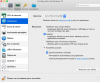
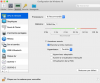
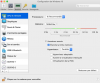
upload_2020-5-11_20-5-13.png

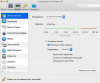
no 3D or Direct-X-options????
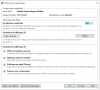
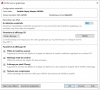
upload_2020-5-11_20-5-54.png

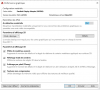
Autocad 2020: DrectX 9???? Where is DirectX11?
upload_2020-5-11_20-6-7.png
 

Attachments

  • upload_2020-5-11_19-59-50.png
    upload_2020-5-11_19-59-50.png
    140 KB · Views: 4
  • upload_2020-5-11_20-3-47.png
    upload_2020-5-11_20-3-47.png
    185.1 KB · Views: 3
  • image.png
    image.png
    185.1 KB · Views: 2
  • image.png
    image.png
    140 KB · Views: 2
Guys, please reproduce the issue, then collect the tech report right after that and post the report's ID here.
What has the problem of Video Radeon Pro Vega 20 card and 3D Acceleration Direct X been solved?
I have a problem for many months, that when working on Altium Designer, the computer crashes after a few minutes. I am working on iMac configurations: CPU: 2.5 GHz Fourteen-core Intel Xeon W processor, video card: Radeon Pro Vega 64 16 GB. Windows 10 operating system When I work on a laptop that has a different Video card the problem is not there. On both I am using Parralels version 20.1.1. please help!!!
 
Back
Top