Mile5Teg
Bit poster
Follow along with the video below to see how to install our site as a web app on your home screen.
Note: This feature may not be available in some browsers.
I never had this problem, in update 26.4 I have itSame issue after I upgraded to 26.4 and using Windows 11.
Hello @JohnG28Parallels just released an update to version 26.3.0 that solved this problem for me.
Report ID 516286427 sent. But I'm not sure how to attach a screenshot showing that the message no longer pops up.Hello @JohnG28
Kindly provide us with a technical report for our internal investigation (click Parallels icon || > Help > Send technical data > check "Attach screenshots..." > press Send Report) and send the report's 9-digit ID.
Regards,

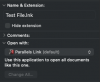
Same here on an Intel Mac with Tahoe 26.4. On 26.2 no pop-up, after update to macOS 26.4 every time I open the Parallels Desktop app the pop-up is triggered. As @JohnG28 noted, the identifier 'com.parallels.SharedAppLink.Agent' is associated with 'Parallels Link.app' located in /Applications/Parallels Desktop.app/Contents/MacOS'. Double-clicking this app once apparently solved the issue for me. Now when I open the Parallels Desktop app or double-click on any pvm bundle it doesn't trigger that pop-up.Running Tahoe 26.4 beta, I started seeing this pop-up when I launch a Windows 11 VM. I'm directly clicking on the Parallels Virtual Machine file (.pvm), not the Parallels Desktop app.
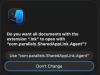
View attachment 24164