Prompt to open .lnk with com.parallels.SharedAppLink.Agent

Mile5Teg

Bit poster
Running Tahoe 26.4 beta, I started seeing this pop-up when I launch a Windows 11 VM. I'm directly clicking on the Parallels Virtual Machine file (.pvm), not the Parallels Desktop app.
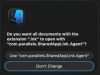
Do you want all documents with the extension .lnk to open with "com.parallels.SharedApplink.Agent"?
Screenshot.png
 
Best answer
Running Tahoe 26.4 beta, I started seeing this pop-up when I launch a Windows 11 VM. I'm directly clicking on the Parallels Virtual Machine file (.pvm), not the Parallels Desktop app.
View attachment 24164
Same here on an Intel Mac with Tahoe 26.4. On 26.2 no pop-up, after update to macOS 26.4 every time I open the Parallels Desktop app the pop-up is triggered. As @JohnG28 noted, the identifier 'com.parallels.SharedAppLink.Agent' is associated with 'Parallels Link.app' located in /Applications/Parallels Desktop.app/Contents/MacOS'. Double-clicking this app once apparently solved the issue for me. Now when I open the Parallels Desktop app or double-click on any pvm bundle it doesn't trigger that pop-up.
Dear Andreas, your message of April 1, 2026 seems to be helpful!
Here is a minor correction:
located in "/Applications/Parallels Desktop.app/Contents/MacOS"
should be:
located in "/Applications/Parallels Desktop.app/Contents/Applications/"
on my System, that is Tahoe (26.5.2) Parallels Desktop 18 Version 18.3.4 (53630).
Regards, York
 
Back
Top