Process for Converting from Legacy to UEFI (in prep for Win 11)

Thanks to @BradB7, who passes along a way to trick the registry into thinking your system passes all the tests (note that hacking the registry is not for the squeamish. Always backup your VM when doing things like this):
  • Open the Registry Editor and navigate to HKEY_LOCAL_MACHINE\SYSTEM\Setup\MoSetup
  • Search for AllowUpgradesWithUnsupportedTPMOrCPU
  • Change its value to 1.
Once you've done that, restart your PC (or VM in this case) and install Windows 11 using your preferred method.

Thanks for your help. This is interesting. I navigated to the HKEY... but there was no Allow... line anywhere, so I added it. Still didn't work. I tried adding it both as a Key and as a Binary. Other ideas?
 
In my case I actually had to add it to the registry myself. Had no issues upgrading my Win10 using the setup.exe in Win11_English_x64.iso. I did have the TPM and secure boot set, but my processor wasn't on their list.
 
Can anyone who added this value to the registry please post some detailed steps on how your did it? Like JoelH1, I do not have that AllowUpgrades... item in my registry at all.
 
Can anyone who added this value to the registry please post some detailed steps on how your did it? Like JoelH1, I do not have that AllowUpgrades... item in my registry at all.
If it's not there, you have to add it, as I said. that said, if you don't know how to add a value manually to the registry, perhaps you shouldn't.
 
System won't validate my drive when I attempted the conversion. CheckDisk shows everything being okay, but still can't get the validation. Additionally, I don't have the AllowUpgrades... part either.
 
Thanks @Mark Fine, for the instructions. I copied the VM, renamed it and performed the steps to go from MBR to UEFI, and the conversion went ok.
Software Update still said the 'PC does not meet the requirements', but PC Health Check said all was OK for Windows 11.
I went to Microsoft's Windows 11 download page and choose the 'Upgrade' option. All went smoothly.
 
I picked this up from another site but it worked well for me on two W10 VM's. One on an iMac and the other a MBP. W11 is downloading as I type.
Thanks
 
Happy to finally find a way through upgrading from VM with "Legacy bios". For some reason I get stuck in step 5 in the #1 post???
The pwd for my MS account (the very one, I am logged on with - and it IS an administrator account!!) is rejected? I have no idea why?
Since I am stuck there in the procedure, I would be happy if someone can help me to resolve the block??
Thanks in advance....
 
Easy. Change the account to a local login, set an easy password before rebooting into the troubleshooting mode. Finish the upgrade then switch back to your microsoft/live login. Use this on my 4 VM's that I converted.
 
Hey! I got passed step 5 - thanks! I got to the "Grief" in 6.d. and stuck again.
I get the following from the command "mbr2gtp /convert":
"MBR2GPT: Attempting to convert disk 0
MBR2GPT: Retrieving layout of disk
MBR2GPT: Validating layout, disk sector size is: 512 bytes
MBR2GPT: Trying to shrink the OS partition
Cannot find room for the EFI system partition.
MBR2GPT: Conversion failed"
I tried to extend the size of the VM disk w 10GB, but that can't be it. It came back with the error.
SO: I am hoping for someone to give me another clue: How can I come past this one?
Thank y'all!
 
I can't get the mbr2gpt commands to work , is it because my iMac hard disk has a Boot Camp partition?
 
This worked perfectly for me, thanks you very much for posting this response.
I made a copy of my VM after this, got a B SOD first restart but has been working great since.

Now for the Win 11 upgrade on the chipped VM. Pity that Parallels advise this solution but to do a full install of Win 11
 
I attempted to follow these instructions several times, but MBR2GPT consistently failed. A YouTube video informed me how to find the error log, and the error seems to be:
ValidateLayout: First partition too close to the beginning of the disk. Should start at offset 17408 or above, found at 512
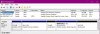
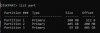
This is absolutely the case, but I have no idea what I can do about it. This VM was created under Parallels back in Windows 7 (perhaps even XP) and has simply been upgraded since then. The disk looks like this:

Screen Shot 2022-04-13 at 9.07.04 PM.jpg
and

Screen Shot 2022-04-13 at 9.11.17 PM.jpg

Is there anything I can do (that's not insanely effort-intensive) to end-run this problem?
 
Back
Top