I'm using a Macbook pro (2009), Mac OS Sierra, and Parallels 11 for Mac.
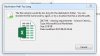
When I am connected to my work webdrive on Windows via parallels on my Mac at home I frequently get the error message, "The file name(s) would be too long for the destination folder. You can shorten the file name and try again, or try a location that has a shorter path". If I try and move or delete the same files on the drive when I'm in the office using my Windows PC I do not get the same problem, so I'm presuming that using Parallels on the Mac to access the Webrive through Windows increases the path length beyond the 259 character limit that the Windows operating system allows.
Has anyone else encountered a similar problem, and would there be any way to get round this problem on Parallels? The names of the files are not that long and the problem doesn't exist when using Windows without Parallels.
Cheers
Colin
When I am connected to my work webdrive on Windows via parallels on my Mac at home I frequently get the error message, "The file name(s) would be too long for the destination folder. You can shorten the file name and try again, or try a location that has a shorter path". If I try and move or delete the same files on the drive when I'm in the office using my Windows PC I do not get the same problem, so I'm presuming that using Parallels on the Mac to access the Webrive through Windows increases the path length beyond the 259 character limit that the Windows operating system allows.
Has anyone else encountered a similar problem, and would there be any way to get round this problem on Parallels? The names of the files are not that long and the problem doesn't exist when using Windows without Parallels.
Cheers
Colin