Power BI Desktop stopped working Arp 01

AndreiG6

Bit poster
Hi,

Since yesterday i cannot use Power BI Desktop app,
After file is opened, all charts are showing errors.
Can be related to Power BI Mar 2025 update, it was released on Mar 31.
Tried to use prev versions of PBI, works better but still with same error.
Tried to reinstall windows, install fully new copy, still same problem
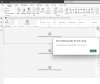
 

Attachments

  • Screenshot 2025-04-01 at 11.52.09.png
    Screenshot 2025-04-01 at 11.52.09.png
    346 KB · Views: 41
I have the same issue and it's a big problem. As a workaround the January 2025 release of Power BI Desktop doesn't give me this error but I sincerely wish this get's fixed soon.
 
I can also add that I've tested the same reports on a Windows PC with the March version of Power BI and there it works fine so the issue seems to be Parallels/ARM related.
 
Hi,

Since yesterday i cannot use Power BI Desktop app,
After file is opened, all charts are showing errors.
Can be related to Power BI Mar 2025 update, it was released on Mar 31.
Tried to use prev versions of PBI, works better but still with same error.
Tried to reinstall windows, install fully new copy, still same problem

Did you solve this? I'm pretty desperate
 
Did you solve this? I'm pretty desperate
hi, not yet..
i tried to reinstall every driver in found, related to analytics service, still not working..
came to office to get windows laptop... im giving up..
dont know what else to check / who else to ask.
i created ticket for microsoft, but not help
 
Hello guys,

Have any one of you contacted the support ?

I have, they're troubleshooting but requieres from me the problematic reports to recreate the crash.

Because of sensitive data, I cannot send them rigth away my failing report. Did one of you contact them ? Have they already received samples from one of you ?
 
Hi,
i tried prev versions: Dec 2024 and Feb 2025 - better, but still with problem
i contacted microsoft support, after week, they said that they cannot provide help for Parallels users
 
checked windows events logs, found this error:

The description for Event ID 22 from source MSOLAP$AnalysisServicesWorkspace_5197df01-9cf1-4cb1-8a69-5635121933e1 cannot be found. Either the component that raises this event is not installed on your local computer or the installation is corrupted. You can install or repair the component on the local computer.
If the event originated on another computer, the display information had to be saved with the event.
The following information was included with the event:
An unexpected exception occurred.
 
https://community.fabric.microsoft....ing-Data-for-this-Visual/m-p/4635612#M1386934
People in the forum recommend downloading previous version of PowerBI:
February 2025 version of Power BI Desktop - 64-bit

Please comment in MSFT thread and also if you have time submit an issue via Feedback Hub app.
this may work for someone, but only like temporary solution,
buy time for your team to fix this. could you please address this issue to someone from parallels who can help?
 
Hi,
I have the same problem with visuals simply displaying an error. I solved it by downgrading to Power Bi Desktop 32 bit, which will end being supported in July.
Regards,
FC
 
Same issue.
I found out that it is pertaining to dates - callendars function problems when there are couple of visuals with dates used in any form (slicer and table/or matrix and you move slicer - it glitches) - see print screent. Also - any measure and its derivatives from callendar/date usage has problem as well (sameperiodlast year, max (date) etc). Also - nothing is wrong when getting file to windows laptop (have mac pro3 and lenovo t14 gen3) - works and everything is fine.
Also - trouble on desktop - cloud is no problem if you manage to get the job done with those glitches and publish the report to power BI service - it works in the cloud, even glitched on desktop.
P.S. Ask of my impresions of Mac - moved to it in September..... :-D
upload_2025-5-13_13-58-50.png
upload_2025-5-13_13-58-3.png
 
Back
Top