Good find, have you let the developers/support know of your findings?Same issue.
I found out that it is pertaining to dates - callendars function problems when there are couple of visuals with dates used in any form (slicer and table/or matrix and you move slicer - it glitches) - see print screent. Also - any measure and its derivatives from callendar/date usage has problem as well (sameperiodlast year, max (date) etc). Also - nothing is wrong when getting file to windows laptop (have mac pro3 and lenovo t14 gen3) - works and everything is fine.
Also - trouble on desktop - cloud is no problem if you manage to get the job done with those glitches and publish the report to power BI service - it works in the cloud, even glitched on desktop.
P.S. Ask of my impresions of Mac - moved to it in September..... :-D
View attachment 23535
View attachment 23534

Install the app
How to install the app on iOS
Follow along with the video below to see how to install our site as a web app on your home screen.
Note: This feature may not be available in some browsers.
You are using an out of date browser. It may not display this or other websites correctly.
You should upgrade or use an alternative browser.
You should upgrade or use an alternative browser.
Power BI Desktop stopped working Arp 01
- Thread starter AndreiG6
- Start date
I guess, they have no problem figuring this thing out - as mentioned above, they understand its due to some deeper coding. Nevertheless - if not solved within a week or two, will simply move back to Win PC: too much habits developed and problems known to run into new ones (mac has always been portrayed as problem free riding - sorry to say - not. Simple absence Ctrl + Scroll kills half of joy... )Good find, have you let the developers/support know of your findings?
This issue is not happening on parallel devices but all devices on ARM including Surface Laptops. This is a microsoft problem
Solved: Weird behavior with date slicer and MAX measure on... - Microsoft Fabric Community
Solved: Weird behavior with date slicer and MAX measure on... - Microsoft Fabric Community
Good guess! I went back and checked my visuals, and I isolated the following problem: filtering an amount of money with "is greater than" 0:
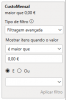
This causes the visual to crash:

Changing the filter to check if the value is empty and is greater than 0 solves the problem:
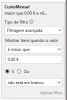
Hope this helps!
Best regards,
FC
This causes the visual to crash:
Changing the filter to check if the value is empty and is greater than 0 solves the problem:
Hope this helps!
Best regards,
FC
Hey guys - I created an account just for that topic...
This is ridiculous - if I downgrade to January version, I cannot open my dashboard that was created with August version.
I cannot try FilipeC2's comment as I don't find this settings. Anyone to confirm FilipeC2's solution?
This is ridiculous - if I downgrade to January version, I cannot open my dashboard that was created with August version.
I cannot try FilipeC2's comment as I don't find this settings. Anyone to confirm FilipeC2's solution?