PD4 & Boot Camp: Unable to connect to hard disk 1

Regarding the error mentioned earlier:
"Failed to configure the Boot Camp partition's hard disk.

A disk configuration error has occurred. Make sure that you have read/write permissions for the disk."

I had that error, and looked into multiple things (including those suggested above). However, none worked, and I (sheepishly admit) that I had not noticed how little space was available on my winxp partition - booted natively into Boot Camp, and deleted some unnecessary stuff to give me about a little less than a GB available space.

That was enough. Back in OS X, I went right into the configuration of my old Parallels Boot Camp VM, and all went fine. I did have to reactivate WinXP though (and probably MS Office?).
 
Regarding the error mentioned earlier:
"Failed to configure the Boot Camp partition's hard disk.

A disk configuration error has occurred. Make sure that you have read/write permissions for the disk."

I had that error, and looked into multiple things (including those suggested above). However, none worked, and I (sheepishly admit) that I had not noticed how little space was available on my winxp partition - booted natively into Boot Camp, and deleted some unnecessary stuff to give me about a little less than a GB available space.

That was enough. Back in OS X, I went right into the configuration of my old Parallels Boot Camp VM, and all went fine. I did have to reactivate WinXP though (and probably MS Office?).

I have 1,75GB free and it doesn't work :(

C'mon Parallel's staff help us :(:(
 
I don't even see my hard drive

I am sharing my hard drive, but the windows partition doesn't even appear in Finder as it did in 3.0. Nice.
 
I have a solution that worked for me. Hopefully it works for you guys too. I havn't had any problems since, though it did take me a while to sort out.

1) Close the virtualization of your Boot Camp Windows if it's running and delete the VM.

2) Shut down Parallels completely.

3) Download NTFS-3G here and install it.

4) Restart in Boot Camp.

5) Go to "Add/Remove Programs" and uninstall "Parallels Tools".

6) Reboot in Mac OS X and open Parallels again, creating a new VM for your Boot Camp partition.

This has worked (so far) for me without the error re-occuring. I have found though that the Windows partition is still mounted on the desktop (at first under a different name (Untitled)) while Parallels is running. This isn't a problem really, it means you can access the partition while Parallels is running without having Parallels mount it to the desktop. Changing some settings may get rid of that though. You may be able to sort the problem out without deleting the VM and uninstalling Parallels Tools, but I found that when I did that use of the mouse was severely hampered. For you it may work though.
 
Boot Camp not accessible

Guys, pleeeeaaase, put here report IDs! We can help you if you will post them here. But without reports it's much harder to understand what happened. Thanks.

Report ID 15254.

* Cannot get into VM configuration.
* <hdd> in config.pvs shows full path to hdd-file.

Come on guys - I've payed the upgrade fee of fourty euros for something completely broken. That's incredible.
 
Last edited:
got 3540 and now get this error when I try to set up a bootcamp VM:

"Failed to configure the Boot Camp partition's hard disk.

A disk configuration error has occurred. Make sure that you have read/write permissions for the disk."


The log says this:

Nov 23 02:33:42 HD ntfs-3g[1618]: Version 1.5012 external FUSE 27
Nov 23 02:33:42 HD ntfs-3g[1618]: Mounted /dev/rdisk0s3 (Read-Write, label "XP", NTFS 3.1)
Nov 23 02:33:42 HD ntfs-3g[1618]: Cmdline options: locale=en_US.UTF-8,auto_xattr,defer_auth,defer_permissions,local,volname=XP
Nov 23 02:33:42 HD ntfs-3g[1618]: Mount options: auto_xattr,defer_auth,defer_permissions,local,volname=XP,silent,allow_other,nonempty,relatime,fsname=/dev/disk0s3
Nov 23 02:33:42 HD fseventsd[42]: log dir: /Volumes/XP/.fseventsd getting new uuid: 0C8C820C-FAF7-4F1F-B21A-958FB9686435
Nov 23 02:33:43 HD mdworker[1628]: (Fatal) Worker: worker couldn't check in with mds
Nov 23 02:33:43 HD com.apple.launchd[1] (0x10d4a0.mdworker[1628]): Exited: Terminated
Nov 23 02:33:43 HD ntfs-3g[1618]: Unmounting /dev/rdisk0s3 (XP)
Nov 23 02:33:43 HD KernelEventAgent[38]: tid 00000000 received VQ_DEAD event (32)
 
Last edited:
yes, it is from that post
- Hard disk cannot use the Boot Camp partition after the upgrade - fixed.
Note: If this error occurs in the release version of Parallels Desktop 4.0, open the virtual machine configuration, select Hard Disk 1 in left pane and click OK.
- The message "Failed to configure the Boot Camp partition" appears after the upgrade - fixed.
Note: If this error occurs in the release version of Parallels Desktop 4.0, open the virtual machine configuration and click OK.
 
yes, it is from that post
- Hard disk cannot use the Boot Camp partition after the upgrade - fixed.
Note: If this error occurs in the release version of Parallels Desktop 4.0, open the virtual machine configuration, select Hard Disk 1 in left pane and click OK.
- The message "Failed to configure the Boot Camp partition" appears after the upgrade - fixed.
Note: If this error occurs in the release version of Parallels Desktop 4.0, open the virtual machine configuration and click OK.

I said that I read the topic. And as I said, none of the information posted fixed my issue. It still cannot access the Boot Camp partition, even after trying the suggested steps. I get the error:

"Failed to configure the Boot Camp partition's hard disk.

A disk configuration error has occurred. Make sure that you have read/write permissions for the disk."

I can neither convert my old 3.0 Boot Camp VM nor create a new one in 4.0. I get this error every time no matter what I try. I attempted making a VM with a disk image HD then changing it to a Boot Camp disk in the configuration, but again up pops the error.
 
Last edited:
Hi Peabo
You are not the only guy with this problem. I cannot create a new VM for my Boot Camp partition after upgrading to Parallels 4.0. Installed lastest version of Nov 22 (4.0.3540) but no joy.
Every time I want to create a new VM for the boot camp I get that "read/write permission" error.

MySupport Ticket ID: 15406
Hope to find a solution soon - I really need to work.
With regards,
Rolf
 
Cannot create Boot Camp VM or upgrade existing

I have the same problem as every body else it seems:

Report ID: 15470
Running 4.0.3540. OS X 10.5.5 Danish Language / Win XP SP2 US.

I cannot convert my existing PD3 Boot Camp VM or create a new one. Get the same error message every time.

"Failed to configure the Boot Camp partition's hard disk.
A disk configuration error has occurred. Make sure that you have read/write permissions for the disk."

Tried to edit the config.pvs on the existing VMs but to no avail. Tried creating a new Boot Camp VM, but same error message.

Haven't checked whether my Boot Camp Partition still works - afraid that I'll find out PD4 have destroyed it, and I'm already on the verge of pulverizing some inanimate object in the office. A few more days, and I'm recommending the company to go with VMWare instead.
 
Just tried the latest build - Parallels-Desktop-4.0.3540.209168

Still after step 1 of the upgrade I receive the error:

Windows could not start because of a computer disk hardware configuration problem.
Could not read from the selected boot disk. Check boot path and disk hardware.
Please check the Windows documentation about hardware disk configuration and your hardware reference manuals for additional information.

Any progress on this issue?
 
Any progress on this issue???
MySupport Ticket ID: 15406

Boot to your native Windows.
Go to the %windir%\Driver Cache\I386 (%windir% is a windows directory, that usually is C:\Windows).
Check is there sp1.cab file exists.
If there are no such file, you should copy it from I386 directory of your Windows setup disk.
If you have no sp1.cab on your Windows setup disk, you can copy driver.cab file and rename it to the sp1.cab

Boot to Mac.
Run PD40
Open your virtual machine, go to the configuration editor, remove HDD from configuration and add it again (do not forget to select Boot camp type of the disk).
Or you can just recreate your virtual machine.

That should solve your problem.
 
I have tried all these solutions and still get the error:

Failed to configure the Boot Camp partition's hard disk.

A disk configuration error has occurred. Make sure that you have read/write permissions for the disk.

I cannot even make a VM using bootcamp to begin with.
 
I have tried all these solutions and still get the error:

Failed to configure the Boot Camp partition's hard disk.

A disk configuration error has occurred. Make sure that you have read/write permissions for the disk.

I cannot even make a VM using bootcamp to begin with.

Send problem report and write its ID here. Thanks.
 
Issue Fixed

If you're having the following issue, this may fix your problem (It did for me).

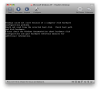
Windows could not start because of a computer disk hardware configuration problem.
Could not read from the selected boot disk. Check boot path and disk hardware.
Please check the Windows documentation about hardware disk configuration and your hardware reference manuals for additional information.

First, if you're bootcamp install is formatted in NTFS, install NTFS-3g so that you can write to your bootcamp drive.

Once that's done, or if your drive is FAT32, edit your boot.ini file using either Textedit.

Then following the instructions on AlsBlog for fixing your boot.ini file.

For me I had to change the partition number from 2 to 1. I believe this problem occurred when I upgraded by bootcamp drive. For some reason Parallels 3.x was able to work with the incorrect boot.ini file while 4.x had a hard time.

Hope this helps all those out there still struggling with this problem.
 

Attachments

  • Picture 1.png
    Picture 1.png
    77.8 KB · Views: 12
Back
Top