Parallels on MacBook Air - can't connect network on Windows 11?

AW_4

Bit poster
upload_2022-2-19_19-1-51.png
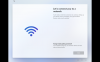
Nothing is coming up on this screen and I've been unable to get past it for a while now... I've done everything I've seen people suggest, however none of them seem to work. There is a good WiFi connection on the actual Mac itself.
 
I finally found the answer for this. When the Setup app starts up, hit Shift + F10 and enter the command: OOBE\BYPASSNRO
The VM will automatically reboot, and when you get back to that screen, you will have to option to click "I don't have internet" (for some reason, Internet is not capitalized ).
I hope that helps!
 
  • Like
Reactions: AMP
I finally found the answer for this. When the Setup app starts up, hit Shift + F10 and enter the command: OOBE\BYPASSNRO
The VM will automatically reboot, and when you get back to that screen, you will have to option to click "I don't have internet" (for some reason, Internet is not capitalized ).
I hope that helps!
Merci infiniment, la commande OOBE\BYPASSNRO marche tres bien :)
pour les clavier FR, cliquer sur : fn+MAJ+F10, puis sasir la commande : OOBE\BYPASSNRO
 
Back
Top