Falchion

Bit poster
For reference, I'm on macOS 26 Beta 3 (25A5306g) on a 2024 MacBook Pro. For some reason I'm unable to install Parallels via the Automatic Installer. It just gets stuck at this screen forever and will not continue. I obviously do have internet, I've tried everything I could think of. Using a VPN, ethernet, my phone's hotspot, and even a completely different Mac on the same macOS build (an M1 MacBook Pro). I don't think it's my ISP blocked access because this even happens on my mobile hotspot. My ISP is Comcast just for reference. Using the normal fat installer is NOT a solution for me. I saw a Reddit post about this, and other Parallels forum users talking about this issue but all were just dead ends. If anyone else is experiencing this issue please chime in here.

For any Parallels employees reading, I already had a ticket number about this and have been back and forth emailing support but they also couldn't figure it out (#5349167).
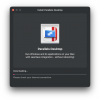
Screenshot 2025-07-14 at 10.56.36 AM.png
 
I am having the same issue... I'm on MacOS 26 Tahoe Beta, and whatever I try it doesn't work. I made sure no internet proxies were in use, I tried with the firewall disabled... I tried everything I could find on the internet. Did you ever figure it out?
 
I haven't found any solution yet, however the Parallels team is aware of this issue, but it seems to be taking them awhile to fix it. As far as I know, this only effects macOS Tahoe Betas. If you can please create a support ticket with the Parallels Support team to bring more attention to the issue!
 
I have the same issue but you need to be aware that Parallels could stop working under Tahoe Beta as it doesn't recognize your parallels registration and will close your session because it assumes that you have a pirated version of parallels.
At least this is what I am dealing with.
 
I paid for the parallels subscription and downloaded the app. But I am unable to install the app. It just gets stuck at this screen forever and will not continue. I've tried everything I could think of but still at the same screen. There is something seriously wrong with this company. Is this how this company is running?
Screenshot 2025-08-04 at 6.36.50 PM 2.png
 
Hey, there's a quick fix that works for macOS 26!
Just install PD19 first, and then you can upgrade to PD20.
I've tried it, and it works.Screenshot 2025-08-10 at 02.50.19.png
 
Back
Top