Parallels Desktop Lite - Install of Sierra on Mac running El Capitan - which hard drive?

SofiaA

Bit poster
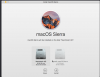
My Macbook Pro is running El Capitan because my drafting software isn't compatible with Sierra (whole other gripe). I am trying to install Sierra in Parallels Lite because I need it to run the latest version of TurboTax. I had no problem installing Parallels Lite, but when I go to install Sierra it asks me which Hard Drive to install on and the only Hard Drive showing up is one that it says has 68GB of space. I am confused because I have way less than 68GB of space on my main Hard Drive and therefore I'm not confident that this installation is happening only within Parallels and isn't going to override my El Capitan installation. I am attaching screen shot of what I'm seeing.
(Note the instructions really only tell you how to install Windows in Parallels, so I'm not finding them helpful.)
 

Attachments

  • Screen Shot 2018-12-29 at 11.23.00 AM.png
    Screen Shot 2018-12-29 at 11.23.00 AM.png
    204.9 KB · Views: 3
when I go to install Sierra it asks me which Hard Drive to install on and the only Hard Drive showing up is one that it says has 68GB of space. I am confused because I have way less than 68GB of space on my main Hard Drive
Hi
It is ok. Parallels creates a virtual disk for VM. It is ok if your real hard disk has say 10GB spave and Parallels says that virtual disk size is say 200GB. This will not overwrite anything. If real data size written to virtual disk will exceed the available space on real disk, Parallels will display a message, saying that no space left of real disk and will suggest to free some data. Nothing will be erased.
 
Thank you!!! I am all installed and Sierra is running in Parallels. I am now installing TurboTax, but it seems a little glitchy...flickering screen. Wondering if there are any negative side effects to clicking on Free Up Disk Space and will that help?

P.S. Can I just say, being old enough to remember a world before computers....how amazing it is that this all actually works. Thank you for a wonderful product.
 
Back
Top