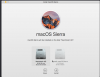
My Macbook Pro is running El Capitan because my drafting software isn't compatible with Sierra (whole other gripe). I am trying to install Sierra in Parallels Lite because I need it to run the latest version of TurboTax. I had no problem installing Parallels Lite, but when I go to install Sierra it asks me which Hard Drive to install on and the only Hard Drive showing up is one that it says has 68GB of space. I am confused because I have way less than 68GB of space on my main Hard Drive and therefore I'm not confident that this installation is happening only within Parallels and isn't going to override my El Capitan installation. I am attaching screen shot of what I'm seeing.
(Note the instructions really only tell you how to install Windows in Parallels, so I'm not finding them helpful.)
(Note the instructions really only tell you how to install Windows in Parallels, so I'm not finding them helpful.)