Parallels 4.0 won't start WindowsXP

Parallels 4.0

Hi,

Same problems here. I install Parallels 4.0, launch, select a VM to launch. Then the dialogue "Backup and convert", "Convert" etc, I click "backup etc" which seems to work ok. Then I see the dialogue telling me to launch the VM to complete the upgrade - I click yes, then I get the XP window for about 2-3 secs and then the application quits. When I relaunch I get the bug report dialogue. Have tried several times, uninstalled, rebooted, reinstalled, switched off ClamXav on OSX, have now reinstalled Parallels 3.0. The troubleshooter is no help either!

If there's no solution in the next few days, I will be looking for a full refund. This has wasted hours of my time, get it together Parallels.

Heffalump
 
MacBook 2GHz Intel, 2GB mem, 75GB HD, Mac OS 10.5.5. I purchased v4 this morning and have been extremely frustrated with the installation process ever since. (its now 7pm!) I did the v3 backup to an external drive (internal drive did not have enough space) then started my installation at about 1pm. It took me through several "you must start xp and hit setup.exe manually" After each time it asked it went a little further into the installation process. First the step 1 of 4 took about 1 hour, then step 2 of 4 took about 1 and 1/2 hours, then (and this is were I am now) step 3 of 4 has been going on for about 5 hours! and the progress bar is only 3/4 done. I don't think this should be this difficult!

Thanks for any and all help,

Robert.
 
Tried to install XP (SP3) from scratch. All works fine. Install was a bit slower as on 3.0 but it works. But that's not solve the Problem with the existing 3.0 VM's. And i hope, that Problem will be solved shortly!
 
same issues here. I sent in a support ticket earlier today. Have not heard back at this time. very frustrating as I have been out of commission for several hours.
 
I just couldn't wait any longer so I did a "force quit" on v4. then i restarted parallels. to my surprise it completed installation! (it went through step 4 of 4 in about 5 min) don't ask me how/why it happened.

regards,

Robert.

ps. everything seems to be working ok...............
 
I just couldn't wait any longer so I did a "force quit" on v4. then i restarted parallels. to my surprise it completed installation! (it went through step 4 of 4 in about 5 min) don't ask me how/why it happened.

regards,

Robert.

ps. everything seems to be working ok...............

Yeah, I have noticed that if I cancelled some of the windows installation screens (in manual upgrade mode), it would progress in auto mode at the next step.

I let it complete and then did a Parallels tools install update again, just in case.
 
downgrading to v. 3

It took me a while to find a copy of 3.0 again, but the backup 4.0 made works fine.

There are links to v3 lurking around the forums here in case you lost your installer:
i.e. http://forum.parallels.com/showthread.php?t=20980

As others mentioned I also tried upgrading MacFUSE, no luck.
Am going to attempt John's suggestion and create from 3, shutdown, and try again.

The big point is, upon downgrading back to 3.0 and using the backup the 4.0 made all is well again in the mean time until the bugs get worked out.
 
Decided to delete v4 and reinstall v3 from the backup.

V3 is working again without issues. Will hold out on V4 for a few more days to see if a new version available.
 
Hello.

I have a Problem with Parallels 4.0. Ok, i have uninstalled the previous 3.0 first and installed the Parallels 4.0 Upgrade. After that, Parallels 4.0 has to upgrade the "old" 3.0 XP Image (Step 1-4). But at the end, 4.0 starts up for a Second and quits without Error Message! I made a new Config for XP with the upgraded Image File but with the same result. Windows starts up end shuts down. If i start the VM, 4.0 upgrade the Image File again! After Step1 Windows starts up again und shut down. Can anyone help me?

Ralf.

Machine: MacPro 2.0 Dual Xeon, 6GB RAM, 512 ATI 3870

I have the exact same problem. It looks like there are many of us. No solution in sight...
 
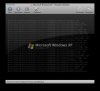
Boot messages screenshot

When booting I held down ctrl-option-apple-r, selected manual install, then safe mode. This allowed me to see boot messaged before the screen goes black. See screenshot, I hope this helps.
(It looks like the last thing it touches is agp440.sys)
 

Attachments

  • Picture 3.jpg
    Picture 3.jpg
    11.2 KB · Views: 46
Last edited:
Ditto -- Same Issues

I have tried about every possibility listed above trying to get it to update my XP image but no luck! I really do not have anything else to add as it has already been said BUT I did want to chime in as my issues are the same. I now I have a useless image but I do have a backup. I hope they can get this resolved!
 
I have tried about every possibility listed above trying to get it to update my XP image but no luck! I really do not have anything else to add as it has already been said BUT I did want to chime in as my issues are the same. I now I have a useless image but I do have a backup. I hope they can get this resolved!

So, when you boot the XP image, it won't complete (even if with things broken) or kick of the automated update splash screen thing?

Nothing?
 
I meant if you did not backup the 3.0 before trying to convert to the screwed 4.0 ... is it possible to use your going back to 3.0 Solution ... and if not is there a tool in parallels to extract some files that are stuck in the screwed up image .. I have some important data on that image ... and this whole releasing non working software by the Parallels team is really screwed up a lot of things ....
 
Back
Top