Install the app
How to install the app on iOS
Follow along with the video below to see how to install our site as a web app on your home screen.
Note: This feature may not be available in some browsers.
You are using an out of date browser. It may not display this or other websites correctly.
You should upgrade or use an alternative browser.
You should upgrade or use an alternative browser.
Parallels 19 on macos Sonoma bad
- Thread starter ParallelsU1212
- Start date
-
- Tags
- parallels 19 sonoma
ParallelsU1212
Bit poster
Fixed! 
I downgraded to Ventura via a reinstall and got again a working Parallels. When I talked to someone who had no problems with Sonoma I thought I would give it another try. This time everything is working fine! Paralles responds quickly as it normally does and all network problems are gone.
I downgraded to Ventura via a reinstall and got again a working Parallels. When I talked to someone who had no problems with Sonoma I thought I would give it another try. This time everything is working fine! Paralles responds quickly as it normally does and all network problems are gone.
My networking is completely dead now, for both my Windows and Ubuntu VMs. Doesn't matter if I use shared or bridged mode, or manually enter network settings. Even tried reinstalling Parallels and created a fresh new Windows VM. I've submitted a support ticket and will wait to see what they say.

Mikhail Ushakov
Problem solver
Thanks, Donald! I've moved your ticket directly to the Second Line Support team, they'll reach out to you shortly.My networking is completely dead now, for both my Windows and Ubuntu VMs. Doesn't matter if I use shared or bridged mode, or manually enter network settings. Even tried reinstalling Parallels and created a fresh new Windows VM. I've submitted a support ticket and will wait to see what they say.
** I upgraded to Sonoma first, then installed Parallels V19.0.0; I encountered different problems that I solved by installing all upgrades to Parallels that were made available; In the end all problems were solved by installing V19 for macbook Pro + all latest upgrades -> Currently Parallels V19.1.0; Then reboot the Macbook; Start again, open parallels, windows + I had to activate coherence mode upon which every everything went smoothly. Fast opening of any application running on Windows -> in coherence mode, that is.I have upgraded to macos Sonoma and this for a big part broke my Parallels 19.
My Windows VM's cannot use the recommended "Shared Networking", this just doesn't work, only Bridged Networking seems to work.
Networking on my Linux VM's doesn't work either way, no matter what I do.
Beside this Parallels and my VM's respond really slow when changing states and editing configurations.
Reinstalling Paralles, VM's or updating tools: Nothing helps.
Is anyone experiencing the same issues?
I was having the same Sonoma problem with Shared networking not working. Switching to bridged worked, but no longer goes through my company's VM correctly, so not really a viable solution. I suspected it was a permissions issue, so tried switching from Apple Hypervisor to the Parallels Hypervisor. Upon doing that, it requested access as part of changing that configuration and then Shared networking started working again. Perhaps Apple added a layer of security around networking? I haven't tried switching it back to the Apple hypervisor yet to see if it still works, but thought I'd share this bit of information as part of the puzzle. Perhaps the Parallels folks can suggest or add functionality to fix the underlying configuration/permissions issue this suggests is happening?
I have the same issue, except, that I stay on Ventura 13.5.
All above doesn't helped for me.
My Probs started with updateting to Parallels 18. I reinstalled Parallel Tools, updated one step ahead to Parallels 19, also reinstalled Parallels Tools, but nothing helped.
Hypervisor was Apple. I changed the Hypervisor to Parallels (same issue) and back again to Apple (same issue).
Windows 10 Guest cannot connect to the Paralles DHCP Server when used Shared network.
With Bridged, I have a network connection, although on the Mac site I'm loosing network connection, so in summary I can't do my work ...
All above doesn't helped for me.
My Probs started with updateting to Parallels 18. I reinstalled Parallel Tools, updated one step ahead to Parallels 19, also reinstalled Parallels Tools, but nothing helped.
Hypervisor was Apple. I changed the Hypervisor to Parallels (same issue) and back again to Apple (same issue).
Windows 10 Guest cannot connect to the Paralles DHCP Server when used Shared network.
With Bridged, I have a network connection, although on the Mac site I'm loosing network connection, so in summary I can't do my work ...
I have since switched back to Parallels 17 and it worked straight away.
Seems to be a compatibility problem for me. I tried all possible tips listed here for Parallels 18 and 19. In the end, however, the DHCP server of the shared network was not passed through to Windows by Parallels. Maybe it could not be started or provided by Parallels? If anyone has more information on this, I would be grateful for it.
Since there have also been reports here of problems with the shared network after updating to Sonoma (I know - many people were able to do it after the tips here) and I can then no longer go back to Parallels 17, I'm sticking with Ventura for the time being.
My problems started with the update to Parallels 18. Then to Parallels 19, because the latest version should always be used (puff cake!)
Although my problem has been fixed for the time being, I am interested in the technical background to this, perhaps someone from Parallels can shed some light on this: Could the compatibility problem explained above be due to my company environment? Due to policies, certificates or similar?
Or is it a bug in Parallels that is possibly only environment-dependent?
I would be grateful for any technical background information
Seems to be a compatibility problem for me. I tried all possible tips listed here for Parallels 18 and 19. In the end, however, the DHCP server of the shared network was not passed through to Windows by Parallels. Maybe it could not be started or provided by Parallels? If anyone has more information on this, I would be grateful for it.
Since there have also been reports here of problems with the shared network after updating to Sonoma (I know - many people were able to do it after the tips here) and I can then no longer go back to Parallels 17, I'm sticking with Ventura for the time being.
My problems started with the update to Parallels 18. Then to Parallels 19, because the latest version should always be used (puff cake!)
Although my problem has been fixed for the time being, I am interested in the technical background to this, perhaps someone from Parallels can shed some light on this: Could the compatibility problem explained above be due to my company environment? Due to policies, certificates or similar?
Or is it a bug in Parallels that is possibly only environment-dependent?
I would be grateful for any technical background information
Mikhail Ushakov
Problem solver
Hello @syber , @DavidL77 ,same issues here. Download ok, yet upload ca. 5% from the host OS. I have written a ticket for customer support, yet received no answer since weeks.
First of all, kindly accept our apologies for the delay in response. We're trying to do our best to get things done properly as soon as possible.
Would you share your ticket number with me so that we can prioritize your issues, please?
Mikhail Ushakov
Problem solver
We'll create a ticket for you directly in the Second Line team. Our engineers will contact you shortly.Just review my 3 posts under @DavidL77, if you are curious about the backstory ... as for a ticket number, I don't think I have a ticket number (or don't recall one ... but I have tried multiple times to create one, which always end with being directed to a Parallels Forum.
Also cannot connect Windows 11 to internet via Parallels 19 trial on Mac OS Sonoma running on an M1 Mac Studio. If you want us to buy this software, you have to supply a working version. I have spent 3 days chasing every suggested solution on this forum. Nothing solves this issue. It's not my network either, I am running Windows on a MacBook Pro via Boot camp and it connects to my internet with no issues. Clearly this is a Parallels issue. Is a fix coming. My demo will expire in 11 days.

Hello @DavidL77,I still haven't heard from anyone yet ... please have someone contact me.
As per your case created, the issue seems to be already resolved by the Support Team.
Thank you.
Hello,Also cannot connect Windows 11 to internet via Parallels 19 trial on Mac OS Sonoma running on an M1 Mac Studio. If you want us to buy this software, you have to supply a working version. I have spent 3 days chasing every suggested solution on this forum. Nothing solves this issue. It's not my network either, I am running Windows on a MacBook Pro via Boot camp and it connects to my internet with no issues. Clearly this is a Parallels issue. Is a fix coming. My demo will expire in 11 days.
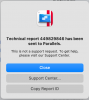
For us to further investigate this issue, while reproducing the issue and collect a technical report (right-click Parallels icon in Dock > Help > Send technical data > check "Attach screenshots..." > press Send Report) and provide us with the report's 9-digit ID in reply to this post.
Thank you.
I have an Imac 15.1. I am running parallels pro 19.2.1 with Windows 11. I used open core-patcher to install Sonoma 14.3. My windows screens are coming up blank in the VM. If I disable the video card on the VM side I am able to see all screens correctly, but now defaults where I can not go into coherence anymore.
-Is there a work around? or is it that the Open core patched the video on the imac side to be able to upgrade to Sonoma now the parallel patch wont recognize it?
-Is there a work around? or is it that the Open core patched the video on the imac side to be able to upgrade to Sonoma now the parallel patch wont recognize it?
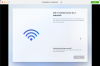
My report number is 449829846 - These are screenshots of my installation process trying to install Windows 11 Pro via Parallels on a Mac Studio M1 running Sonoma. Every time the installation stalls at the window "Lets Connect you to the Network"Hello,
For us to further investigate this issue, while reproducing the issue and collect a technical report (right-click Parallels icon in Dock > Help > Send technical data > check "Attach screenshots..." > press Send Report) and provide us with the report's 9-digit ID in reply to this post.
Thank you.