

MHWill
Bit poster
Hello. I recently upgraded from Parallels Desktop 18 to v19, running on a Mac Studio with an Apple M1 Max chip. While still on v18, I had previously installed Windows 11 and macOS 13 Ventura. Once on v19, I installed a new instance of macOS 14 Sonoma (not upgrading/overwriting over macOS 13).
My macOS 14 VM has no ethernet internet connectivity (DHCP with an IP of 169.254.143.151).
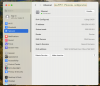
However my macOS 13 VM connects just fine (DHCP with an IP of 192.168.64.26).
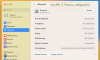
I have tried manually configuring macOS 14 using the same router, subnet and DNS addresses that work on macOS 13, but to no avail. (I can connect to my host Mac, naturally.)
Any ideas?
My macOS 14 VM has no ethernet internet connectivity (DHCP with an IP of 169.254.143.151).
However my macOS 13 VM connects just fine (DHCP with an IP of 192.168.64.26).
I have tried manually configuring macOS 14 using the same router, subnet and DNS addresses that work on macOS 13, but to no avail. (I can connect to my host Mac, naturally.)
Any ideas?