
Install the app
How to install the app on iOS
Follow along with the video below to see how to install our site as a web app on your home screen.
Note: This feature may not be available in some browsers.
You are using an out of date browser. It may not display this or other websites correctly.
You should upgrade or use an alternative browser.
You should upgrade or use an alternative browser.
Good evening, the immediate solution was to install the x86 version. And installing these packages https://docs.microsoft.com/en-US/cpp/windows/latest-supported-vc-redist?view=msvc-170.
After installation I open the ODBC connector using Win+R and typing: %systemdrive%\Windows\SysWoW64\odbcad32.exe
After installation I open the ODBC connector using Win+R and typing: %systemdrive%\Windows\SysWoW64\odbcad32.exe
AlejandroC13
Bit poster
Good evening, the immediate solution was to install the x86 version. And installing these packages https://docs.microsoft.com/en-US/cpp/windows/latest-supported-vc-redist?view=msvc-170.
After installation I open the ODBC connector using Win+R and typing: %systemdrive%\Windows\SysWoW64\odbcad32.exe
Hi,
This is not working for me.
I download and install https://docs.microsoft.com/en-US/cpp/windows/latest-supported-vc-redist?view=msvc-170.
Then I download and install https://dev.mysql.com/downloads/connector/odbc/
When I install odbc mysql-connector-odbc-8.0.29-winx64 I get an error 1928
Any sugguestions?
Working on Windows11
M1 chip
JohannesS8
Bit poster
Hi,
This is not working for me.
I download and install https://docs.microsoft.com/en-US/cpp/windows/latest-supported-vc-redist?view=msvc-170.
Then I download and install https://dev.mysql.com/downloads/connector/odbc/
When I install odbc mysql-connector-odbc-8.0.29-winx64 I get an error 1928
Any sugguestions?
Working on Windows11
M1 chip
Same setup, same problem. Does anyone have a solution yet?
I installed the 32-bit connector as per Amanda1. It did work and I was able to create a 32-bit DSN. However, Excel DSN connector wouldn't work due to a 64-bit / 32-bit mismatch.
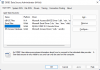
After some more trial and error, I got the 64-bit driver working, but didn't know what exactly worked. ODBC Data Source Administrator was showing a 32/64-bit driver.
What worked for me after starting from scratch was installing:
After some more trial and error, I got the 64-bit driver working, but didn't know what exactly worked. ODBC Data Source Administrator was showing a 32/64-bit driver.
What worked for me after starting from scratch was installing:
- Microsoft Visual C++ 2015-2022 Redistributable (x64) - 14.32.31332
- mysql-connector-odbc-8.0.30-winx64.msi (when errors pop up, click the ignore button and complete the install)
Attachments
ChristopherM22
Bit poster
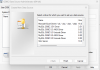
Hi there all. This problem is really pissing me off. No amount of trying to install the X64 version fails every time with error 1928. I can install the 32bit version and get it to show in the ODBC data sources using %systemdrive%\Windows\SysWoW64\odbcad32.exe but it will not actually connect to the database i'm trying to access through visual studio. I can see that RandallQ has it installed as an ODBC data source but is this running under arm or intel. I can get the intel version working easily on parallels but no luck with the M1.
I'm running on a Mac Studio M1 Max.I can see that RandallQ has it installed as an ODBC data source but is this running under arm or intel. I can get the intel version working easily on parallels but no luck with the M1.
AlejandroC13
Bit poster
RichardH43
Bit poster
I too have the same problem. Error 193 happens on the installation of the MySQL x64 ODBC Driver installation (ignored) and also when attempting to add the driver with the 64 bit ODBC Administrator. I Searched for what the Error 193 means which indicates a mismatch between 32bit and 64bit. I have the 64bit C++ Redistributable installed. The driver does not show up in the Add list of drivers using the 32bit ODBC Administrator. Another suggestion I read was to run the msi installer as administrator. Done that, didn't work. Nothing I have tried will work to get a 64bit ODBC driver working. I have successfully installed a 32bit driver but that does not work for PowerBI which requires a 64bit driver. I even got a trial version of a commercial ODBC driver that claimed it would work but still get this error and no successful 64bit ODBC driver.
What does one have to do to get a 64bit ODBC driver installed under Parallels?
What does one have to do to get a 64bit ODBC driver installed under Parallels?
I too have the same problem. Error 193 happens on the installation of the MySQL x64 ODBC Driver installation (ignored) and also when attempting to add the driver with the 64 bit ODBC Administrator. I Searched for what the Error 193 means which indicates a mismatch between 32bit and 64bit. I have the 64bit C++ Redistributable installed. The driver does not show up in the Add list of drivers using the 32bit ODBC Administrator. Another suggestion I read was to run the msi installer as administrator. Done that, didn't work. Nothing I have tried will work to get a 64bit ODBC driver working. I have successfully installed a 32bit driver but that does not work for PowerBI which requires a 64bit driver. I even got a trial version of a commercial ODBC driver that claimed it would work but still get this error and no successful 64bit ODBC driver.
What does one have to do to get a 64bit ODBC driver installed under Parallels?
Guys... I got this working on my M1 Max Macbook Pro running the latest Ventura 13 and latest Parallels version.
1. Download the x86 Visual C++ https://learn.microsoft.com/en-us/cpp/windows/latest-supported-vc-redist?view=msvc-170
2. Download Windows (x86, 64-bit), MSI Installer drivers https://dev.mysql.com/downloads/connector/odbc/
It'll install without error 193. You won't get any errors at all. From there just open up ODBC and setup your connection as you typically would.
Cheers.
RichardH43
Bit poster
Guys... I got this working on my M1 Max Macbook Pro running the latest Ventura 13 and latest Parallels version.
1. Download the x86 Visual C++ https://learn.microsoft.com/en-us/cpp/windows/latest-supported-vc-redist?view=msvc-170
2. Download Windows (x86, 64-bit), MSI Installer drivers https://dev.mysql.com/downloads/connector/odbc/
It'll install without error 193. You won't get any errors at all. From there just open up ODBC and setup your connection as you typically would.
Cheers.
I had both x86 and x64 latest vcr installed. When installing the (x86, 64-bit) MySQL ODBC connector, I get the 193 error twice, pressed ignore twice but it did continue to finish. When installing the driver with ODBC Admin got the error 193, no driver available for a DSN. I removed the x64 vcr and tried again. Got an error that vcr x64 is required, driver not installed. Installed x64 vcr and removed vcr x86. Again, when installing the latest version of MySQL ODBC driver, got the 193 error twice on install but ignore allowed it to continue. Tried to install the driver with ODBC 64 Admin but got the error 193. Still no success with 64 bit driver. I have yet to install Ventura. I will try that next.
RichardH43
Bit poster
Updated to Ventura 13.0.1 and tried again. Still the same. No joy.
There is no way you were able to install 64-bit MySQL Connector with x86 Visual C++ Redist...Guys... I got this working on my M1 Max Macbook Pro running the latest Ventura 13 and latest Parallels version.
1. Download the x86 Visual C++ https://learn.microsoft.com/en-us/cpp/windows/latest-supported-vc-redist?view=msvc-170
2. Download Windows (x86, 64-bit), MSI Installer drivers https://dev.mysql.com/downloads/connector/odbc/
It'll install without error 193. You won't get any errors at all. From there just open up ODBC and setup your connection as you typically would.
Cheers.