Mavericks DP6 breaks USB

I called, and there is a fix

I mean the Windows 8 and Windows 8.1 VM's have the constant Windows "chime" sound of USB devices connecting and disconnecting. This also makes the VM's response time about 90% slower than normal.

I see the USB device icon in the notification area appearing and disappearing constantly with no USB devices attached to the VM at all. I do not see this in my Windows 7 x86 VM...

Turn off the VM. edit configuration/hardware/boot order, and add this under flags:
devices.usb.ehc=0
 
James,

Ok...I added the config string...and this does stop the constant USB connect/disconnect, endless USB "chimes", etc.

However, now when I attach a USB device...like a simple thumb-drive...it takes it from the mac side...as expected...and it shows under Devices-External...but does not attach to Windows 8. It indicates "the device cannot start" in the Devices and Printers Panel.

This is exactly the scenario I saw when Mavericks DP6 was installed under Parallels 8. The device appears to be seen by Paralleles but not the guest OS.

Any other ideas?

Thanks...
 
Last edited:
I am using 10.8, not maverick. Use their online chat, and they can take over your computer. Except that the logmein package was corrupt.
 
my rainbow usb works again on parallels 9 + dp6.

but they brought their super fast mouse problem they introduced with their last 8 update.

no choice but back to fusion for me.
 
It works, but sometimes it is a bit odd - if i assign a new usb device to my VM directly via the pop up dialogue, it is registered as USB-device under the menu "Devices - USB", but I sometimes can't see it in the explorer - however if I deselect it under "Devices - USB" it then shows up in the Explorer. Strange behavior but consistent and I get my USB-devices to connect. Just give it a try. I tested it with a USB Stick and HD.

Is device a Camcorder, or some other device with a camera attached? If so, you can correct this odd behavior by choosing VIRTUAL MACHINES>CONFIGURE>USB&BLUETOOTH, uncheck the Automatic Sharing:WEBCAMERAS

In my virtual machine, I need it to NOT show up as a network device. I assume most people's cases, it does not matter, but in my case it does.
 
Just an update...I reloaded my system with 10.8.4...then installed Parallels V9...and the USB issue is there as well on all Windows 8/8.1 VM's, so this is not only a Mavericks issue. I even did a fresh VM build of Windows 8 and the problem is there.

I see this same issue now in many other support threads...and the Parallels support team has acknowledged it and say they need to get fixes out for V9 ASAP. I would highly advise folks to be very cautious installing this on any production system. How this blatant of an error was not caught in QA in beyond me.
 
How this blatant of an error was not caught in QA in beyond me.

Well, they could have been a week ahead in fixing this if they had responded to this thread ...

I tried to post a bug report, but their system kept redirecting me to a useless FAQ about Mavericks instead of allowing me to file a report. I wonder how much other feedback they missed ...
 
Parallels Team,
Please fix this ASAP. I suffer a lot on this bug. I need my NTFS USB disk working as it should be. I don't want to use Mac hidden NTFS write support nor 3rd party driver.
 
Just an update...

USB functionality remains broken in Parallels v8 on 10.9 DP7 & Parallels v9 on 10.9 DP7.

Tomorrow is the general release of v9? Man...there will be lots of unhappy campers...
 
Last edited:
I'm one of the 2560+ views on this thread, and thought I'd finally post. I'm still seeing this problem in 10.9DP7 with PD8, and I depend on USB functionality in Parallels for some key tasks at my job. Things are going to get urgent eventually, so I'll keep checking the forums here for a fix.
 
I feel your pain. v9 USB functionality does not work on 10.8.4 either.

So...tomorrow...if they make v9 generally available without a patch...the "stuff will hit the fan" for sure...

According to other support threads...there is a race condition created for USB 2 devices in v9...I would hope a patch is very close by now.
 
Yes...i added the disable USB 2 flag...which does stop the constant connect and disconnect Windows "chimes"...however, with this flag, none of my USB devices successfully connect to my VM's. I tried USB flash drives, standard USB external drives...none of them are available to the VM.

So...this is not a workaround for me, at least.
 
Did you add the boot flag to the VM?

devices.usb.ehc=0

Fixed the problem for my hardware ...
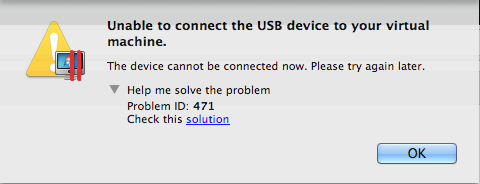
I tried this, and I'm still getting the same error.

pd8_usbbug.png


Thanks though! I'll keep an eye on how things develop.
 
Well...Before installing new versions of Parallels tools etc., to any VM I ALWAYS backup my VM's using a marvelous tool called QRecall. I also use Carbon Copy Cloner to make an image of my system partition before upgrading to Parallels v9.

So...my recovery was actually easy...I simply restored my system partition from the image created by Carbon Copy...and then restored all my VM's from the QRecall archive. This completely removes any components involved with both the Host and Guest upgrades 100%.

This is just standard procedure for me since I learned the hard way in years past to be very cautious of these new versions.
 
The new version has solved all USB issues for me!!!! It works great on 10.9 DP7.

The new build number is 9.0.23046...with a September 4, 2013 update date.
 
Back
Top