Mac M3 Max, Tahoe 26.1, Parallels 26 Install Stuck in 'Starting..' icon

AndrewT45

Bit poster
Been struggling to download and get parallels going on my mac and it keeps getting stuck, I have tried giving it 30min, but it still is stuck in the same starting icon. PC stats in title, no software on mac shows no updates.
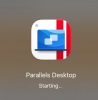
upload_2025-12-9_13-17-0.png
Steps I take:
  1. download the Parallels Desktop 26 dmg file
  2. open the dmg
  3. enter computer password as prompted
  4. see the "Parallels Desktop" icon with "Starting.."
  5. never gets further
 
Turns out the issue was my internet service provider. During the initial boot phase the parallels desktops needs to ping some server for auth, and my ISP what having a problem with specific IP ranges I guess (as it was working normally otherwise / I have had this problem before with them). I would suggest running a quick hotspot for this to test if its your ISP being dumb. Spent hours trying to figure that out before finally trying that.
 
Back
Top