
Hi,
I need to create a development environment inside my M1 chip Mac.
I'm running Sequoia 15.3.2 so I thought creating a Sequoia 15.3.2 VM would have been the easiest solution.
Well, I was wrong.
First of all, there are no ISO/DMG ready to be used (problem of Apple I know). I followed several guides but no success really.
I read your guide but it is outdated and/or doesn't provide the right steps to me.
Let's go through it.
But this one has become a serious nightmare and I'm wasting too much time on it, while I should spend my time on development not on the environment setup.
Sorry for my "rant" but I feel VERY frustrated. Is anybody else in my situation or has anybody worked it out somehow?
Thanks guys
P.S.: the question mark of "Create New" UI

redirects to a dead link
I need to create a development environment inside my M1 chip Mac.
I'm running Sequoia 15.3.2 so I thought creating a Sequoia 15.3.2 VM would have been the easiest solution.
Well, I was wrong.
First of all, there are no ISO/DMG ready to be used (problem of Apple I know). I followed several guides but no success really.
I read your guide but it is outdated and/or doesn't provide the right steps to me.
Let's go through it.
- Solution 1: Automatic installation
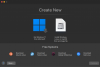
This is the new UI and there is no chance to "Download Mac OS"
- Alternative way of installation
I downloaded the Sequoia 15.3.2 ipse file. I selected Parallels Desktop as primary App to open it, as mentioned in the guide, and this is the error

- Advanced Installation
When I try to create the VM using prlctl command, terminal can't find that command:

I am using the last version of Parallels Desktop I guess (about shows Version 1.10.2 (23897))
But this one has become a serious nightmare and I'm wasting too much time on it, while I should spend my time on development not on the environment setup.
Sorry for my "rant" but I feel VERY frustrated. Is anybody else in my situation or has anybody worked it out somehow?
Thanks guys
P.S.: the question mark of "Create New" UI
redirects to a dead link
