
I have several virtual machines on my MacOS host, and I have 2 displays. Some virtual machines always start on display 1, some always start on display 2. I don't know why. It also seems this setting is not changeable anywhere. I would like to configure my VMs to always start only on display 2.
There is this KB article supposedly explaining how to do it:
https://kb.parallels.com/123234
The problem is that it is outdated and does not work. The ability to configure VM to start in fullscreen or window etc works just fine. Never had a problem with that. But there is no way to select a startup display. The KB says:
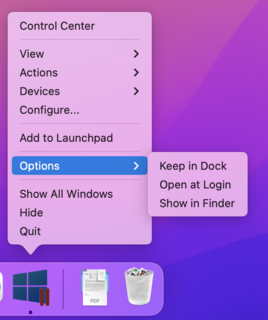
Does anyone have any tips on how to choose a startup display for a particular VM?
There is this KB article supposedly explaining how to do it:
https://kb.parallels.com/123234
The problem is that it is outdated and does not work. The ability to configure VM to start in fullscreen or window etc works just fine. Never had a problem with that. But there is no way to select a startup display. The KB says:
There is simply no such option "Desktop on Display 2". I have reported the KB multiple times as inaccurate and unhelpful, but no one seems to care. This is what right-clicking on a VM icon in dock looks like:Right-click on Parallels Desktop icon in Dock > Options > Desktop on Display 2.
Does anyone have any tips on how to choose a startup display for a particular VM?