ping - does anyone have an answer? How do I use the Recycle Bin with files I access from Windows on my Mac driver?
Greetings,
Thank you for your feedback.
Due to the new implementation of symbolic links, deleting a file from your Windows VM will exhibit different behaviors depending on the location of the file being deleted.
If you delete a Mac file or folder from within Windows, you'll see a Windows notification informing you that the file will be permanently deleted. Please be careful when deleting files since they can't be restored then.
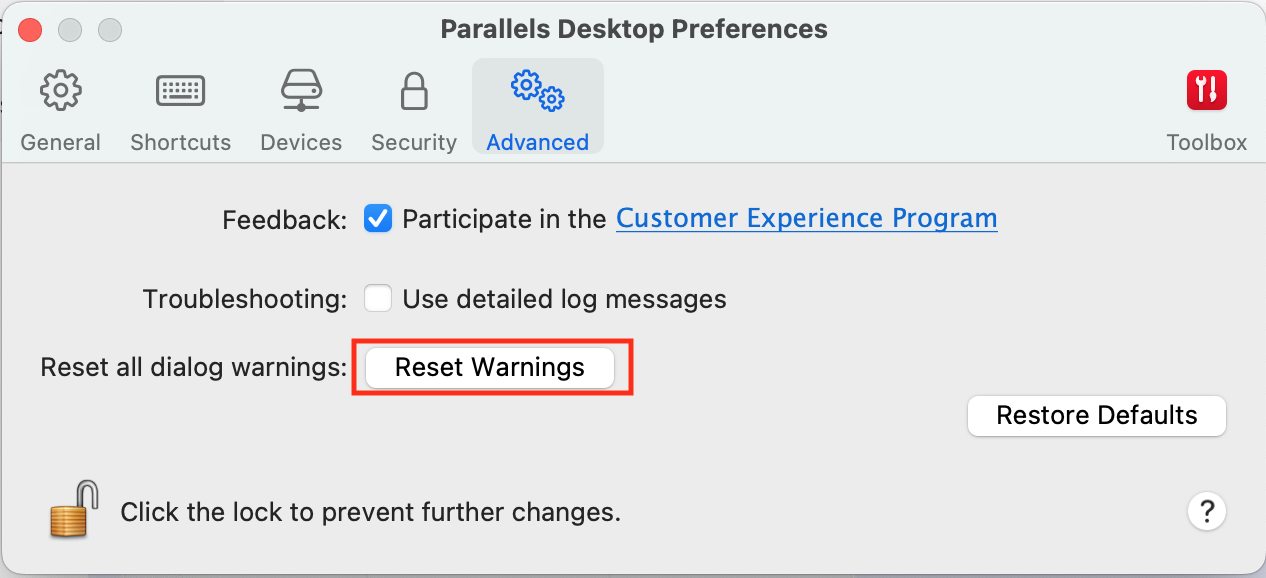
Note: If you do not receive a Parallels Desktop warning when deleting files from Shared profile folders or Shared folders, perform the following steps to reset Parallels Desktop warning dialogs.
1. Right-click the Parallels Desktop icon (on your dock) > Preferences
2. Switch to the Advanced Tab.
3. Click on Reset Warnings.
4. A dialog informing you that "Hidden messages have been restored" is displayed.
5. Click on OK to close the dialog box.
For more information regarding different deletion scenarios, please check the article
https://kb.parallels.com/en/130138