
In coherence mode, when I enlarge a parallels application, it won't stretch past the dock. If I exit coherence and switch to full screen mode, all applications will fill the screen and the dock will hide and show itself only as you run the mouse past the bottom of the screen. Just curious if there's a way for me to fully enlarge application windows in coherence to fit my full display and the dock collapse (hide & show) as it would with any of my Mac applications. I prefer working in individual applications rather than switching between desktop views.
I am currently running Parallels Desktop 13 for Mac Home Edition on my 2016 15" MacBook Pro.
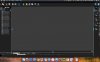
I'll attach a photo of an application fully enlarged in coherence mode. Note that it won't stretch to the bottom of the screen and collapse the dock as it would in the Desktop/fullscreen mode or as a regular Mac application would.
I am currently running Parallels Desktop 13 for Mac Home Edition on my 2016 15" MacBook Pro.
I'll attach a photo of an application fully enlarged in coherence mode. Note that it won't stretch to the bottom of the screen and collapse the dock as it would in the Desktop/fullscreen mode or as a regular Mac application would.
Attachments
Last edited:
