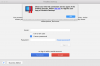
"Check your internet connection" during parallel desktop activation

Hi, we had a minor technical glitch which has been resolved now. Please try to register now and let us know if you are experiencing any issues.

Thank you! Everything seems to be up and running normally this morning! I appreciate the update and getting the issue resolved expeditiously! I did still have to sign in on that same splash screen, but this time I was then taken to my Windows startup screen!!!!

Thanks again!!!
 
Thank you! Everything seems to be up and running normally this morning! I appreciate the update and getting the issue resolved expeditiously! I did still have to sign in on that same splash screen, but this time I was then taken to my Windows startup screen!!!!

Thanks again!!!
Hi @MichaelS61, glad to know that you were able to access it now. Please post again for any additional queries.
 
I'm getting the same thing. I tried uninstalling completely and reinstalling twice. I've tried using different windows disks. It just refuses to work. I also tried all tricks in forum that I could find. Help please!
I can't log in too! I bought it yesterday.
 
I have and I still cannot login to activate my license. I am dead in the water.
Parallels Desktop 15 for Mac Pro Edition
Check your Parallels account, your Parallels Desktop 15 subscription has been activated. Please let us know do you still have the same issue?
 
Check your Parallels account, your Parallels Desktop 15 subscription has been activated. Please let us know do you still have the same issue?
The SOCKS proxy was reenabled when a software update dropped during this process. But it was also being reenabled each time I rebooted. Somewhere along the line it stopped doing that and I was able to activate my license.
 
I have been using Parallels Desktop on my Mac since 2013, and yesterday, after the latest update, I am getting exact same issue with "Check your Internet Connection" and I can no longer get to my Windows 10. I did a chat last night on lottery sambad with someone from Parallels, and they stated that they were aware of the issue, and that there is no ETA for a fix. I need access to my Windows 10 on my mac, I am a school teacher, and I need files that I can only get while in Windows. Does anyone have a fix for this, or is there anyway to roll back to the previous version??
Facing the issue but resolved after few sec.. Hopefully your problem also resolved in the next few sec/mintues. Stay Blessed
 
I am unable to login yo my account for activation after installing parallel desktop.
The same message of "check your internet connection" keep showing up.
My internet connection is normal.
Firewall is turned off.
I have tried the command in terminal.
Refund please!!
 
I am using Parallel since 2014 and i am getting this error from some days how acn i fix this issue, my desktop machine is i5.
I need access to my Windows 10 on my mac, I am a school teacher, and I need files that I can only get while in Windows. Does anyone have a fix for this, or is there anyway to roll back to the previous version??
 
Last edited by a moderator:
I just purchased this today and this problem is kolkataff happening over and over. Please help. Thanks
 
Last edited by a moderator:
Hello! I Urgently need access to my windows, but parallels keeps showing the error "Check your internet connection and try again". I tried everything enlisted in the knowledge base, firewalls and proxies are off, port is open, etc. I have parallels 11. Renewed the subscription today
 
Back
Top