Can't Reserve Win10 - Parallels Display Driver Critical Issue

The instructions in the link posted above by Marat worked for me.
I first uninstalled update KB3035583 though as it seemed to be stuck so that the last check whether my PC is suitable for Windows 10 was last month and I could see no way of re-checking. I then re-installed KB3035583 before following these instructions in the link:

Instructions to run the tool:

1. Go to https://www.dropbox.com/s/0u0au9xgy6ss18p/win10fix_full.zip?dl=0 and download the file.
2. Copy the win10fix_full.bat file to anywhere else like desktop.
3. Right click the file and click run as administrator.
4. Follow the screen instruction untill to come to main menu screen.
5. On main menu screen do step 1 first and check if you go the updates insalled and and then press any key it will take you back to main menu.
6. Now do step 2 which only takes like 1 second and should have the icon in the task bar.

The little Windows 10 icon appeared in the task bar and right clicking it gave me the option of reserving Windows 10. Clicking this opened a box requesting my email address and after submitting this I now appear to have successfully reserved my copy. This time I encountered no problems suggesting incompatibility with the Parallels graphics driver.
 
I assume this "fix" is for those who don't see the Window 10 Upgrade icon in the System Tray? But would have no effect if I see the upgrade icon but see the message that the Parallels virtual video driver is not compatible.
 
Swandy, I assumed the same but I could see the upgrade icon in the system tray too. I did exactly as I posted above (uninstalled and then reinstalled KB3035583, then ran the tool in the link) and the option to reserve my upgrade appeared. I was surprised I must admit but I don't know whether this will work for others.
 
Swandy, I assumed the same but I could see the upgrade icon in the system tray too. I did exactly as I posted above (uninstalled and then reinstalled KB3035583, then ran the tool in the link) and the option to reserve my upgrade appeared. I was surprised I must admit but I don't know whether this will work for others.
I was already able to "reserve" Windows 10 BUT when I go to check your computer (not sure if that is the exact wording, it shows up if you have the Windows 10 Reservation app open and click on the small icon in the upper left corner that looks like several bars), it still says that the Parallels video adapter is not compatible.
 
My issue was that the reported incompatible Parallels graphics driver prevented me from even progressing to the option to reserve Windows 10. At least I've been able to do that now, during the advance period when it is being offered free. If the graphics driver is actually still incompatible that's obviously a problem but hopefully Parallels will sort the issue out.
 
Well I did the suggested instructions above (downloaded and ran the BAT file for Windows 10). And even afterwards, when I checked it still says my computer (because of the Parallels adapter) is not compatible with Windows 10. So hopefully the guys behind Parallels will be able to resolve this issue before the July 29th release. (Would really rather not go back to using Bootcamp to run Windows.)
 
The instructions in the link posted above by Marat worked for me.
I first uninstalled update KB3035583 though as it seemed to be stuck so that the last check whether my PC is suitable for Windows 10 was last month and I could see no way of re-checking. I then re-installed KB3035583 before following these instructions in the link:

Instructions to run the tool:

1. Go to https://www.dropbox.com/s/0u0au9xgy6ss18p/win10fix_full.zip?dl=0 and download the file.
2. Copy the win10fix_full.bat file to anywhere else like desktop.
3. Right click the file and click run as administrator.
4. Follow the screen instruction untill to come to main menu screen.
5. On main menu screen do step 1 first and check if you go the updates insalled and and then press any key it will take you back to main menu.
6. Now do step 2 which only takes like 1 second and should have the icon in the task bar.

The little Windows 10 icon appeared in the task bar and right clicking it gave me the option of reserving Windows 10. Clicking this opened a box requesting my email address and after submitting this I now appear to have successfully reserved my copy. This time I encountered no problems suggesting incompatibility with the Parallels graphics driver.

Well, I did all of the above, tried all three methods given in the .bat file, ran the .cmd file from the thread Marat
had linked to. Still, no joy in Mudville with no Get Windows 10 icon!!! Maybe I am not supposed to or even
should go to Windows 10 ?!?!?

Hopefully MS will have a full upgrade installer at some point. The whole "reserve" process just seems really
hokie to me in the first place. Does MS really think people are going to flock to Windows 10 so much that their
download servers would be flooded?
 
Well you know in general as well Windows in parallels looks so ugly as compared to the same Windows running on a sole Windows machine (not as virtual machine in a Macintosh). That is why probably the Microsoft guys are finding the Parallels Display driver to be incompatible with Windows 10. So if the parallels team can really improve the Parallels display driver and whatever else is required to make the Windows running as a virtual machine in a Macintosh look beautiful, that would be a really good idea. Also the Macintosh side looks so beautiful as compared to the Windows running in the same machine as a virtual machine using Parallels Desktop.
 
HI,I have the same issue and its show the mac does not have enough RAM
my report ID 68678783
 

Attachments

  • Screen Shot 2015-07-09 at 9.59.38 PM.png
    Screen Shot 2015-07-09 at 9.59.38 PM.png
    599.1 KB · Views: 23
Was any solution found on this issue? I am facing the same display won't work issue. I am afraid I am gonna lose the free upgrade like many others. Parallels team, please help!
 
I was not able to get the windows 10 upgrade button on my Windows 8.1. I tried the other solutions that I found on the 'net, batch files etc., and what worked for me to get the Windows upgrade button on the taskbar was to use regedit and to go into UpgradeExperienceIndicators and then the reduced key and there were two values there that were "Red". I changed them to "Green" and then used the task scheduler to run the tasks related to the Windows 10 upgrade app and I got the button on my taskbar. However, I still have the following problem. The app says:

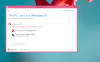
This PC can't run Windows 10
It doesn't meet the system requirements.

About your PC
Here's why Windows 10 can't be installed on this PC.
Parallels Display Adapter (WDDM)
The display manufacturer hasn't made your display compatible with Windows 10. Check with the manufacturer for support.

I filed a problem report with parallels.
 
Remarkable, i have the problem too as mentioned before and no solution from Parallels yet , while the big release date is only hours away from now.
 
Remarkable, i have the problem too as mentioned before and no solution from Parallels yet , while the big release date is only hours away from now.
You might want to try what I wrote above. I was able to reserve my copy of Windows 10. Who knows if it will install though.
 
I was not able to get the windows 10 upgrade button on my Windows 8.1. I tried the other solutions that I found on the 'net, batch files etc., and what worked for me to get the Windows upgrade button on the taskbar was to use regedit and to go into UpgradeExperienceIndicators and then the reduced key and there were two values there that were "Red". I changed them to "Green" and then used the task scheduler to run the tasks related to the Windows 10 upgrade app and I got the button on my taskbar. However, I still have the following problem. The app says:

This PC can't run Windows 10
It doesn't meet the system requirements.

About your PC
Here's why Windows 10 can't be installed on this PC.
Parallels Display Adapter (WDDM)
The display manufacturer hasn't made your display compatible with Windows 10. Check with the manufacturer for support.

I filed a problem report with parallels.
An update to the above:
I was able to reserve my copy of 10. The Windows 10 Update app is still saying the WDDM isn't compatible and Win10 can't be installed. Hopefully I can at least start downloading as soon as it's available.
 
Hello,
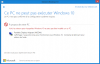
I've got the exact same problem with the win10 reservation.
I have the icon, but it says that Win10 cannot be installed.
Capture d'écran 2015-07-28 à 14.15.35.png

As Windows10 is about to be released tomorrow, It's very annoying to have this message saying it can't be installed because of a display driver/adaptater...
And no workaround works...

Parallels, please, do something, quickly !
 
Hello,
I've got the exact same problem with the win10 reservation.
I have the icon, but it says that Win10 cannot be installed.
View attachment 10056

As Windows10 is about to be released tomorrow, It's very annoying to have this message saying it can't be installed because of a display driver/adaptater...
And no workaround works...

Parallels, please, do something, quickly !
I suppose it is possible that this is something the Windows 10 Update app is saying but the Win10 installer might not choke on. Let's see if we really can't download and/or install. I believe people who have downloaded the Win10 preview have successfully installed it.
 
Back
Top