
Install the app
How to install the app on iOS
Follow along with the video below to see how to install our site as a web app on your home screen.
Note: This feature may not be available in some browsers.
You are using an out of date browser. It may not display this or other websites correctly.
You should upgrade or use an alternative browser.
You should upgrade or use an alternative browser.
Can't Reserve Win10 - Parallels Display Driver Critical Issue
- Thread starter MichaelS4
- Start date
Best answer

Guys, please check some info about the issue here.
Also I'd like to let you know that we're working on the resolution with our Development.
While we do not have ETA for the fix, it has been prioritized appropriately.
Also I'd like to let you know that we're working on the resolution with our Development.
While we do not have ETA for the fix, it has been prioritized appropriately.
kamahaffey1
Bit poster
An update. I was able to reserve Windows 10 on my Mac mini (Mid 2011) 2.5 GHz Core i5 running OSX Yosemite. However, the iMac continues to get the message stating there's a problem and incompatible with Parallels Display Adapter (WDDM) driver; thus, cannot reserve. Running the same versions of Yosemite and Parallels with over 8 GB on both macs. I'm also running Windows 7 with SP1 on both machines. Parallels, please help.
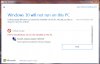
Further Update. I checked today and it's not reserved on the 2011 mac mini and it has the same message now that I had on the 2009 iMac stating that "Windows 10 will not run on this PC ... Here's Why Windows 10 can't be installed: Parallels Display Adapter (WDDM) (You'll experience problems with your display)."
Just an update as Parallels is hopefully working on a solution.
Brunetto_Ferrarese
Bit poster
Good morning,
simply to say that I have the same problem wit Windows 7 sp1.
Hope developer's team solve this issue before 29 july
Thanks in advance,
B.
simply to say that I have the same problem wit Windows 7 sp1.
Hope developer's team solve this issue before 29 july
Thanks in advance,
B.

Maria@Parallels
Problem solver
Brunetto_Ferrarese
Bit poster
I'll sent a report too
ID 66667050
Hope solution soon,
B.
ID 66667050
Hope solution soon,
B.
Hi All,
As of now we do not have any update for this issue, please refer http://kb.parallels.com/123053
This issue in under investigation, stay tuned our developers are looking in to this.
As of now we do not have any update for this issue, please refer http://kb.parallels.com/123053
This issue in under investigation, stay tuned our developers are looking in to this.
ChristopherR1
Bit poster
I found a workaround:
Just right-click on the Windows (Reservation) Logo on the right side of the taskbar and click on the "Reserve your Windows 10" option. It might be called slightly different. I am not using an english version here. But then you'll get the screen where you can enter your email and submit it to microsoft.
Just right-click on the Windows (Reservation) Logo on the right side of the taskbar and click on the "Reserve your Windows 10" option. It might be called slightly different. I am not using an english version here. But then you'll get the screen where you can enter your email and submit it to microsoft.
I was able - through the normal clicking on the icon - to give MS my email for notification. But I still get the message that the Parallel video driver is not compatible. So while you and me might have our emails registered, I don't think that that actually solves the issue.I found a workaround:
Just right-click on the Windows (Reservation) Logo on the right side of the taskbar and click on the "Reserve your Windows 10" option. It might be called slightly different. I am not using an english version here. But then you'll get the screen where you can enter your email and submit it to microsoft.
Maria@Parallels
Problem solver
The problem I have is that on two Windows8.1 VMs, I do not get any
"Windows 10 Update App" icon on either installation.
I have all available updates (including optionals) installed in Windows
as of today (7/4/2015). I am running the most recent Parallels build available
with Paralllels Tools installed.
So, I don't even get the chance to be told that Windows 10 won't work
(even though I have a preview version working just fine in a VM).
FWIW:
Machine 1 : Early 2011, 2.7 GHz, 13" Macbook Pro with 8GB memory, 256 GB SSD, Intel HD3000 graphics
Machine 2 : Late 2013, 3.2GHz, 27" iMac with 32 GB memory installed, NVIDIA GeForce GT 755M 1024 MB
Both machines now running OS X 10.10.4 (issue was there with 10.10.3 as well).
Perhaps with Windows 10 and OS X El Capitan around the corner (supposedly with significant
graphics interface improvements) the Parallels team is a bit overloaded.
Or perhaps, Microsoft either:
a) Doesn't want Windows 10 on VMs
or
b) Really wants to force people using VMs to purchase Windows 10.
"Windows 10 Update App" icon on either installation.
I have all available updates (including optionals) installed in Windows
as of today (7/4/2015). I am running the most recent Parallels build available
with Paralllels Tools installed.
So, I don't even get the chance to be told that Windows 10 won't work
(even though I have a preview version working just fine in a VM).
FWIW:
Machine 1 : Early 2011, 2.7 GHz, 13" Macbook Pro with 8GB memory, 256 GB SSD, Intel HD3000 graphics
Machine 2 : Late 2013, 3.2GHz, 27" iMac with 32 GB memory installed, NVIDIA GeForce GT 755M 1024 MB
Both machines now running OS X 10.10.4 (issue was there with 10.10.3 as well).
Perhaps with Windows 10 and OS X El Capitan around the corner (supposedly with significant
graphics interface improvements) the Parallels team is a bit overloaded.
Or perhaps, Microsoft either:
a) Doesn't want Windows 10 on VMs
or
b) Really wants to force people using VMs to purchase Windows 10.