
Install the app
How to install the app on iOS
Follow along with the video below to see how to install our site as a web app on your home screen.
Note: This feature may not be available in some browsers.
You are using an out of date browser. It may not display this or other websites correctly.
You should upgrade or use an alternative browser.
You should upgrade or use an alternative browser.
Can't connect to Internet on windows side using parallels!!!
- Thread starter ANON
- Start date

Elric
Parallels Team
Report id: 8503355
Hi, The version you are running (4.0.3522.205957) is too old, it was released many monthes before SnowLeopard. You definitely need to download and install the latest build of Parallels Desktop 4.0. The link for the latest build can be found here: http://kb.parallels.com/en/5802
ErikDumard
Bit poster
Hi Guys, I had the same problems and I already send the report.
Find the report ID: 10261135
Thanks for your help.
Find the report ID: 10261135
Thanks for your help.
ErikDumard
Bit poster
I want to buy it, but needs work before.
Hi Guys, I had the same problems and I already send the report.
Find the report ID: 10261135
Thanks for your help.
Hi Guys, I had the same problems and I already send the report.
Find the report ID: 10261135
Thanks for your help.
Elric
Parallels Team
Hi Guys, I had the same problems and I already send the report.
Find the report ID: 10261135
Thanks for your help.
Hi
sorry for the late reply, we had maintanence on the reports-server.
not all configuration information is visible, but I don't see any problem in networking in the report. If you want, we can schedule a remote session to your computer and look at directly.
Send me you email and acceptable timeframe for the session if you want via forum's private messages. My time is 10.00-18.00GMT
Elric
Parallels Team
Report ID: 10272050
Hi,
I've never seen anything like this before. Please try the following (steps are taken from Microsoft). If this doesn't help, we can do a session (see my message above).
Configure the connection to obtain an IP address automatically
a. Click "Start", input "NCPA.CPL" (without quotation marks) to Start Search bar and press "Enter".
b. Right-click the network connection and click "Properties".
If you are prompted for an administrator password or confirmation, type the password or provide confirmation.
c. Click to highlight "Internet Protocol Version 6 (TCP/IPv6)" and click "Properties".
d. Check "Obtain an IP address automatically" and "Obtain DNS server address automatically".
e. Click "OK".
f. Click to highlight "Internet Protocol Version 4 (TCP/IPv4)" and click "Properties".
g. Check "Obtain an IP address automatically" and "Obtain DNS server address automatically".
h. Click "OK".
i. Reboot the VM.
Mac OSX Lion, Windows 7 - Internet not working on Windows
Hi
Here is my report number 10766757.
IPv4 has internet. IPv6 isn't working.
The internet was working until I added an admin user account on Mac OSX and opened Parallels with it and booted the same Windows 7 drive and logged in as the same user (on Windows).
I've tried restarting, and tried accessing the internet from both Mac logins but no success.
I tried this walkthrough http://kb.parallels.com/en/8865 but the driver has no errors.
Thanks.
Jamie P
Hi
Here is my report number 10766757.
IPv4 has internet. IPv6 isn't working.
The internet was working until I added an admin user account on Mac OSX and opened Parallels with it and booted the same Windows 7 drive and logged in as the same user (on Windows).
I've tried restarting, and tried accessing the internet from both Mac logins but no success.
I tried this walkthrough http://kb.parallels.com/en/8865 but the driver has no errors.
Thanks.
Jamie P
Elric
Parallels Team
Hi
Here is my report number 10766757.
Hi, seems that you've met the common problem with bonjour-service (it happens on real windows machines also). Try this http://kb.parallels.com/en/112528
I tried clicking on your link, http://kb.parallels.com/en/112528, but it came up saying "You can't see internal articles". Can you post the instructions here?
Elric
Parallels Team
No Network in my VM - Default Gateway is 0.0.0.0
Article ID: 112528
Last Review: Oct, 14 2011
Symptoms
Default Gateway on my virtual machine equals 0.0.0.0. As a result, network does not work inside it.
Cause
This is a known incompatibility issue between Microsoft's Windows OS and old version of Bonjour service. This old version could came from for example Adobe CS3 (CS4 should have this problem solved), old version of iTunes or with another application
The Default Gateway may have been set to 0.0.0.0 on a Windows Vista-based or later OS running Apple’s Bonjour service
Resolution
To fix it, please disable Bonjour service in your virtual machine:
1. Go to Start > Run
2. Type Services.msc and hit Enter
3. Find a service with a strange name, e.g.
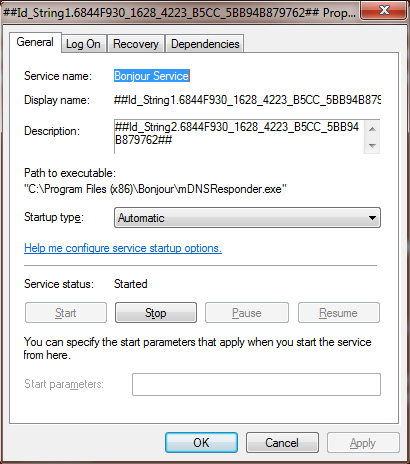
4. Stop the service and change its Startup type to Disabled.
5. Reboot your virtual machine.
Article ID: 112528
Last Review: Oct, 14 2011
Symptoms
Default Gateway on my virtual machine equals 0.0.0.0. As a result, network does not work inside it.
Cause
This is a known incompatibility issue between Microsoft's Windows OS and old version of Bonjour service. This old version could came from for example Adobe CS3 (CS4 should have this problem solved), old version of iTunes or with another application
The Default Gateway may have been set to 0.0.0.0 on a Windows Vista-based or later OS running Apple’s Bonjour service
Resolution
To fix it, please disable Bonjour service in your virtual machine:
1. Go to Start > Run
2. Type Services.msc and hit Enter
3. Find a service with a strange name, e.g.
4. Stop the service and change its Startup type to Disabled.
5. Reboot your virtual machine.
Elric
Parallels Team
I have been having similar issues connecting to the internet with IE8. I am running Parrallels 7, Windows 7 on an iMac with 10.6.8 with 4GB of RAM. Will the command line, Stacey proposed back in 2008, work for me or is there another solution?
likely ther will not.
please make sure that you are using Shared Networking. Then click Start -> Run and execute cmd.exe. Type in the appeared window command "ipconfig /all" (make sure that all output fits to the window). Then, without closing the window, click Parallels Destkop menu "Help"->"Report a Problem", send a problem report (it is not necessary to provide description) and post here the report ID.
likely ther will not.
please make sure that you are using Shared Networking. Then click Start -> Run and execute cmd.exe. Type in the appeared window command "ipconfig /all" (make sure that all output fits to the window). Then, without closing the window, click Parallels Destkop menu "Help"->"Report a Problem", send a problem report (it is not necessary to provide description) and post here the report ID.
I have gone in and clicked Shared Networking but now cannot boot the virtual machine. I keep getting an error message "There is no operating system installed on this virtual machine. ..." I was originally set up as a Bridged Network/Ethernet. Now when I go back to that setting I get the same error message. I am totally shut down on the virtual side.
Elric
Parallels Team
Hi, same problem here. Report ID: 16916573
Hi, it is strange. I don't see any issues in the report - all stats looks ok for me.
Please execute from cmd.exe the next three commands
ping 10.211.55.1
ping www.apple.com
ping 92.123.149.15
and post here results.
I need output of the commands
this is Mitchell and I typed the commands outlined above. Here are my results:
All three are 100% fails
REquest timed out. (4x)
Packets: Sent = 4, Received = 0, Lost = 4 (100%)
Hi, it is strange. I don't see any issues in the report - all stats looks ok for me.
Please execute from cmd.exe the next three commands
ping 10.211.55.1
ping www.apple.com
ping 92.123.149.15
and post here results.
Hi Elric, the new ID is 16926257. Still not connecting to Internet from VM
Hi again. I saw that Internet Explorer was saying "detecting proxy" so I went into Internet Properties and learned that Windows said I was already connected to the Internet, so I thought I could download Firefox and try with another browser. It worked. I don't know why Internet Explorer is not giving me access to browse, but at least I can now use the connection on the VM. If you happen to know how to solve the Internet Explorer issue, I will appreciate your help. There are still some pages that need to be used with IE (can you believe that? haha). Thanks.