quick_joey
Junior Member
Backgroud
While updating windows 10 to 1903 version I was asked to add some more space. After that I resized partition back inside windows so I had 14Gb of unused space. Then I've been trying to resize windows drive from 50Gb down to 36Gb to get those 14Gb in my mac. Instead parallels starts to inflate virtual disk until no space left on real drive on mac.
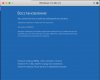
Windows was unable to boot from this drive from both EFI and plain BIOS. Says "No boot device available". Mounting this drive with parallels mount utility shows EFI boot folder and nothing else.
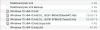
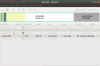
Now I have 80Gb virtual drive file with content shown on screenshot:
Steps I already tried

While updating windows 10 to 1903 version I was asked to add some more space. After that I resized partition back inside windows so I had 14Gb of unused space. Then I've been trying to resize windows drive from 50Gb down to 36Gb to get those 14Gb in my mac. Instead parallels starts to inflate virtual disk until no space left on real drive on mac.
Windows was unable to boot from this drive from both EFI and plain BIOS. Says "No boot device available". Mounting this drive with parallels mount utility shows EFI boot folder and nothing else.
Now I have 80Gb virtual drive file with content shown on screenshot:
Steps I already tried
- prl_disk_tool check --hdd /Users/dennis/vm/Windows\ 10\ x64-0.hdd - no errors
- prl_disk_tool merge --hdd /Users/dennis/vm/Windows\ 10\ x64-0.hdd - no errors - got 50Gb drive which looks just like there was no merge
- gparted from installed ubuntu with mounted corrupted virtual drive
- windows check disk from fresh installed windows
- ntfs toolkit
- macrium reflected show this structure
- disk internals ntfs recovery