
Install the app
How to install the app on iOS
Follow along with the video below to see how to install our site as a web app on your home screen.
Note: This feature may not be available in some browsers.
You are using an out of date browser. It may not display this or other websites correctly.
You should upgrade or use an alternative browser.
You should upgrade or use an alternative browser.
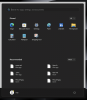
Border around the Windows Start menu in Coherence Mode
- Thread starter MaxP21
- Start date
RichardK26
Bit poster
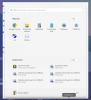
I have the same problem. In my case, sometimes it is just gray border, sometimes it is part of another app window (with text etc.) - see attached file. Anyone has any suggestions?
MacOS 15.7.2 (24G325), Parallels Pro Edition 26.1.1 (57288)
MacOS 15.7.2 (24G325), Parallels Pro Edition 26.1.1 (57288)
Attachments
I reached out to customer support -- they told me the issue is in the code and that they're going to check it further with the development team.I have the same problem. In my case, sometimes it is just gray border, sometimes it is part of another app window (with text etc.) - see attached file. Anyone has any suggestions?
MacOS 15.7.2 (24G325), Parallels Pro Edition 26.1.1 (57288)

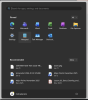
If you’re seeing a border around the Windows Start menu in Coherence Mode, it’s usually related to the app’s display or integration settings. Try switching Coherence Mode off and on, or check the display settings. If the issue continues, Koshish India also recommends checking for updates, as compatibility issues can sometimes cause these visual glitches.