Blackberry desktop software not working

Sorry to hear that bones. I spent three hours on the phone with Verizon and Blackberry Tech support...with no avail. Here is what was done:

We tested connecting the DM 4.2.2 to my Pearl with 100% success.

We put on a fresh copy of DM 4.2.2 (this assured we had no corrupt files and provided the drivers for the BB). We wiped the BB 8830 competely clean and were able to connect it to the Virtual Machine and the DM's application loader. When it connected it showed up in the USB controller simply as "blackberry" (vs. RIM Mass Stroage Device or RIM Composite Device which are the usual ones). We then used the App loader to reinstall the BB's software. We disconnected the device and tried to reconnect and the same problem returned.

What this boils down to:
Xenos, BB says the drivers are all the same for the devices so if the 8100 Pearl can connect the 8830 should too w/o a problem. This is somewhat confirmed by the fact that the Parallels and the DM were able to hook up the the device itself (when the device was in its simples "hardware" state and didn't have any of the application software on it).

Once the Blackberry's app software was loaded back up Parallels failed to connect. It went into the endless connect/disconnect loop.

VM Ware doesn't have this problem. All BB devices and Palm devices I've tired work no problem. I think Parallels is getting confused by the BB's multiple modes (mass storage, composite device, etc). This results in the loop. Why this doesn't happen when I connect the Pearl I don't know.

Any ideas?
 
Hello all,

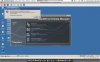
SD Macman, thank you for the screenshots and all the data provided. Bones, thank you for your report as well.

The issue you are describing could have been caused by improper updating to 5582.
Please try the full uninstall of Parallels Desktop, then reinstall it:

a. Go to Finder - Applications - Utilities - Terminal.

b. Type and run the following commands:

• sudo rm /System/Library/Extensions/vmmain.kext
• sudo rm /System/Library/Extensions/hypervisor.kext
• sudo rm /System/Library/Extensions/Pvsvnic.kext
• sudo rm /System/Library/Extensions/ConnectUSB.kext
• sudo rm /System/Library/Extensions/Pvsnet.kext
• sudo rm -rf /Library/Parallels/
• sudo rm ~/Library/Preferences/com.parallels.*

Before you run these commands, please make sure that your VM hdd and pvs files are NOT stored in ~/Library/Parallels.

c. Reboot your Mac and reinstall Parallels.

Best regards,
Xenos
 
Tried the advice here - still no Joy

Xenos,

Jut wanted to let you know - i did follow this procedure and it still does not work - i did have to use the -fr command to remove the .kext directories.

Here is what i did:

Uninstalled bb desktop 4.5
Uninstalled parallels 5582
Followed procedure listed above, but put -fr in after the rm for the .kext files/dirs
Rebooted
RE-installed parallels 5582
plugged in the phone (8830) with no bb desktop installed
At this point the windows did about the same thing in it seemed to retry to connect to the device - making that USB dinging sound over and over just like before.
I then installed bb 4.22 desktop.

It just still does the USB reset on the device - makes the dinging sound.

So i think i can comfortably say that doing this does not resolve the issue.

I do believe like Macman that the issue has something to do with these blackberries ability to switch between phone and storage mode. This is where the device seems to get into the loop.

Anyways - any help on this would be great. It really is a bummer - i mucked with it enough on the old build that it worked if i did it just so. But now i can't even get that working again. Help please!

One more thing to note - when i unplug the device i do get the parallels dialog box that pops up saying that it can not access a usb device because something else is using it. I stress that this only happens when i unplug the blackberry and at no other time.
 
Last edited:
Xenos

I too didn't have any success by doing the re-installation of Parallels. I did though want to comment that when I ran the terminal commands the files didn't get removed. What worked was using the uninstall program provided with the 5582 .dmg. I'm attaching the results from the terminal commands before and after running the uninstall program.


A side note: I tried removing the media card and turning media card support off in the Blackberry thinking this may get it to recognize it as RIM Composite Device instead of Mass Storage. It didn't make any difference what so ever. Lastly, the Pearl connects beautifully (with the mass storage not seeming to cause any issues) so why does the 8830 not work?
 

Attachments

One more interesting note on this issue

I have one more interesting note regarding this issue. It seems as if my copy/paste between the mac side and the windows side has gone away since i started troubleshooting this issue. I am unsure it is related and it use to be that a reboot of parallels and/or the mac would fix this up. But now (i haven't messed with it a bunch i must admit) i can't seem to copy/paste between the mac OS and the host OS no matter how much restarting i do. I guess some help here would be nice as well - but more importantly if this helps troubleshoot the blackberry sync issue i thought i would bring it up.

Here are the current versions on my mac and parallels
Mac OS 10.4.11 with all the software updates installed
Parallels 5582
 
Last edited:
Hello,

SD Macman and Bones, I am sorry to say that the model of Blackberry device you use have not been tested by our developers yet. However we have already ordered 8830 to test and make Parallels supporting it.

Copy-paste issue comes up after update to 5582 on Tiger. The build with the fix is coming soon.

Could you please send me the screenshots of the Terminal with the output of the commands you used to uninstall Parallels?

Best regards,
Xenos
 
Commands to uninstall

Xenos,

This is what i ran AFTER i ran the uninstaller that came with the .dmg file for 5882, i did this to just ensure the whole thing was gone.

sudo /Library/StartupItems/Parallels/Parallels stop
sudo rm -rf /System/Library/Extensions/vmmain.kext
sudo rm -rf /System/Library/Extensions/hypervisor.kext
sudo rm -rf /System/Library/Extensions/Pvsvnic.kext
sudo rm -rf /System/Library/Extensions/ConnectUSB.kext
sudo rm -rf /System/Library/Extensions/Pvsnet.kext
sudo rm -rf /Library/Parallels/
sudo rm ~/Library/Preferences/com.parallels.*
 
Thank you, Bones. I thought you could not remove Parallels Desktop by running these commands, so I wanted to see the output you got when running them. However I see now that you managed to make a complete uninstall.

Best regards,
Xenos
 
Blackberry - JVM connecting to the device

hi,
just to let you know that i have exactly the same issue:
my config:
MAC Leo with parallels desktop 5582.
WinXP Pro sp2 up to date.
DM 4.3 for blackberry pearl 8120 uk/O2
....what else can i say?

it doesn't work. remain jammed prior to sync. have checked the device manager in winxp pro and it is properly installed.

the error is: connecting to the device (jvm)

i have 2 BB pearls. 8100 and 8120....none of them works...
i have tried also DM 4.2 SP2 without media manager...same issue...
 
Last edited:
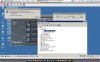
thought you might need these screens..
 

Attachments

  • Screenshot_MAC_Leo 1.jpg
    Screenshot_MAC_Leo 1.jpg
    18.1 KB · Views: 9
  • Screenshot_MAC_Leo 2.jpg
    Screenshot_MAC_Leo 2.jpg
    17.9 KB · Views: 5
  • Screenshot_MAC_Leo 3.jpg
    Screenshot_MAC_Leo 3.jpg
    22.9 KB · Views: 5
  • Screenshot_MAC_Leo 4.jpg
    Screenshot_MAC_Leo 4.jpg
    24.7 KB · Views: 3
  • Screenshot_MAC_Leo 5.jpg
    Screenshot_MAC_Leo 5.jpg
    21.5 KB · Views: 5
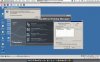
a few more screens...
it's driving me mad now....
 

Attachments

  • Screenshot_MAC_Leo 6.jpg
    Screenshot_MAC_Leo 6.jpg
    21.2 KB · Views: 3
  • Screenshot_MAC_Leo 7.jpg
    Screenshot_MAC_Leo 7.jpg
    20.8 KB · Views: 4
Last edited:
Hello Laurentio,

Thank you for the report. I have delivered it to QA team and they are testing the device. Will let you know as soon as they provide me with any information.

Best regards,
Xenos
 
Active desktop in parallel desktops

there is another issue that really bothers me.
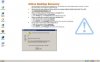
when i switch to windows from mac (after a full restart only) i get that "active desktop" error. please see the attached screen.

by the way, thank you for the good job you're doing here, even if it's slow, it is much appreciated!
regards,
 

Attachments

  • Screenshot_MAC_Leo 1.jpg
    Screenshot_MAC_Leo 1.jpg
    15.6 KB · Views: 8
Hello Laurentio,

We are checking the both devices.

Could you please send me the screenshot of the error message you get on the desktop when having Active Desktop Recovery? I would like to be able to read it. Thank you in advance.

Best regards,
Xenos
 
Laurentio, I've sent you an e-mail on the address you used to register here asking to provide me with two screenshots.

Could you also check if the Blackberry devices you are trying to use can sync in Mac, without Parallels Desktop?

Appreciate your feedback.

Best regards,
Xenos
 
hi Xenos,
i have never tried to sync in mac.
i use winxp as the main os as i have office 2007. i can try it if you want, that's not a problem i just that i need you to point me to the right link...
regards,
3 pics sent. (active desktop and usb)
 
Last edited:
Hello Laurentio,

Thanks a lot for the screenshots. I've sent you an answer - please check.

We just wanted to know if you can get your Blackberry devices synchronized when not using Parallels. Keep on investigating the issue...

Best regards,
Xenos
 
Same Problem with 10.5.1 and VZW 8830?

Greetings!

It sounds like I'm having a similar problem. Is there a solution / work around for this?

Here's my configuration:

MacBook w/ Leopard 10.5.1
XP Pro SP2 in Boot Camp partition
Parallels Desktop 3.0 (Build 5582)
Verizon Wireless BlackBerry 8830
BlackBerry Desktop Manager v4.2.2.12 (on the XP system)

When I boot directly in to XP via Boot Camp, I can attach my BlackBerry, sync, etc. But when I boot the Boot Camp partition using Parallels, it does not see the BlackBerry attached to the computer. Regardless of which USB cable, which USB port, etc.

I also get the "USB charging current is insufficient..." message when I plug the USB cable in to the phone while booted in to XP via Parallels, and the BlackBerry "attached" to Parallels Desktop.

Am I missing something here? VZW folks were scratching their heads. It sounds like it's a Parallels problem, because it works when booted directly in to XP via Boot Camp.

Any advice is appreciated!!
 
Hello Nlauriat,

The Verizon Wireless BlackBerry 8830 has not been tested by Parallels developers so we can not guarantee its normal connection via USB cable. However you can connect (and synchronize) BlackBerry to the Guest OS via Apple Bluetooth:

1. Insert the original Leopard DVD into the DVD drive of the Mac.
Connect the disk to the virtual machine by choosing the "Default CD/DVD"
drive under the "Devices - DVD rom" menu.

2. Hold down the Shift key in order to disable the autorun option and
stop the Boot Camp drivers automatic installation. If the Boot Camp
window appears, click on the "Cancel" button to cancel the installation.

3. Open My Computer, right click on the Boot Camp DVD disk, choose the
"Open" option, browse to the "Drivers-Apple" folder. Double click on the
BluetoothInstaller EXE file and let it install.

4. Go into the folder with Apple drivers again and double click on the
BluetoothEnabler driver EXE file and let it install.

5. Now go to the Parallels menu and check the selection for "Apple -
Wireless" which is for the Bluetooth (you will previously have to make
the Bluetooth device get synced to your Mac under Bluetooth -> System
Preferences). Once you select Apple Wireless under the USB choices,
you will see your Virtual Machine connecting to a Bluetooth device - it will
take a few minutes.

On this step when you click "Apple - Wireless" under the USB section you
can lose the connection to Apple Bluetooth mouse and keyboard, if you
are using them. In this case you will have to use the actual Mac
touchpad and keyboard. Later when you uncheck
"Apple - Wireless" from the USB (Parallels), you will get the Bluetooth
mouse/keyboard back.

6. Now you can find the Bluetooth icon in the Control Panel on the
Virtual Machine. Go in there and configure your Bluetooth device on the
Virtual Machine - add the device, enter passkey process -> now you have
bridge from Mac to the Virtual Machine via Bluetooth.

Best regards,
Xenos
 
Last edited:
Back
Top