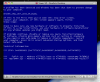
After upgrade Windows XP virtual machine fails to boot with BSOD

Unable to make changes in Virtual Machine

This is great but the configuration screen, while showing the number of CPU's and the memory, will not allow me to make any changes to any of the configuration options and that includes the Boot Sequence.
 
no change after cpu set to 1

is there any other tip that helps…

maybe the developer start to do something????

ive ben in the service chat fro paralles, this people there are verry low first level supporters they know how to use there database but did not know anything about paralels - they ask me to repair my windows partition (bootcamp) but i cant because my syystem is service pack 3 and my inst cd is servicepack 1 this does not work…
and on bootcamp windows runs perfect - no problems. SO the Problem is only Paralles.

So if any developer read this pleas do something
 
Markus,
please post some more details about your confituration here:
- exact Windows version with SP (guess it is XP)
- exact BSOD you get
Your case is different from the one in 6873 article; most probably you will have to submit support ticket.
 
details to my configuration

it is a windows XP Professionell (done all the updates) so it is SP3

deled the applemnt.sys bring no change

1 CPU ore 8 ore 2 does bring any effect

Bootcamp works fine, also VM and paralels 4

nothing special

my computer is the newest Macpro with 6gb ram and 10.6.1

i already submit a support ticket, i was in the service chat with someone he told me he will forward this to a higher support level because hi did not understand the problem. He ask me to reinstall my windows or do a repair of my windows (my windows cd is sp1 im already on sp3 with many updates....- so repair will not work)

aso send the problem from the paralles application itself

markus Bischoff:


one Ticket number is: 806039
 
BSOD also

I'm getting the BSOD after upgrading. tried the 1 cpu thing but no luck.
I'm running snow leopard on a macpro. guest OS: XP SP3. Get the DRIVER_IRQL_NOT_LESS_OR _EQUAL error.

Don't think it actually upgraded my virtual machine from 4. Bootcamp works fine if I boot into it natively.
thanks!
 

Attachments

  • Screen shot 2009-11-06 at 9.49.59 AM.png
    Screen shot 2009-11-06 at 9.49.59 AM.png
    71.2 KB · Views: 44
The guest is WinXP Pro SP3 32bit.

When I power the VM on and after several seconds of waiting I get bluescreen and the VM is forced to reboot. Next XP shows "start windows normally" option, but still the same error. I tried to recover the VM to the "clean" snapshot which is taken after the XP install, but after the reboot the XP still gives me the same bluescreen error again. If the xp copes to boot to the desktop it will crash a few seconds later!

Before this day, the XP VM worked fine, i don't know where this error came from?
 
same problem

I'm experiencing what looks like the same problem

I have a macbook pro and a mac pro: both run snow leopard (10.6.1); I have been using parallels desktop 4 with the windows XP of my BootCamp partition; I purchased two upgrades to paralells desktop 5; I installed one on the macbook pro and it worked fine: it initially told me that it couldn't find the VM, but then I restarted the macbook pro, tried again and it worked; I just tried to install 5 on my mac pro and it doesn't work; windows XP starts, then I get long an error message stating that windows had to be stopped and asking whether I want to restart normally or use last known configuration; in both cases, it tries to restart and I get the same error, over and over again; in short, it doesn't work; I started windows from within bootcamp and it works;

I contacted support and, as it happened with my last support problem, I started receiving unhelpful suggestions, such as reducing the number of processors to 1 (it was already the case), re-installing the VM, etc.; with my previous problem it took over a month before a qualified support person finally stepped in and solved the problem;
 
I also have the same problem as ReidB shown above (BSOD with the same modules). I've changed to 1 processor and deleted the floppy disk and I still get the same problem.

Win XP 32bit SP3 running from a bootcamp drive.

Are there any other suggestions than the KB article for using 1 processor which is not working for some people?
 
We just got several indications from customers in email support queue that the issue with Boot Camp BSOD is solved for them by upgrading to Snow Leopard 10.6.2. Please try this solution in case you are using Windows Boot Camp partition and still get BSOD even after applying 1CPU workaround described in KB.
 
here are more details on the error message I get (I'm also attaching a file with the error window):

the file that seems to be causing problem is called: MDPMGRNT.sys

and the technical information reads as follows:

*** STOP: 0x000000BE (0xF7409C5C, 0x0784B121, 0xF78AE4FC, 0x0000000B)
*** MDPMGRNT.sys - Address F74DACF2 base at F74D7000, Datestamp 4a12f82D

may a tech support person can make sense of this and find a solution
 

Attachments

more on the MDPMGRNT.sys file

following up on my previous message (not yet posted): it appears that the MDPMGRNT file is a MacDrive 7 (Mediafour) partition driver file; I took it out of C:\windows\System32\drivers but MacDrive reinstalls it immediately...

I started WindowsXP in safe mode and I can start the VM without problems...; if I restart windows normally I get the same error apparently caused by that MacDrive file that has reinstalled itself the drivers folder

the strange thing is that I also have MacDrive 7 on my macbook pro and I was able to upgrade successfully to Parallels Desktop 5 and everything works fine; I only have this problem on my Mac Pro desktop...
 
problem solved

OK, I de-installed MacDrive from the Windows XP Boot Camp partition and after doing so I was able to launch the Parallels Desktop 5 VM, install parallels tools etc.; so, everything seems now to be working fine ... except that I still don't understand why on my MacBook Pro I can have MacDrive and Parallels without any conflict (when I launch the VM I am told that MacDrive will not work in the VM environment, which makes sense, but MacDrive doesn't cause any conflict) , while on the Mac Pro I cannot do that because there seems to be a conflict
 
Hi,

I use the same configuration:

Modellname: Mac Pro
Modell-Identifizierung: MacPro4,1
Prozessortyp: Quad-Core Intel Xeon
Prozessorgeschwindigkeit: 2,93 GHz
Anzahl der Prozessoren: 1
Gesamtzahl der Kerne: 4
L2-Cache (pro Kern): 256 KB
L3-Cache: 8 MB
Speicher: 6 GB
Geschwindigkeit für Prozessorverbindungstyp: 4.8 GT/s
Boot-ROM-Version: MP41.0081.B04
SMC-Version (System): 1.39f5
SMC-Version (Prozessormodul): 1.39f5

Win XP professional 32bit SP3 running from a bootcamp drive (NTFS).

I was upgrading to 10.6.2 before installing Parallels.
(Installation file: ParallelsDesktop-parallels-de_DE-5-1.0.9220.531119.dmg).

After upgrading from Parallels 4.0 to 5.0: Same problem with the blue screen.

PARALLELS TEAM - PLEASE HELP!

Best regards,
Michael
 
This did not work for me. Within the virtual machine processors area, two processors are indicated and are grayed out so I cannot change. Seems like I get a slightly different message each time I unsuccessfully try to boot up my Windows XP Home version.
 
This did not work for me. Within the virtual machine processors area, two processors are indicated and are grayed out so I cannot change. Seems like I get a slightly different message each time I unsuccessfully try to boot up my Windows XP Home version.

You must first stop your VM before you can change the number of CPUs. The VM is running even after the OS fails to start unless you explicitly stop it. Once the VM is stopped, the number of CPUs will not be greyed out.
 
I couldn't change the configuration of CPU's, then went into the Console utility which showed a program crashing, one that I had uninstalled a few months ago "Littlesnitch". I searched for traces of Littlesnith which I found in one of the Libraries (can't remember which one) After deleting and restarting, I was able to change the CPU setting in Parallels to "1" and Windows XP booted without any problem.
 
Back
Top