
Install the app
How to install the app on iOS
Follow along with the video below to see how to install our site as a web app on your home screen.
Note: This feature may not be available in some browsers.
You are using an out of date browser. It may not display this or other websites correctly.
You should upgrade or use an alternative browser.
You should upgrade or use an alternative browser.
After upgrade Windows XP virtual machine fails to boot with BSOD
- Thread starter DaTa
- Start date
Same BSOD here.
Model Name: Mac Pro
Model Identifier: MacPro4,1
Processor Name: Quad-Core Intel Xeon
Processor Speed: 2.26 GHz
Number Of Processors: 2
Total Number Of Cores: 8
Error
*** STOP: 0x000000BE (0xF788fc34, 0x0A3D6121, 0XF78A251C, 0X0000000B)
*** NDIS.SYS - Address F788FC34 base at F786A000, DateStamp 48025d03
I hope this issue can be easily sorted out...
Model Name: Mac Pro
Model Identifier: MacPro4,1
Processor Name: Quad-Core Intel Xeon
Processor Speed: 2.26 GHz
Number Of Processors: 2
Total Number Of Cores: 8
Error
*** STOP: 0x000000BE (0xF788fc34, 0x0A3D6121, 0XF78A251C, 0X0000000B)
*** NDIS.SYS - Address F788FC34 base at F786A000, DateStamp 48025d03
I hope this issue can be easily sorted out...
Kirk Dickinson
Bit poster
I have tried all the things in this post, except I have yet to upgrade to 10.6.2 yet.
No joy. XP won't boot even in safe mode. One CPU, graphic acceleration turned off.
No joy. XP won't boot even in safe mode. One CPU, graphic acceleration turned off.
Same BSOD here:
Model Name: Mac Pro
Model Identifier: MacPro4,1
Processor Name: Quad-Core Intel Xeon
Processor Speed: 2.66 GHz
Number Of Processors: 1
Total Number Of Cores: 4
RAM: 6 GB
MacOS 10.6.2 German
Bootcamp Tools: 3.0
Windows XP SP3
DRIVER_IRQL_NOT_LESS_OR_EQUAL
Error
*** STOP: 0x000000D1 (0xF752FC5C, 0x000000FF, 0X0000001, 0XF7AB4629)
*** ftdisk.sys - Adress F752FC5C base at F752E000, DateStamp amp 3b7d8419
*** AppleMNT.sys - Address F7AB4629 base at F7AB4000, DateStamp 4a15a557
Model Name: Mac Pro
Model Identifier: MacPro4,1
Processor Name: Quad-Core Intel Xeon
Processor Speed: 2.66 GHz
Number Of Processors: 1
Total Number Of Cores: 4
RAM: 6 GB
MacOS 10.6.2 German
Bootcamp Tools: 3.0
Windows XP SP3
DRIVER_IRQL_NOT_LESS_OR_EQUAL
Error
*** STOP: 0x000000D1 (0xF752FC5C, 0x000000FF, 0X0000001, 0XF7AB4629)
*** ftdisk.sys - Adress F752FC5C base at F752E000, DateStamp amp 3b7d8419
*** AppleMNT.sys - Address F7AB4629 base at F7AB4000, DateStamp 4a15a557
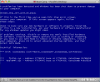
Getting same BSOD here on start up of Boot Camp installation with Parallels..
Attached screenshot
27" iMac Core i7 2.8 Ghz
8 GB RAM
I've gone in under Boot Camp and done all Windows updates, I've switched CPU's to one, and have even turned off the printer, network connection, and DVD in the configuration of parallels to try to avoid IRQ issues.. Still nothing, same exact problems..
ftdisk.sys
AppleMNT.sys
Any thoughts on this? Seems like a lot of people are having the same issue...
Attached screenshot
27" iMac Core i7 2.8 Ghz
8 GB RAM
I've gone in under Boot Camp and done all Windows updates, I've switched CPU's to one, and have even turned off the printer, network connection, and DVD in the configuration of parallels to try to avoid IRQ issues.. Still nothing, same exact problems..
ftdisk.sys
AppleMNT.sys
Any thoughts on this? Seems like a lot of people are having the same issue...
Attachments
no solution for MacPro Early 2009 and the newest iMacs?
Is it a problem with the new processors build at the MacPro Early in 2009 and the newest iMacs?
Maybe the settings at Parallels 5 to 1 processor cannot avoid that several cores will work and therefore a BSOD is generated?
In the meantime I already have received the 4-th message of the Technical Support, which is not concerned with the failing integration of boat camp but rather tell me basic tips.
I think that nobody knows a solution. So we have to hope for a new Parallels build.
Is it a problem with the new processors build at the MacPro Early in 2009 and the newest iMacs?
Maybe the settings at Parallels 5 to 1 processor cannot avoid that several cores will work and therefore a BSOD is generated?
In the meantime I already have received the 4-th message of the Technical Support, which is not concerned with the failing integration of boat camp but rather tell me basic tips.
I think that nobody knows a solution. So we have to hope for a new Parallels build.
here a screen movie
I have created a Screen-Movie about the start attempt. You can see at the beginning the hard disk symbol recognized (green bar). If the Windows-XP logo appears there is probably no more accesses (no green bar).
If I start Bootcamp at the native mode and the black failing start window disappears, I will got the same problems: After new start with Mac OS 10.6.2 and start of Parallels, the black failing start window stays disappeared, however, the BSOD and the endless loop was coming again.
Screen_movie
I have created a Screen-Movie about the start attempt. You can see at the beginning the hard disk symbol recognized (green bar). If the Windows-XP logo appears there is probably no more accesses (no green bar).
If I start Bootcamp at the native mode and the black failing start window disappears, I will got the same problems: After new start with Mac OS 10.6.2 and start of Parallels, the black failing start window stays disappeared, however, the BSOD and the endless loop was coming again.
Screen_movie
FranciscoP
Bit poster
I have the same issue with the blue screen. VM created in 3.0, upgraded to Snow Leopard so I was forced to upgrade to parallels 5. After the upgrade, windows starts to boot, and then goes to the blue screen and restarts. Tried changing to 1 processor, but it was already set to 1. Please help.

Why does one not want to understand me?
Below you can find the 7th reply to Parallel's Technical Support:
Hello,
No, my Bootcamp Partition is ok.
If I start native with Bootcamp, so it works fine.
If I start Bootcamp with Parallels 4 (before the upgrade to Parallels 5) it works fine as well.
I have said it here always again!
Your links below describe MS information of BSOD error, if Windows cannot start (but native it can start see my first lines).
Today I have deleted the Bootcamp partition and created a new at Mac OS 10.6.2.
Then I have installed via Bootcamp a fresh Windows XP SP 2. At this small windows installation I have only add to Bootcamp-Drivers and Parallels 5 drivers. Then I start Parallels 5 again.
What do you think has happened? Yes I have got the same BSOD as before!!!!
Certainly I had installed Parallels 5 again; I have physical disconnected all FireWire and USB devices. Only my monitor the mouse and the Keyboard stay connected. All without any success!!
I think I have hard worked, but this to do is not my job!! I think there is nothing more what I have not already tried out.
Do you work for a new build? When?
Below you can find the 7th reply to Parallel's Technical Support:
Hello,
No, my Bootcamp Partition is ok.
If I start native with Bootcamp, so it works fine.
If I start Bootcamp with Parallels 4 (before the upgrade to Parallels 5) it works fine as well.
I have said it here always again!
Your links below describe MS information of BSOD error, if Windows cannot start (but native it can start see my first lines).
Today I have deleted the Bootcamp partition and created a new at Mac OS 10.6.2.
Then I have installed via Bootcamp a fresh Windows XP SP 2. At this small windows installation I have only add to Bootcamp-Drivers and Parallels 5 drivers. Then I start Parallels 5 again.
What do you think has happened? Yes I have got the same BSOD as before!!!!
Certainly I had installed Parallels 5 again; I have physical disconnected all FireWire and USB devices. Only my monitor the mouse and the Keyboard stay connected. All without any success!!
I think I have hard worked, but this to do is not my job!! I think there is nothing more what I have not already tried out.
Do you work for a new build? When?
P5 crash during 1st VM config - same issue as others -any solution or did u give up?
Hi,
I have exaclty the same issues as you all:
Hardw: new iMac Quad 27'
latest 10.6.2 factory install
nothing connectede except USB KB and BT new mouse.
Installed XP Pro SP3 version 2002, and updated in standalone boot the latest patches from MS.
Standalone Bootcamp works fine
VM Fusion 3 install works fine
P5 does not install - but gives BSOD during VM config
Par 5 desktop install hangs during first time VM config in step 1/4 always at about 25-30% progress
Since VM Fusion 3 successful instal, reinstalled P5. Now it does not hang anymore, it give BSOD, like other person pasted in theis thread:
Driver_IRQL_NOT_LESS_OR_EQUAL
STOP:0x000000D1 (some hex address)
ftdisk.sys - address sone hex address
AppleMNT.sys - again hex address
I can't create ticket as this is a trial version. I do have P3 on other machine installed. I already checked - the VM config setup for Bootcamp client and for Win XP both were already set up for 1 CPU.
Did anyone get anyware here, or did you all give up and use VM Fusion 3 ?
kind regards
JVDW
Hi,
I have exaclty the same issues as you all:
Hardw: new iMac Quad 27'
latest 10.6.2 factory install
nothing connectede except USB KB and BT new mouse.
Installed XP Pro SP3 version 2002, and updated in standalone boot the latest patches from MS.
Standalone Bootcamp works fine
VM Fusion 3 install works fine
P5 does not install - but gives BSOD during VM config
Par 5 desktop install hangs during first time VM config in step 1/4 always at about 25-30% progress
Since VM Fusion 3 successful instal, reinstalled P5. Now it does not hang anymore, it give BSOD, like other person pasted in theis thread:
Driver_IRQL_NOT_LESS_OR_EQUAL
STOP:0x000000D1 (some hex address)
ftdisk.sys - address sone hex address
AppleMNT.sys - again hex address
I can't create ticket as this is a trial version. I do have P3 on other machine installed. I already checked - the VM config setup for Bootcamp client and for Win XP both were already set up for 1 CPU.
Did anyone get anyware here, or did you all give up and use VM Fusion 3 ?
kind regards
JVDW
Hello, yesterday I upgraded from Parallels 4 to 5, this morning I tried to open the Bootcamp partition with Windows XP and I had the same issue explained in this discussion (if I had read this discussion before I surely choose not to upgrade...)
My MacPro is an "early 2009" 2x2,6 Quad Core with Leopard.

Now I will try to uninstall Parallels 5 and install again version 4, waiting for a solution to this issue.
My MacPro is an "early 2009" 2x2,6 Quad Core with Leopard.
Now I will try to uninstall Parallels 5 and install again version 4, waiting for a solution to this issue.
When I first launched Parallels 5.x, it asked to "back up and convert" existing VM (named winxp.hdd) or just "convert". I selected "convert" since I had copied a version of the VM (winxp.hdd) to my back up drive. The conversion never completed (after an hour) and Parallels 5.x had to be Forced Quit. Now I cannot open my VM (winxp.hdd, about 33 GB file) in any version of Parallels.
I tried to migrate using Parallels Transport and I get a message "the virtual hard disk you specificed is a Parallels virtual hard disk. You needn't convert it to Par. format. Please specify another disk"
I can open Parallels Desktop 5.x app, but cannot open my winxp.hdd disk (about 33 GB). I tired the File/Open and File/Import commands in Parallels Desktop.
I even tried to reinstall my winxp.hdd backup from Time Capsule, but that file will not copy down.
How can I open and retrieve my files from my Winxp.hdd drive?
Product Version: 5.0
Computer Type: MacBook
Build Number: 9220
Amount of memory: 2-4GB
Host OS: Mac OS X 10.5.x Leopard
Host OS details:
Where did you buy our product?: From an online store
How many licences have you purchased?: 1-2
Guest OS: Windows XP Professional
Guest OS type: 32-bit
Number of CPUs in Virtual machine: 1
Amount of Guest OS memory:
Thanks,
Steve Tello
Ticket ID 829869
I tried to migrate using Parallels Transport and I get a message "the virtual hard disk you specificed is a Parallels virtual hard disk. You needn't convert it to Par. format. Please specify another disk"
I can open Parallels Desktop 5.x app, but cannot open my winxp.hdd disk (about 33 GB). I tired the File/Open and File/Import commands in Parallels Desktop.
I even tried to reinstall my winxp.hdd backup from Time Capsule, but that file will not copy down.
How can I open and retrieve my files from my Winxp.hdd drive?
Product Version: 5.0
Computer Type: MacBook
Build Number: 9220
Amount of memory: 2-4GB
Host OS: Mac OS X 10.5.x Leopard
Host OS details:
Where did you buy our product?: From an online store
How many licences have you purchased?: 1-2
Guest OS: Windows XP Professional
Guest OS type: 32-bit
Number of CPUs in Virtual machine: 1
Amount of Guest OS memory:
Thanks,
Steve Tello
Ticket ID 829869
Disabling P3.sys resolves BSOD
Disabling p3.sys using Windows Recovery console resolved my BSOD issue, when upgrading from 3.0 to 5.0 on XP.
It appears to be a pentium 3 driver, which the VM doesn't need. After diabling it I was able to complete the conversion of my VM and running XP happily now.
Disabling p3.sys using Windows Recovery console resolved my BSOD issue, when upgrading from 3.0 to 5.0 on XP.
It appears to be a pentium 3 driver, which the VM doesn't need. After diabling it I was able to complete the conversion of my VM and running XP happily now.
I couldn't change the configuration of CPU's, then went into the Console utility which showed a program crashing, one that I had uninstalled a few months ago "Littlesnitch". I searched for traces of Littlesnith which I found in one of the Libraries (can't remember which one) After deleting and restarting, I was able to change the CPU setting in Parallels to "1" and Windows XP booted without any problem.
We have the same situation. Help. What should we do.?