Mouse/trackpad scrolling issues

JustinM10

Junior Member
I've seen several threads about this, but no solutions I've come across yet. I have Paralells Desktop 17 which I'm using on an M1 Mac. Everything is generally fine except when scrolling with either the mouse wheel or trackpad the functionality feels "off". There is a delay/lag and/or it requires enough inertia of a really hard scroll or several scrolls to get started moving. From there it's just generally not smooth and is clunky.

FWIW I'm using a Logitech MX Master 3 mouse or the MacBook Pro trackpad and I get the same issue either way.
When using windows on a PC, I do not have this issue at all. It's most evident to me in the folder pane in outlook or the folder pane in file explorer but is also evident in word docs and to some extend in the inbox in outlook. Any help is appreciated because it really makes it nearly unusable vs a PC.
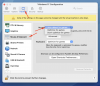
 
Shut down the VM, and go to Configuration. Select the Tab Hardware, then scroll to bottom to find Boot Order. Click on the Advanced button and enter this text --

vm.mouse.scroll.pix2ang=256

See if that helps.
 
Shut down the VM, and go to Configuration. Select the Tab Hardware, then scroll to bottom to find Boot Order. Click on the Advanced button and enter this text --
vm.mouse.scroll.pix2ang=256

See if that helps.
P.S. You might need to re-install the Parallels Tools. To do that start the VM and then select Actions>Reinstall Parallels Tools from the Toolbar at the top. A Restart is required after you reinstall the Parallels Tools.
 
P.S. You might need to re-install the Parallels Tools. To do that start the VM and then select Actions>Reinstall Parallels Tools from the Toolbar at the top. A Restart is required after you reinstall the Parallels Tools.
Thanks. I did try that but it's no better.
 
I have the exact same issues, right down to the Outlook issues, which is the program I use the most I have a new Mac (Intel) and use a magic mouse. I have done some of my own research and found a YouTube video that installs Apple drivers to fix the issue. The only problem is, is that the drivers can't be installed on a VM like they can be installed on a PC. See below..
FREE! Use WIN10 & APPLE MAGIC MOUSE scrolling + MAGIC.
Please help us!!!!!!!!!!
 
I'm also in the same boat. Have an MX3, tried reinstalling toolbox, running parallels 17 & Windows 10. In Excel, if you try and slowly use the wheel nothing happens. It's only when you really spin it that anything happens, and of course that lag makes it difficult to control and you often go way past where you want to. The pointer works fine though, it's just the wheel and scrolling I'm trying to sort. Any help much appreciated
 
Here is a list of things I've done to improve scrolling --
  1. Run fully compatible 64-bit Apps, not 32-bit.
  2. Memory -- Two things here: a) on an M1 Mac with 16MB memory, use "Recommended Memory Settings" of 4 Processors and 8 GB memory; b) on a better configured M1 Mac with 32 MB memory, use 6 Processors and 16 GB memory. The second option may only be available with the Parallels Pro license
  3. Change TrackPad Scroll Speed -- To do this go to System Preferences > Accessibility > Pointer Control, then select "Mouse & Trackpad" and then click on "Trackpad Options". Set the speed to FAST and leave Scrolling "checked" and "with inertia".
  4. In the Parallels VM, to to Settings > Bluetooth & Devices > Mouse and under Scrolling set it to "Multiple lines at a time" and set "Lines to Scroll" to 25. I have left the "Scroll inactive windows" setting to OFF.
I think the use of 64-bit apps is important, but I also feel that the Mac Trackpad scrolling speed is important. Finally, the extra memory seems to help for large files.
 
Here is a list of things I've done to improve scrolling --
  1. Run fully compatible 64-bit Apps, not 32-bit.
  2. Memory -- Two things here: a) on an M1 Mac with 16MB memory, use "Recommended Memory Settings" of 4 Processors and 8 GB memory; b) on a better configured M1 Mac with 32 MB memory, use 6 Processors and 16 GB memory. The second option may only be available with the Parallels Pro license
  3. Change TrackPad Scroll Speed -- To do this go to System Preferences > Accessibility > Pointer Control, then select "Mouse & Trackpad" and then click on "Trackpad Options". Set the speed to FAST and leave Scrolling "checked" and "with inertia".
  4. In the Parallels VM, to to Settings > Bluetooth & Devices > Mouse and under Scrolling set it to "Multiple lines at a time" and set "Lines to Scroll" to 25. I have left the "Scroll inactive windows" setting to OFF.
I think the use of 64-bit apps is important, but I also feel that the Mac Trackpad scrolling speed is important. Finally, the extra memory seems to help for large files.
1. i'm running 64 GB
2. I have an M1 Max MBP with 64 GB RAM - i don't think memory is an issue. I've tried any configuration you can think of between the auto option and all the way maxed out and it's the same no matter what.
3. This is already set as such
4. This doesnt help at all. It still takes several scrolls or a crazy hard scroll to get it going and then once you do it jumps all over the place and isn't precise at all. The issue is not scrolling once you get it started but it is far too difficult to get the scrolling to start moving.
 
Did you download the 64-bit Microsoft Project?
P.S.I found the scrolling issues to be much worse when running a 32-bit version of MS Project. Then I downloaded the Plan 3 version from the Office 365 website. It runs like a champ on the M1 Mac with Parallels and Windows 11.
 
I have the same issue, using a Macbook pro M1, Windows 11 and office. The scrolling issue is not only in the apps in windows it also affects scrolling through files in the explorer. Scrolling advances in a non-continous way. I get everywhere but uncomfortably. On the browsers scrolling is very fast but not jumpy.
 
I had similar mouse scrolling issues. My configuration is:
  • Mac Studio with M1 silicon + Parallels DT v17
  • VM is Windows 11 (i have one for Home and Enterprise)
In the VM configuration, I set the Mouse to "Don't optimize for games". Now it works fine on both my Win 11 Home and Enterprise VMs.
Hope this helps
 
I had similar mouse scrolling issues. My configuration is:
  • Mac Studio with M1 silicon + Parallels DT v17
  • VM is Windows 11 (i have one for Home and Enterprise)
In the VM configuration, I set the Mouse to "Don't optimize for games". Now it works fine on both my Win 11 Home and Enterprise VMs.
Hope this helps
I tried set both mouse & keyboard to "Don't optimize for games". It doesn't help.
I found that the "scrolling inertia" issue only happens to MX3 (or maybe all Logitech's mice with flywheel). I connected a cheap/typical Dell mouse that came with the PC, there is no scrolling problem in VM.
Perhaps Parallels' developers don't use MX3 mouse so they are not seeing this issue.
 
@EricY6 did you find a solution?

I have the exact same problem. I also tried to plug a wired basic mouse and no issue in this case.
I can confirm that the issue seems to be either with Logitech hardware/software, or maybe bluetooth?
 
@EricY6 did you find a solution?

I have the exact same problem. I also tried to plug a wired basic mouse and no issue in this case.
I can confirm that the issue seems to be either with Logitech hardware/software, or maybe bluetooth?
It's not the Bluetooth issue. I tried it with another Logitech mouse M553 via BT, it responded very well. So it's definitely something about MX & Parallel compatibility.
Unfortunately I didn't find any solution. You'll get use to it after awhile :)
 
Thanks for your feedback.

I actually went ahead a bought a bluetooth mouth from Microsoft, and indeed it works fine.
 
Back
Top