Windows 11 ARM on MacOS (Parallels) stops functioning properly

LeventY1

Bit poster
I'm running Windows 11 ARM Insider Preview on my macOS Big Sur.
I'm using Parallels Desktop 17 for Mac on a Mac Big sur version 11.6 with M! processor and 16 GB RAM.

Upon installation Windows Updatevstartaed installing Insider Preview Build 22478.rs-prerelease.211008-1414. AFTER this update Windows started misbehaving. Example:

- Start menu opens but I can't open/start (can't open settings app)
- Windows Update menu doesn't exist under the Control Panel
- Windows Insider menu to login and link computer to doesn't exist
- File explorer takes time to open

Overall a very buggy experience.
I had Windows 10 before this on my Mac computer, it was slow, but functioned. This time, Windows 11, isn't useable.

I hope someone has a solution, an update or a workaround....?
 
Sorry, can't help you but you are better off posting this in the Windows ARM forum here rather than the general Windows Guest OS. Might get better results as people there are dealing with all sorts of Window ARM on Mac issues.
 
Sorry, can't help you but you are better off posting this in the Windows ARM forum here rather than the general Windows Guest OS. Might get better results as people there are dealing with all sorts of Window ARM on Mac issues.

Not sure if there is a "Windows ARM" forum on here. I couldn't find it.
 
I'm running Windows 11 ARM Insider Preview on my macOS Big Sur.
I'm using Parallels Desktop 17 for Mac on a Mac Big sur version 11.6 with M! processor and 16 GB RAM.

Upon installation Windows Updatevstartaed installing Insider Preview Build 22478.rs-prerelease.211008-1414. AFTER this update Windows started misbehaving. Example:

- Start menu opens but I can't open/start (can't open settings app)
- Windows Update menu doesn't exist under the Control Panel
- Windows Insider menu to login and link computer to doesn't exist
- File explorer takes time to open

Overall a very buggy experience.
I had Windows 10 before this on my Mac computer, it was slow, but functioned. This time, Windows 11, isn't useable.

I hope someone has a solution, an update or a workaround....?
I have the same problem
 
Im having the same problem, after updating to the newest build windows no longer functions properly and the Insider website doesent have the older build available to download anymore
 
I'm running Windows 11 ARM Insider Preview on my macOS Big Sur.
I'm using Parallels Desktop 17 for Mac on a Mac Big sur version 11.6 with M! processor and 16 GB RAM.

Upon installation Windows Updatevstartaed installing Insider Preview Build 22478.rs-prerelease.211008-1414. AFTER this update Windows started misbehaving. Example:

- Start menu opens but I can't open/start (can't open settings app)
- Windows Update menu doesn't exist under the Control Panel
- Windows Insider menu to login and link computer to doesn't exist
- File explorer takes time to open

Overall a very buggy experience.
I had Windows 10 before this on my Mac computer, it was slow, but functioned. This time, Windows 11, isn't useable.

I hope someone has a solution, an update or a workaround....?
I run into the same problems. at least i'm not alone. i hope we find a fix very soon.
 
I also have the same problem, it is very worrying and will it mean that Windows 11 won't work on M1 for a while at least? I guess Parallels are going to have some serious problems if that is the case....
 
Hallo @AlL
I tried a log time to run Windows on M1 MacBook. At the older with Intel CPU no problem. A few weeks back with last version of paralles 17.1 version i was able ru run. The download from MS Insider win10 was fine. Than i made a update to win 11 --- an nothing work rigth anymore. System is slow and hangs.. unimpossible to work with. I installed the windows again, but win10 is no more avalible, just win11 and there are all probles same... It drives my crazy
I hope there is soon a update...
 
Same here, I have the same issue. Any updates regarding the problem? Just upgraded to the new M1 Pro from an Intel based mac and installed the newest Preview from Windows 11 ARM. I have the exact same issues. Couldn't find any workaround. The solutions from the web (powershell commands) to reinstall the settings app couldn't help me.
 
Hey, I finally got a solution. At first - please excuse my bad English.
So I updated all at once - macOS, Windows and Parallels and things in the VM started to get weird. The SearchIndexer.exe caused problems, the Settings-App didn't start, everything is very slow and buggy.

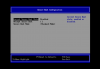
But after a while I figured out, that the Secure-Boot option, which is activated by default by the new version of Parallels is the problem.

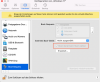
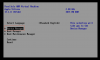
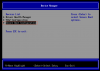
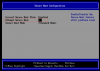
So I went to the preferences of the VM and ticked the box "Select boot device at startup". Now with access to the BIOS/UEFI I deactivated the Secure-Boot-Feature (there is a [X]- option, which needed to be change with "Space" to [ ]). After that, save. Now the tick at "Select boot device at startup" can be removed the preferences and all should work like before.

Best regards
 
Windows 11 can also be installed (non-existing-VM) in this way, but a few extra steps are necessary. The most important of these is that the installation must be done manually. (not via the Parallels tool, which does all the steps for you)
 
Windows 11 can also be installed (non-existing-VM) in this way, but a few extra steps are necessary. The most important of these is that the installation must be done manually. (not via the Parallels tool, which does all the steps for you)

Hi, thank you for your post. Didn't solved my problem, windows is now running faster and with less bugs, but some programs - especially the setting app is not running. I can't even click it. Resetting the setting-app with right click is not possible too. Is a new installation (manually) from windows 11 ARM required? Did you change anything else?
 

Attachments

  • Bildschirmfoto 2021-10-27 um 23.49.18.png
    Bildschirmfoto 2021-10-27 um 23.49.18.png
    190.7 KB · Views: 242
  • Bildschirmfoto 2021-10-27 um 23.50.46.png
    Bildschirmfoto 2021-10-27 um 23.50.46.png
    1,012.6 KB · Views: 201
  • Bildschirmfoto 2021-10-27 um 23.51.59.png
    Bildschirmfoto 2021-10-27 um 23.51.59.png
    764.8 KB · Views: 184
Hey, I finally got a solution. At first - please excuse my bad English.
So I updated all at once - macOS, Windows and Parallels and things in the VM started to get weird. The SearchIndexer.exe caused problems, the Settings-App didn't start, everything is very slow and buggy.

But after a while I figured out, that the Secure-Boot option, which is activated by default by the new version of Parallels is the problem.

So I went to the preferences of the VM and ticked the box "Select boot device at startup". Now with access to the BIOS/UEFI I deactivated the Secure-Boot-Feature (there is a [X]- option, which needed to be change with "Space" to [ ]). After that, save. Now the tick at "Select boot device at startup" can be removed the preferences and all should work like before.

Best regards
Hi Monterey$,
Thank you for your suggestion. Not sure if I understand you right but I tried the settings depicted below that unfortunately did not solve the problem. Is it that what you did?


SCR-20211028-bry.png SCR-20211028-btg.png SCR-20211028-bug.png SCR-20211028-bv7.png
 
@NoelS1:
I'am glad to hear you have less bugs. But I don't understand why you still have problems with the settings app

So what you can try is update windows by command (open cmd as admin, "wuauclt.exe /updatenow") and wait a while because you don't see the progress bar or create a new user to check if the problems are user related.

The steps posted by FrankH29 are exactly what I mean, these solved my problems. But maybe there are future steps for already full configured VMs necessary.
 

Attachments

  • Screenshot 2021-10-27 at 23.38.40.jpg
    Screenshot 2021-10-27 at 23.38.40.jpg
    903.3 KB · Views: 456
Back
Top