Yes, you have Parallels Desktop 14 one-time upgrade key. You have to use Parallels Desktop 12 key as the previous key to complete the activation.Thank you for your response, I am using Parallels 14 with Parallels 14 activation key, but it tells me I used an upgrade key and asks for me to enter an older version key which I don't have as it should be a permanent license for Parallels 14. I don't have Parallels 15 installed. Thank you for any help

Install the app
How to install the app on iOS
Follow along with the video below to see how to install our site as a web app on your home screen.
Note: This feature may not be available in some browsers.
You are using an out of date browser. It may not display this or other websites correctly.
You should upgrade or use an alternative browser.
You should upgrade or use an alternative browser.
you have entered an upgrade key. Please confirm it with a key from the previous version
- Thread starter Igor Moreira
- Start date
I tried that, even though the program never asked this before, the Parallels 14 key was enough. When I use the Parallels 14 activation key and Parallels 12 as a previous version key I get the following error:Yes, you have Parallels Desktop 14 one-time upgrade key. You have to use Parallels Desktop 12 key as the previous key to complete the activation.
The previous activation key has not been accepted by the license server.
Please make sure you have entered the key correctly. Your activation keys are stored in your Parallels account. If you don't want to bother yourself with numerous activation keys and upgrade procedures in future, we recommend that you purchase a subscription to Parallels Desktop.

Maria@Parallels
Problem solver
Changed some settings again, please check the issue and share any results with us pleaseI tried that, even though the program never asked this before, the Parallels 14 key was enough. When I use the Parallels 14 activation key and Parallels 12 as a previous version key I get the following error:
The previous activation key has not been accepted by the license server.
Please make sure you have entered the key correctly. Your activation keys are stored in your Parallels account. If you don't want to bother yourself with numerous activation keys and upgrade procedures in future, we recommend that you purchase a subscription to Parallels Desktop.
Thanks, but still the same error pops up, I even tried removing parallels completely. What can else I do?Changed some settings again, please check the issue and share any results with us please
"The previous activation key has not been accepted by the license server."
Maria@Parallels
Problem solver
Could you provide us please with the screenshot of the error message please?Thanks, but still the same error pops up, I even tried removing parallels completely. What can else I do?
"The previous activation key has not been accepted by the license server."
Sure, here it isCould you provide us please with the screenshot of the error message please?
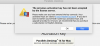
Maria@Parallels
Problem solver
Thank a lot, changed settings once again, please check the issue.Sure, here it isView attachment 15702
Still the same, maybe I'm using wrong serial numbers, I don't know anymoreThank a lot, changed settings once again, please check the issue.

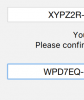
Any news? I still cannot run windows ...Thank a lot, changed settings once again, please check the issue.
Maria@Parallels
Problem solver
Please check your inbox for more info.Anything?
I just have bought a update version from parallels desktop 14 to 15 as suggested in my software but when i will put the key i have received the message "you have entered an upgraded key. Please confirm it with the key from the previous version" requeste my previous key that I put and receive always the message "The product key of a previous version of Parallels Desktop has been not accepted on the license server". How can I validate it?
Maria@Parallels
Problem solver
Hi, is it possible to provide us with the first symbols of your license keys?I just have bought a update version from parallels desktop 14 to 15 as suggested in my software but when i will put the key i have received the message "you have entered an upgraded key. Please confirm it with the key from the previous version" requeste my previous key that I put and receive always the message "The product key of a previous version of Parallels Desktop has been not accepted on the license server". How can I validate it?
Maria@Parallels
Problem solver
Thanks a lot, we've found your purchase order number 216989376.H7YPDC
Please confirm the refund of your upgrade license (if you need it)
Maria@Parallels
Problem solver
Please provide us with your purchase order. We will check it for you.Hi, I have the same issue. Please give me a refund.
Maria@Parallels
Problem solver
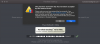
Hello, your order 229194158 has been refundedhi! i have the same problem with activation. Please tell me how to refund or solve the issues. Thanks.View attachment 16306
Funds will appear at your back account during the next 5-7 days.
Please let us know if you have any additional questions.