
Install the app
How to install the app on iOS
Follow along with the video below to see how to install our site as a web app on your home screen.
Note: This feature may not be available in some browsers.
You are using an out of date browser. It may not display this or other websites correctly.
You should upgrade or use an alternative browser.
You should upgrade or use an alternative browser.
Screenshot saved to clipboard
- Thread starter AlanH2
- Start date
- Status
- Not open for further replies.

Dmitry Geynisman
Parallels Team
Hello,
The screenshot functions are good but how about an option to save to memory instead of saving to the desktop so that you can quickly paste the screenshot into another app.
Thanks!
Alan
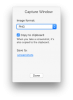
Hi Alan, you can already do that: just press and hold Ctrl button while taking screenshot - the image will be saved to clipboard instead of the Desktop.

Maria@Parallels
Problem solver
Completed.

Alex Patsay
Parallels Team
Try pressing Control when taking a screenshot! 
I love the screen shot tool. I know that if I hold the Control key I can get it to copy to the clipboard. What I would like is to have an option to make that the default choice. Then I don't have to remember to hold the control key. I still want it saved to a file and I'd like to be able to say where to save the file to.
Alex Patsay
Parallels Team
Press Control when taking a screenshot

Hemnath@Parallels
Parallels Support
Hi @BillW5, are you saying that the screen shot should get saved to the clipboard automatically as soon as it's taken, without the use of the Control key?What I would like is to have an option to make that the default choice.
Diego-Cesar
Bit poster
Hi,
It would be nice to have a feature that screen or window captures could be sent directly to the clipboard in order to be able to paste them directly without having to open the file created.
Regards,
Diego
It would be nice to have a feature that screen or window captures could be sent directly to the clipboard in order to be able to paste them directly without having to open the file created.
Regards,
Diego
Alex Patsay
Parallels Team
You can hold Control to copy the screenshot to clipboard. And we will add an option in future update
Alex Patsay
Parallels Team
Starting version 2.6, this functionality was added to all screenshot tools
- Status
- Not open for further replies.